Snap-dome button with tactile click
You press the center of a thin dome and feel it resist; you keep pushing, and suddenly it gives way with a crisp click you feel in your fingertip; you let go, and it springs back on its own, ready for the next press. That is the feel of a membrane keypad, and you can print it in FDM with no metal contacts and no steel domes: all it takes is a shallow dome with the right wall thickness. But that "suddenly" is not a flourish — it is the heart of the mechanism. The whole design comes down to getting the dome to collapse in a single jump rather than sinking in gradually, and then to have enough elasticity to return. Get three numbers right — radius, rise, and thickness — and you have a firm, repeatable click; get them wrong and you have a button that sinks in without warning, or one that stays sunk and never comes back.
The click is a controlled buckle
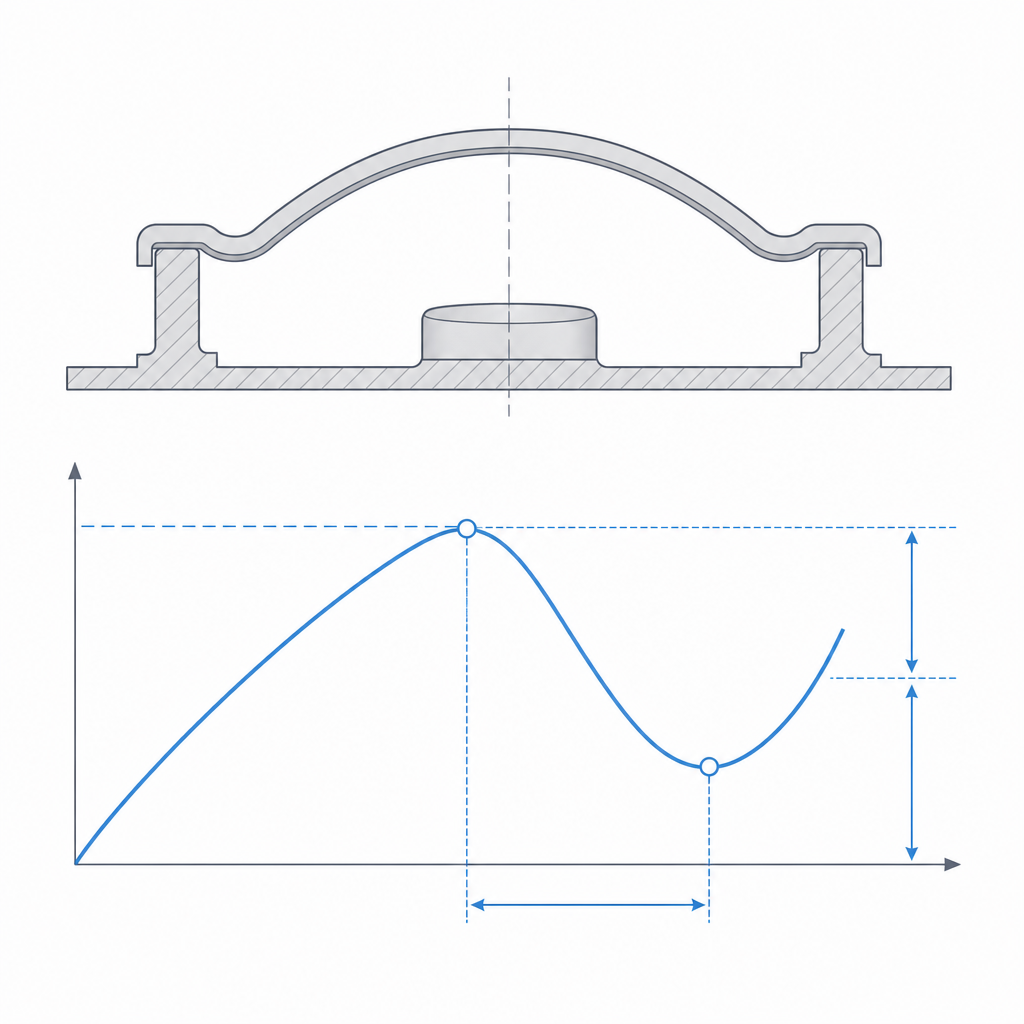
A shallow dome is a half-bistable structure: it has one stable rest shape, the dome bowed outward, and under load it can reach a second configuration, the dome inverted inward. What happens in between is the whole feel. As you push at the center, the dome is loaded in in-plane compression and resists with a stiffness that climbs: every tenth of a millimeter of travel asks for more force, and you feel a wall stiffening. That is the stable branch. It lasts until you reach the critical buckling load, the point where the geometry can no longer absorb load while staying convex, and the structure loses stability all at once.
At that instant you get snap-through, or inversion buckling: the dome jumps to its inverted shape across a stretch where its stiffness is negative — it sinks on its own and asks for less force to keep going, not more. The elastic energy you had been building up on the stable branch is released all at once and accelerates the center inward. That is the click: it is not a stop you hit, it is the whole structure unloading itself in milliseconds. And that is why the feel is so clean and so recognizable — there is a sharp force peak followed by an abrupt drop, exactly the profile your finger registers as a press.
That drop has a name, and it is the metric you really design for: the snap ratio, the proportion between the force that collapses in the jump and the peak that precedes it. A high snap ratio is a decisive click; a low one is a soft sink-in you barely notice. And here is the lever: a deeper dome stores more energy before it buckles and dumps it all at once, so it raises the snap ratio. That is why "raising the rise sharpens the jump" and "the click gets more decisive" are two ways of saying the same thing.
The return is the same process in reverse, but with an asymmetry you need to be clear about. If the dome is not too deep, the inverted shape is not a second stable state but a position that only holds while you keep it pressed; when you release, the elasticity of the material pushes it back through a second jump. And here is the trap: snap-back is not symmetric with snap-through — there is hysteresis. The force that returns the dome is always less than the force it took to invert it, and on a dome close to the bistability boundary it can approach zero. This matters because it turns "comes back / doesn't come back" into a gray zone: a geometrically monostable dome that returns with a laughable force will stay stuck inside the moment its seat rubs even slightly. The return is not decided by the dome geometry alone; it is also decided by the clearance of its housing.
The force is set by radius, rise, and thickness
The click threshold — the force at which the dome collapses — does not come from a single parameter, but from the relationship among the three, and it is worth understanding how each one weighs in before you touch the model.
The rise, the height of the dome above its base, governs whether there is a click and how pronounced it is. A very flat dome barely stores energy before buckling: it gives way early, with little jump, and the feel stays a soft sink-in with no click. Raising the rise makes the peak higher and the following drop sharper — it raises the snap ratio — until you overshoot: the dome becomes so deep that the inverted shape is stable on its own, and it stops being a button and turns into a switch that stays latched. Wall thickness sets the firmness: the bending stiffness of a shell grows with the cube of the thickness, so a thicker dome demands far more force to reach the critical load. And the radius sets the scale: a wide, low-rise dome is softer; a small, bulging one is firmer.
The practical consequence is awkward, and you have to keep it in mind from the start: the click force is very sensitive to thickness, far more than to the other dimensions, because the shell stiffness goes with the cube and the critical load scales roughly with t². A few hundredths of a millimeter more or less of wall shifts the feel from "firm click" to "a wall that won't give" or to "sinks in with no character." And in FDM the real thickness of a thin wall is not the one you draw: it is set by the extrusion width, the squish of the first layer, and, above all, the flow calibration. A dome with a nominal 0.8 mm wall printed with flow 5% above calibration comes out appreciably stiffer than the same dome with flow correctly calibrated. That is why this is a mechanism that does not transfer from one printer to another without recalibrating: the number that gives you the perfect click is tied to your flow and your first layer.
| If you raise… | The click force | The risk that appears |
|---|---|---|
| Wall thickness | Rises a lot (stiffness ∝ t³, critical load ≈ t²) | Hard button; sensitive to flow calibration; can't be tuned in fine steps |
| Rise (dome height) | Raises the peak and sharpens the jump (more snap ratio) | Overshoot it and the dome won't return (stable bistable) |
| Radius | Drops (softer dome) | Too flat: sink-in with no click |
Where to start: sensible first numbers
Before you tune, it helps to know what size we are talking about, because the physics of return and of creep change with scale. A typical panel button lives in a dome of 14–20 mm diameter, with a rise of 1.5 to 3 mm and a two-perimeter wall (on the order of 0.8–0.9 mm with a 0.4 mm nozzle). Below one perimeter the shell does not close reliably, so two beads is the minimum viable thickness, not a stiffness choice. Much wider domes turn soft and call for more rise to keep the click; much narrower ones stiffen quickly and approach the printable limit.
The parameter that really decides whether the dome returns or stays inverted is none of the three dimensions on its own, but their rise/thickness ratio. A monostable dome — one that comes back by itself — lives with the rise below about three or four times the thickness; once the rise comfortably exceeds that multiple, the inverted shape turns stable and the button stops returning. That is the rule of thumb that lets you keep to the shallow side without flying blind: if your real wall is 0.85 mm, a 2 mm rise sits comfortably in return territory, and a 4 mm one is already flirting with permanent bistability. The boundary is fuzzy and depends on the radius too, so when you want guaranteed return, leave margin below it.
Print it so the dome doesn't become its own fracture line
The dome is the part, and the print orientation decides whether it survives the cycles or splits along a layer. The underlying problem is the usual one in FDM: the part is strong along the beads and weak between layers, and a dome that buckles puts its material in bending right where you don't want an interlayer weld that can open up. Layer orientation for motion covers this in detail; here the practical consequence is enough.
Print the dome with its concavity facing down, resting on the rim, so the curved surface grows like a vault. But beware the easy promise of "no supports": a shallow dome — exactly the one we recommend for return — has a very flat crown, nearly horizontal, and that zone exceeds the critical overhang angle. It starts almost vertical at the rim and flattens progressively until it overhangs at the center, where it can sag or come out rough even though it builds up like a vault. There is a real tension here between the two things you want: a low rise favors return but worsens the printability of the crown. The flatter the dome, the more you watch the crown: sometimes it is enough to slow down and boost cooling on those flat-lying layers, and only if it genuinely overhangs should you accept a light support, knowing what it costs.
Because putting supports on the curved surface is the worst case: they leave a rough, nicked face, and every nick concentrates stress on a wall that is already thin and that flexes thousands of times. If you need them, be aware that you are seeding stress concentrators right on the face that does the work. And make the wall continuous, several perimeters, and with no infill: a 0.8 mm wall with a 0.4 mm nozzle resolves into two perimeters, with the extrusion width adjusted so they close with no central gap. That gap is precisely the defect you are trying to avoid — and no infill mesh inside, which adds nothing in bending and does introduce voids where the crack starts. You want a solid pure-perimeter shell, because it is the continuous bead that withstands repeated snap-through; scattered infill here just gets in the way.
Keep in mind that the layer lines in the dome are potential fracture planes. If the orientation leaves those lines crossing the zone of maximum bending, the dome won't fail by fatigue of the plastic but by delamination: it will open between two layers like a clean crack, often well before the material mechanics predict. A continuous-perimeter shell, printed with good interlayer adhesion — a high enough extrusion temperature, not too much cooling in that zone — is what turns a button good for a few hundred presses into one good for several thousand. Don't expect keypad numbers: a steel dome does millions of cycles, and printed plastic in heavy bending near buckling is limited by polymer fatigue, not just delamination. Orienting the layers well removes the premature failure; the material sets the life ceiling, and only a nylon or a PP gets you near the order of tens of thousands.
The failure mode: the dome stays inverted
The failure that defines this mechanism is the dome staying inverted and not returning. It happens along two paths, and it is worth telling them apart because one is a design issue and the other is brought on by time.
The first is geometric: if the rise is too large for the radius and thickness — if you cross that rise/thickness ratio we talked about — the inverted shape is not a transient position but a second stable state. The dome then enters permanent bistability and behaves like a latch — push and it stays in, push again and it pops out — which is a legitimate mechanism but not the one you want in a pushbutton. The boundary is fuzzy, so when you want guaranteed return, stay on the flat side: prefer a dome that clearly comes back, even if the click is a notch less decisive, over skirting the threshold where one batch comes out fine and the next stays stuck. And remember the hysteresis: near the boundary the dome is still monostable on paper, but its return force is so low that a tight seat is enough to prevent its return. A return failure is not always the dome's; sometimes it is the housing's.
The second path is creep, and it is the most treacherous. A dome that returns perfectly on day one can stop doing so weeks later if the material, under the stress of the cycles or of a held press, flows slowly and dissipates the elastic energy that was pushing it back. Here the material rules: PLA loses its return to creep sooner than more elastic and resilient plastics, and service heat speeds it up — a PLA button next to a heat source is a dome that flattens out over time. For a pushbutton that has to survive many cycles or warm environments, a PETG or a nylon keeps its return elasticity far better, at the cost of needing its own thickness calibration. Design it, too, so that at rest the dome is not pre-stressed: if its nominal geometry already leaves it slightly loaded, creep has something to work on from day one. And count on the fact that in FDM the dominant pre-stress is usually not from design but residual from the print: the crown cools at a different rate than the rim and leaves frozen-in stresses in the shell. A gentle anneal relieves those stresses, but it can deform the rise you worked so hard to tune, so it is a lever you apply by measuring afterward, never blind.
What it's for and where it fits
A snap-dome button is the part you reach for when the click confirms the actuation: panel interfaces where the user needs to feel that they pressed without looking, toys, controls where tactile feedback carries much of the product's value. The dome doesn't need electronics to make sense — the feel is valuable in itself — but its natural use is as a tactile part over an external electrical contact: the dome gives the click and the travel, and, as it inverts, closes the circuit against a trace or a membrane switch sitting underneath. It is exactly the architecture of a membrane keypad, with the steel dome replaced by a printed one.
When you mount it on something, remember that the dome's travel and its seating on the rim are fits like any other, subject to the real clearance of your printer — and, as we saw, a tight seat can kill the return of a dome that is monostable on paper. Tolerances for moving parts gives you the rule for getting the button to seat without binding or rattling in its housing.
To close, a note on mechanical kinship: the bistable dome shares its physics with the bistable Belleville washer. It is the same snap-through of a shallow shell, but with the goal inverted. Here you are after the return — that the dome comes back on its own and is ready for the next press — and you avoid stable bistability as a failure mode; there, what you often want is precisely the latching, that the part stays in its second state and acts as a detent. Same mechanics, opposite design decision: what in a button is the failure mode to avoid, in a bistable detent is the function you are after.