
You pull the part off the plate and it comes away wrapped in hairs, or the gap between two towers is a cobweb, or the wall is peppered with tiny zits. None of these marks costs you strength, but they spoil the surface, and they all have the same source: molten plastic leaving the nozzle somewhere off the planned path. Dry the spool and lower the temperature: that fixes almost all stringing. A column of bumps at the same point on every layer is something else, the seam (Where the seam goes).
Why the nozzle oozes
The melt chamber holds a few cubic millimeters of molten plastic, under the pressure the extruder uses to push it out. When extrusion stops, that pressure does not vanish at once. The compressed material keeps pushing (on a Bowden, so does the filament, loaded like a spring inside the tube), the hot plastic expands and gravity does the rest. A drop forms at the tip, and the nozzle drags it along on the next travel move.
The machine's answer is retraction: at the end of a line, the extruder pulls the filament back a fraction of a millimeter, the pressure drops to zero or slightly below and the meniscus retreats into the bore. When the travel ends, the extruder pushes the same length back in. A Bowden needs a stroke several times longer, because the filament moves inside a tube several tens of centimeters long and the slack has to be taken up before the pull reaches the tip (Extruders: direct drive or Bowden).
How much plastic escapes comes down to three factors, and every fix here works on one of them:
- Viscosity, set by temperature and material. Molten PETG is stickier and more elastic than PLA: it clings to the nozzle and stretches into strands instead of breaking off.
- Residual pressure in the chamber, which retraction and pressure advance bring down.
- The time and path of the travel: its length, its speed and whether it crosses open air or runs over plastic.
Damp filament adds a fourth. The water turns to steam in the melt zone, the bubbles push plastic out after retraction has done its job, and you hear popping or hissing. No retraction setting fixes that.
With a direct-drive extruder and calibrated pressure advance, current profiles retract very little, 0.7–0.8 mm: the short filament path does most of the work, and the firmware also bleeds off pressure before every stop. That is why Cura's "Coasting" is almost never needed. Uncalibrated pressure advance gives itself away with bulges at the start and end of lines, not with strings (Pressure advance and clean corners).
Strings and webs
Strings follow the direction of travel between areas separated by air, and they build up as the part grows, because the same travel move repeats layer after layer.
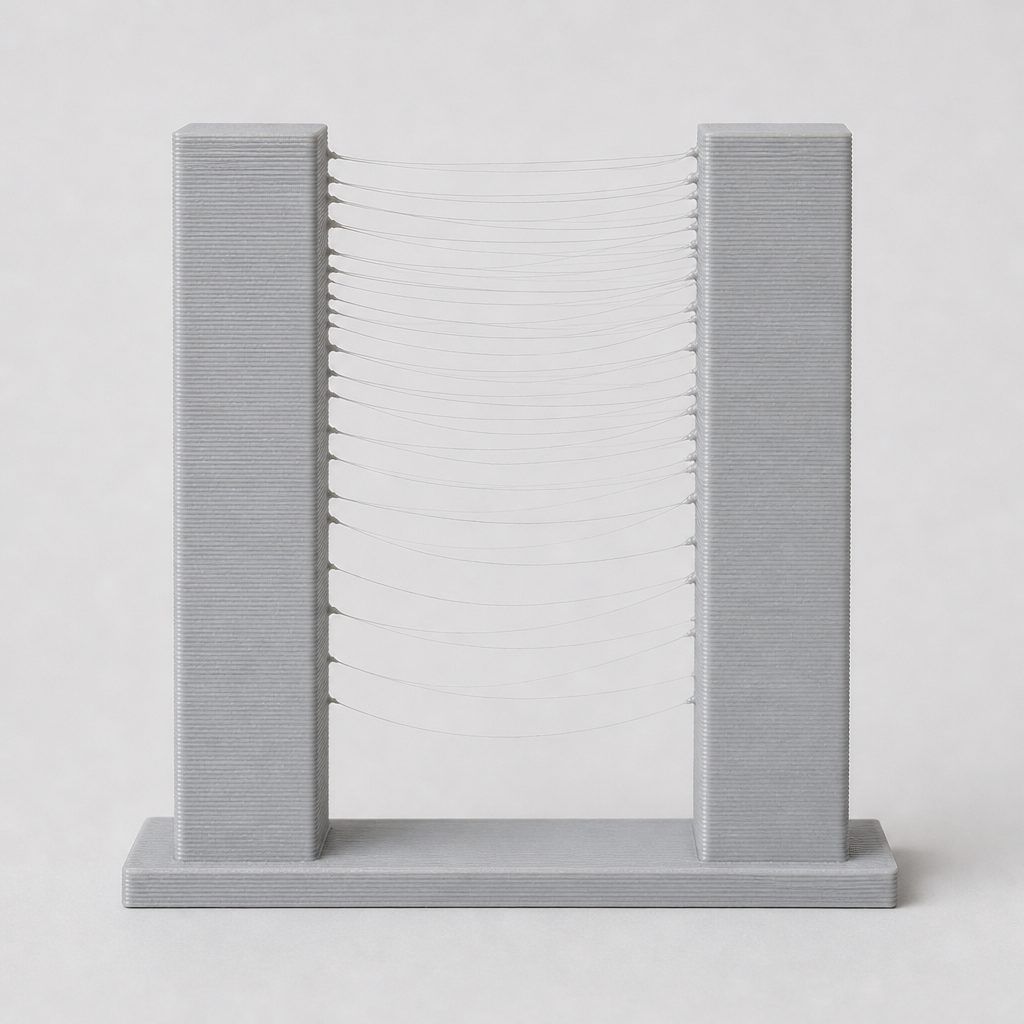
Tell two things apart before you change anything. A thick string with a small ball at each end is real drooling during travel; look at temperature or retraction. Very fine hairs that break when you blow on them are strands the tip draws out as it pulls away because the nozzle is slightly sticky: a few degrees too hot or a slow travel. They are only cosmetic, and they come off afterwards.
Dry it first. Dry the spool before you touch any setting; temperatures and times per material are in Drying and storing filament. The giveaways are popping, hissing and a rough, fuzzy skin alongside the strings. TPU, PA, PC and PVA always need drying, and PETG starts stringing visibly after a few days in a humid room. Do not raise the temperature to make up for damp filament.
Lower the temperature. Bring it down in 5 °C steps toward the low end of the range: PLA 190–230 °C, PETG 230–270 °C, TPU 200–250 °C. The floor is not set by stringing but by the bond between layers and by how much plastic your hotend can melt at the profile's speed. A nozzle too cold for the flow the profile asks for gives weak layers or under-extrusion (Layers splitting apart, Volumetric flow sets the speed). A temperature tower gives you the right window (Temperature towers and retraction tests).
Tune retraction within its range. On direct drive, stock profiles retract 0.7–0.8 mm; on a Bowden, the range runs from about 2 to 6.5 mm. Change the length in steps of 0.1–0.2 mm on direct drive and 0.5 mm on a Bowden, and do it with the retraction test, not by eye. Each slicer's values are in the "Names by slicer" table below.
More retraction is not better. Beyond about 1.5–2 mm on direct drive you pull molten plastic up into the cold part of the heat break, where it sets, forms a plug and jams. It looks like heat creep, but the cause is mechanical (Extrusion problems). With very fast or very frequent retractions, the drive gear bites into the filament and grinds it down; Cura caps them with "Maximum Retraction Count" (90 by default) within the "Minimum Extrusion Distance Window". A long retraction also leaves a gap or a thin start after every travel. The "5 mm of retraction" in a guide was written for a Bowden, and on a direct-drive extruder it ends in a jam.
Change the travel. A fast travel gives the drop less time to fall: older Prusa profiles traveled at 180 mm/s, and today's CoreXY profiles at several hundred mm/s. Route the travel inside the part as well, so the drop lands on the infill and not on a visible face; Orca, Bambu Studio and PrusaSlicer ship with that option off, and Cura with it on. Below a threshold distance the travel does not retract, and in Cura a travel that stays inside does not retract either.
Try wipe. "Wipe while retracting" moves the nozzle back over the last line as it retracts and leaves the drop on the part's own bead. It pays off with PETG.
Watch Z hop. Lifting the nozzle (Z hop) stops it striking top surfaces and tall, thin parts. But with sticky materials, a raised nozzle draws out longer strings. If PETG strings more with hop on, lower it or limit it to top surfaces: in Orca, "On surfaces" set to "Top Only" (Top surfaces). A ramped hop, which raises the nozzle while it moves, loses less time and drags less plastic.
| Setting | Orca | Bambu Studio | PrusaSlicer | Cura |
|---|---|---|---|---|
| Default retraction | 0.8 mm (generic) | 0.8 mm (X1C, A1) | 0.7 mm (MK4S, CORE One); 0.8 for PETG | 6.5 mm, meant for Bowden |
| Retraction speed | — | 30 mm/s | 35–45 mm/s | 25 mm/s |
| Travel inside the part | "Avoid crossing walls", off | "Avoid crossing wall", off | "Avoid crossing perimeters", off | "Combing Mode", on; no retraction inside ("Max Comb Distance With No Retract" at 0) |
| When it does not retract | Below "Travel distance threshold", 2 mm | Below "Travel distance threshold", 1 mm | Inside the part, with "Only retract when crossing perimeters" | Below "Retraction Minimum Travel", 2 × line width (about 0.8 mm) |
| Wipe | "Wipe while retracting", off (1 mm once enabled) | on, "Wipe Distance" 2 mm (X1C) | off (MK4S, CORE One) | — |
| Z hop | "Z-hop type" set to "Slope" (ramped, "Traveling angle" 3°) | 0.4 mm, "Auto Lift" | 0.2 mm, up to 1.5 mm ramped ("Use ramping lift"); 0.15 for PETG | off |
These are the profile values as of late 2026. Retraction and Z hop live in the printer profile, and the filament profile can override them ("Setting Overrides" in Orca and Bambu Studio, "Filament Overrides" in PrusaSlicer). If one material strings, tune it in its own filament profile so PLA keeps its values (Printer, filament and process profiles).
Zits, drops and bulges
Before you touch any setting, find the mark on the map.
Scattered zits on the outer wall, not lined up in a column, appear where the nozzle picks the wall back up after a travel. Each restart leaves a zit if the prime is too generous ("Extra length on restart" in Orca and PrusaSlicer, "Retraction Extra Prime Amount" in Cura, above 0), if the nozzle arrives carrying a drop it oozed on the way, or if the travel crossed the outer wall. Set the extra length to 0, route travel inside, turn on wipe and, in Orca, "Wipe before external loop"; in Cura, turn on "Retract Before Outer Wall". A "Random" seam also scatters zits over the whole wall, but that is a seam decision.
A drop at every layer change happens because the nozzle stops, lifts and starts the next layer without retracting. The X1C profile and Prusa's profiles retract on layer change; Orca's generic profile and Cura ship with it off. Turn it on: "Retract on layer change" in Orca and PrusaSlicer, "Retract at Layer Change" in Cura.
A zit where the infill meets the wall. "Reduce infill retraction" (Orca and Bambu Studio) skips retraction on travels that stay within the infill. It works well until one of those travels ends next to a wall. Turn it off if the zits show up on wall lines right above the infill.
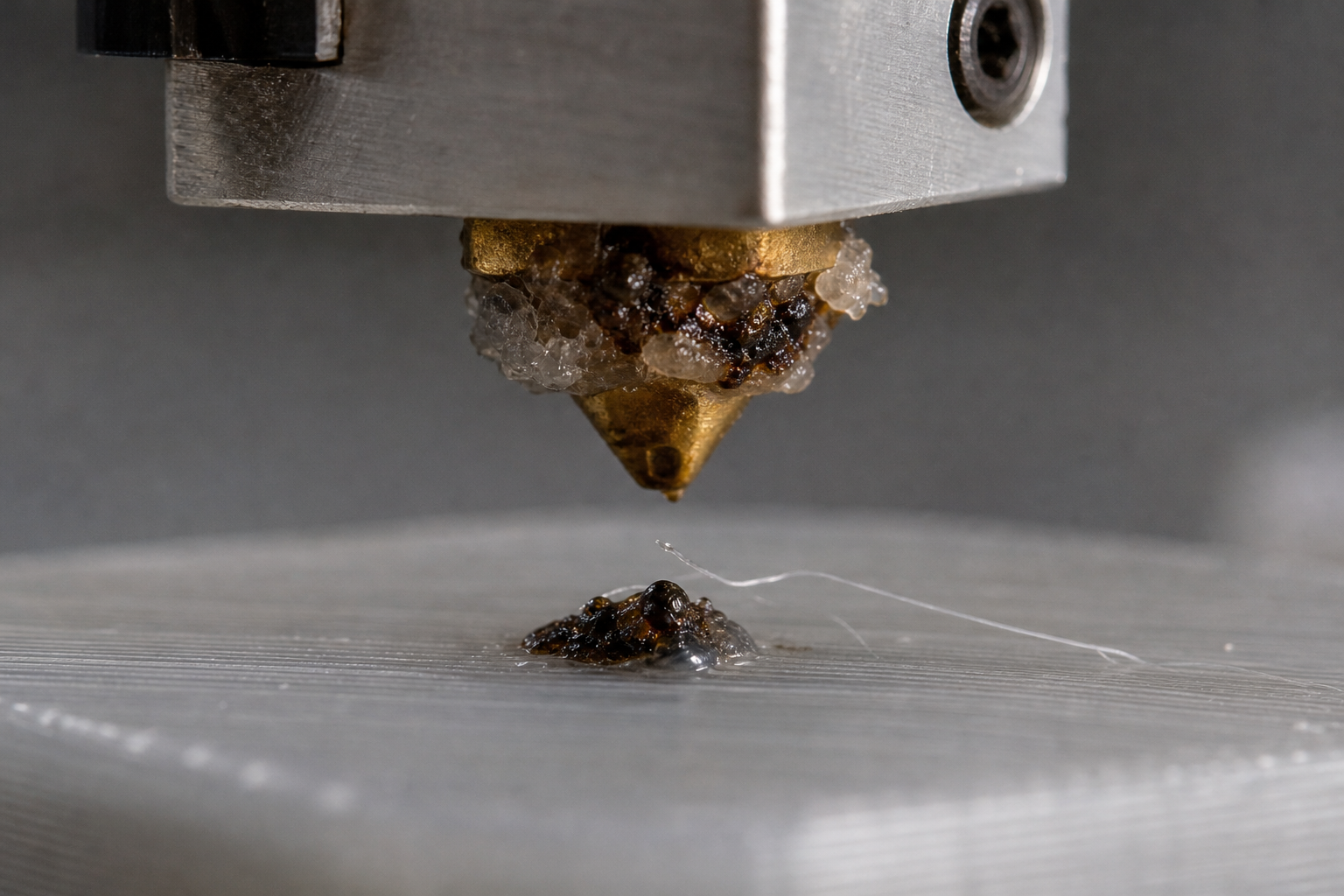
Fallen blobs, often dark or brown. This is plastic that has built up on the outside of the nozzle, burnt and dropped onto the part. PETG is the worst offender, because it sticks to brass. The build-up is fed by an over-squished first layer, which pushes plastic up around the tip, by oozing during heat-up and by a Z hop that lifts strings. Clean the nozzle hot with a brass brush before printing, fit the silicone sock and, if your machine has a nozzle brush or wiper, keep it free of debris (Nozzle and hotend care).
Bulges at the start and end of every line, bulging corners. This is not oozing: it is almost always uncalibrated pressure advance, and sometimes over-extrusion. Slowing the outer wall only hides it; calibrate pressure advance (Pressure advance and clean corners).
Two lookalikes are dealt with elsewhere. The curl of plastic dragged across the first layer at the start belongs to the purge line (Purge and multicolor waste). And on a machine with several nozzles, the idle one oozes and leaves strings at every tool change (Toolchangers, IDEX and dual nozzles).
When the problem is the part, not the flow
Strings grow with the number of travels through the air. Two pins 20 mm apart and 200 layers tall mean 200 travels through the air; the same volume as one connected part means none. A forest of thin pins will string however well you tune retraction.
Every object you add to the plate adds a travel per layer (Many parts on one plate). Printing one part at a time removes the travel between them: "Print sequence" set to "By object" in Orca and Bambu Studio, "Complete individual objects" in PrusaSlicer, "Print Sequence" set to "One at a Time" in Cura. It only works for parts shorter than the clearance under the carriage or gantry. If you print layer by layer, place small parts so the travel between them is short and does not cross a visible face.
In the design, join separate features with a thin rib or with a base below the visible area. Orient the part so tall, separate details form a single connected section where you can (Orientation and overhangs), and expect strings on thin free-standing pins and on text on posts (Minimum features and text). Check the preview before printing: every travel line crossing open air in the travel view is a string on the part.
Hairs that have already formed come off with a fingernail or a quick pass of a heat gun: a few seconds, keep it moving and never hold it on one spot. A thin PLA wall softens at around 57 °C (its HDT at 0.45 MPa). Cut thick strings and their end blobs off with flush cutters or a deburring tool (Support removal and cleanup).
When it fails
| Symptom | Cause | Fix |
|---|---|---|
| Strings between areas with a small ball at each end | High temperature, retraction too short for this extruder, damp filament | Dry, lower in 5 °C steps, run the retraction test |
| Strings with popping and a rough, fuzzy skin | Damp filament | Dry the spool (Drying and storing filament) |
| Very fine hairs everywhere | Temperature slightly high, slow travel | Lower 5 °C, faster travel, a pass of hot air |
| More strings after copying retraction from a guide or switching from Bowden to direct drive | Retraction meant for a different extruder | Go back to the profile value and run the retraction test |
| Gaps or thin starts after every travel, clicking extruder, jam after a few hours | Retraction too long or too fast (plug in the heat break) | Shorten retraction, check the hotend (Extrusion problems) |
| Scattered zits on the outer wall | Excess prime, oozing during travel, travel crossing the wall, "Random" seam | Extra length to 0, travel inside, wipe; check the seam |
| Zits in a vertical column | Seam | Where the seam goes |
| A drop at every layer change | No retraction on layer change | Turn on "Retract on layer change" |
| Dark or brown blobs fallen onto the part | Plastic built up on the nozzle (PETG) | Clean it hot, fit the silicone sock, do not over-squish the first layer (Nozzle and hotend care) |
| PETG strands drawn up from top surfaces | High Z hop on a sticky material | Lower Z hop or limit it to "Top Only" |
| Bulges at corners and line ends | Uncalibrated pressure advance; sometimes over-extrusion | Calibrate pressure advance (Pressure advance and clean corners) |
| Strings and drops where the idle nozzle waits or at every tool change | Idle nozzle oozing | Toolchangers, IDEX and dual nozzles |
How to test it
Print a temperature tower to fix the material's window and then a retraction test at the chosen temperature: two separate towers and nothing else, so each string comes from a single travel. Change one thing per print; the procedure is in Temperature towers and retraction tests.
See also
- Temperature towers and retraction tests: how to find your material's temperature and retraction with a test print.
- Where the seam goes: the column of bumps at the same point on every layer.
- Drying and storing filament: temperatures, times and dryers, the first cause of stringing.
- Pressure advance and clean corners: the bulges at corners and line ends, which are not ooze.