
You need forty clips by Friday, or you have three printers sitting idle all night because the last plate finished at two in the morning. To print more, what counts is what happens between one print and the next, and who is there to do it. Put your jobs in a queue and get each plate cleared without you, or accept one plate per visit and plan around that. Standardize machines, materials and profiles, and size the electrical supply, ventilation and fire protection for the whole room, not for one printer.
One printer, many plates: the queue
A print queue is an ordered list of already-sliced plates that the printer (or the computer driving it) runs one after another. The point is that the next job is ready the moment the plate is free, already sliced for the material, nozzle and plate currently on the machine.
As of late 2026, queues live in several places. Prusa Connect gives each printer its own queue, with a timeline of finish times; you fill it from PrusaSlicer or the browser. On Klipper, Moonraker has a job queue that Mainsail and Fluidd display; it can advance to the next job on its own and run a transition macro in between. OctoPrint does it with the Continuous Print plugin. Bambu Studio, in its multi-device tab, sends one sliced job to several identical machines with the same AMS spool mapping.
The printer does not know whether the plate is empty. That is why a queue should never start the next print by itself unless it has a clearing method you trust. By default, Prusa Connect and Bambu wait for you to confirm the plate is clear. Moonraker with automatic transition, Continuous Print and the farm platforms' auto-print modes do start on their own, and then the transition macro is your clearing method. If that macro clears nothing, the next job prints on top of the last one.
Order the queue around when you will walk past. Long jobs, 10 to 20 hours, go last thing at night or before you leave; short ones while you are nearby to clear them. A queue of 40-minute plates with nobody there is one plate per night.
Also decide whether to group parts on one plate or spread them through the queue. A full plate is one start and one clearing; ten small plates are ten. The catch: a full plate stakes everything on one failure. Farms usually fill each plate up to the point where a failure costs something known and acceptable. And if one part fails mid-plate, you do not have to lose the rest: canceling that object (Exclude Object in Klipper and Mainsail, Skip Objects on Bambu, Cancel object on Prusa) lets the others finish, as Many parts on one plate explains.
Clearing the plate: the real bottleneck
A printer that finishes at 02:00 and is cleared at 08:00 has lost six hours. Over a week, those nights add up to more machine time than any speed tweak will give you. Automating the clearing is what turns a queue into unattended production.
Every automatic method starts from the same fact: the part lets go as it cools, because the plastic and the plate shrink by different amounts (Beds and build surfaces). PLA releases this way on smooth or textured PEI; PETG only on textured, because on smooth PEI it bonds so hard it pulls flakes out of the coating. TPU does not release on its own: keep it out of automatic clearing. That is why every system waits for a release temperature; clearing macros typically wait for the bed to drop to about 30 °C. Sweep earlier and the part is still stuck: the sweep strains the printer, not the part.
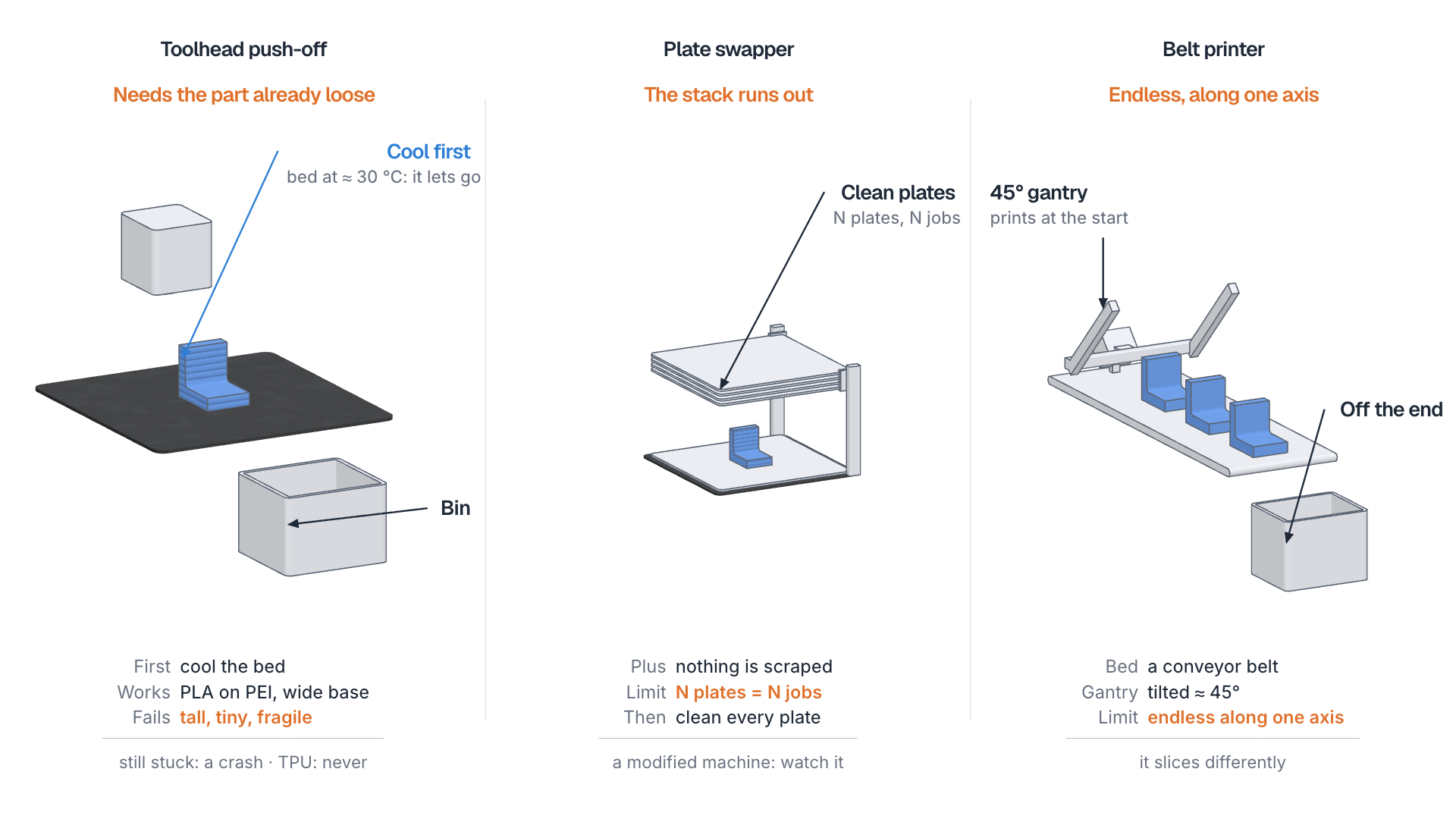
Toolhead push-off
After cooling, the end G-code lowers the nozzle (or a blade on the toolhead, or a sweeper arm) until it almost touches the plate and sweeps across it. The parts drop off the front or back into a bin. It is cheap, and it works on cold PEI with parts that have enough footprint and height for the toolhead to catch. It fails in four cases: tall, thin parts, which topple and jam the exit; tiny parts, which the toolhead passes over; parts still stuck, which end in a crash, a layer shift or skipped steps; and anything fragile. The authors of clearing plugins themselves warn that badly written clearing G-code can damage the printer. Rehearse it in front of the machine, with a throwaway part, before you trust it.
Plate swappers
A mechanism ejects the whole flexible steel plate, parts and all, and loads a clean one from a stack. There are third-party units for a few popular bedslingers, such as Swapmod-style devices for the Bambu A1 and A1 mini. Nothing gets scraped, it suits small and fragile parts, and it does not depend on getting the release temperature right. In exchange, the stack runs out (N plates are N jobs, and then you need a person), every plate has to be cleaned before it goes back in, and the swapper is a modification. The rule from Fire risk and unattended printing applies: a modified printer stays supervised until it has proved reliable.
Belt printers
The "bed" is a conveyor belt and the gantry sits tilted about 45° to it, so finished parts roll off the end and the queue is endless along one axis. Slicing works differently for them, and they have their own limits, explained in Bedslingers, CoreXY and other layouts.
Whatever method you use, check that the plate really is empty. A forgotten part is the next job's crash. SimplyPrint's auto-print includes an AI bed check, still in beta, which needs a camera. Without that check, you need a clearing method you trust or a human confirmation.
Managing the fleet
A farm manager adds, on top of each printer's queue, a shared queue that sends each job to the first free compatible machine: material and color loaded, nozzle diameter, plate type, build volume. It also brings staggered starts, maintenance counters, per-machine history and failure statistics, and user accounts with permissions.
Compatibility decides everything: a job sliced for PETG with a 0.4 mm nozzle on a textured plate cannot start on a printer with a 0.6 mm nozzle and PLA loaded. The software only knows what you tell it: each printer's tags and the loaded filament have to be kept up to date. If your ecosystem allows it, use RFID spools (Filament switchers: AMS, MMU, CFS and ACE).
| Type | Examples | Where it runs | What it adds |
|---|---|---|---|
| Manufacturer | Bambu Farm Manager | Local, on a Windows PC, no cloud; free | Assigns queued jobs to free Bambu printers; optional staggered start |
| Manufacturer | Prusa Connect + PrusaLink | Cloud, with PrusaLink on the printer | Queue and timeline per printer, remote access |
| Manufacturer | Bambu Studio, multi-device | In the slicer | One job to up to six machines of the same model and the same AMS mapping; does not manage printers in LAN mode |
| Open, per printer | Klipper with Moonraker (Mainsail, Fluidd); OctoPrint | Local, on each printer | Per-machine queue, transition macros, plugins |
| Multi-brand | SimplyPrint, Printago, 3DPrinterOS | Cloud; free for a few printers, paid for fleets and automation | Shared queue, auto-print with clearing, failure detection, counter-based maintenance |
Choosing between local and cloud is, above all, a decision about risk. Local keeps files and control on your network and keeps working when the internet or the manufacturer's service goes down. The cloud gives you remote access and phone alerts without opening up your network. In a farm, this is the deciding point: if the cloud service goes down, every machine's queue stops at once. And some manufacturer features do not work in LAN mode. Ecosystem lock-in is covered in Closed and open ecosystems.
Camera-based failure detection matters more with N machines, because one person cannot watch ten cameras. What it catches and what it misses is covered in Sensors, cameras and failure detection. One rule without exceptions: a failed job stops its printer's queue. The next one never starts on top of the wreckage.
Standardizing the fleet
Same model, same nozzle and same plates wherever you can. That gives you one set of profiles, one set of spares, and any job can run on any machine. A mixed fleet multiplies the profiles and limits which machines each job can go to.
Share the printer, filament and process profiles across every machine, and edit them in one place (Printer, filament and process profiles). If a part comes out right on machine 3 and fails on machine 7, it is not bad luck: machine 7 has drifted. When your numbers drift deals with it.
Filament is a consumable. Keep it dry (Drying and storing filament) and use the same brand and product line for each material, so flow and settings do not vary from spool to spool. With switchers, auto-refill with identical spools lets a long job survive the end of a spool. Track the weight of each spool: a 20-hour job cannot start with 50 g left on the spool.
Maintenance goes by hours, not by eye. Nozzles, belts, plates and PTFE tubes wear in proportion to print hours, and a farm racks them up fast. Schedule it by counter: farm platforms raise alerts on hours, grams, prints or failures. The intervals are in A maintenance schedule.
Label plates and parts. When ten machines drop parts into bins, knowing which part came from which job, and from which machine if it fails later, takes labels, one bin per printer, or an embossed code on the part itself.
The room: power, air, heat and fire
The power peak is what catches people out. A printer's average draw is small; the peak while heating is not. An example: an enclosed CoreXY like the Bambu P1S draws around 110–120 W on average printing PLA, but pulls around 850 W during the first minute of heating, according to user measurements, and its rated power is about 1000 W. A 16 A socket circuit at 230 V handles 3,680 W. With four printers heating at once you are already close to that limit; with five you are over it, and sooner if anything else is plugged into the circuit. The fix is a staggered start: the next printer begins when the previous one has finished preheating. Bambu Farm Manager and SimplyPrint offer it. Also spread the machines across several circuits. Your model's rated power is on the manufacturer's power consumption page.
| Quantity | 1 printer | 10 printers | What to do |
|---|---|---|---|
| Heating peak (P1S-type, measured) | ~850 W | ~8.5 kW if they start together | Staggered start, several 16 A circuits (3,680 W each) |
| Continuous heat (average ~110 W) | ~110 W | ~1.1 kW | Ventilation or cooling for that load |
| Emissions | 1× | ~10× | Ten times the air change, or filtration or extraction on each machine |
| Failures (5 % per plate, 3 plates a day) | 1 every ~7 days | ~1.5 a day | First layer, dry filament, maintenance |
Nearly all that power ends up in the room as heat. Ten printers at about 110 W on average are a 1.1 kW heater left on all night. With PLA, an enclosed printer in a hot room readily goes past the 45–50 °C chamber temperature at which heat creep and clogs begin: open the door or the lid, and size the room's ventilation for that load.
Air works the same way: ten machines emit about ten times what one does, so to hold the same concentration you need about ten times the air change (in a 30 m³ room, from 30 to about 300 m³/h) or filtration or extraction on each enclosure; at this scale, exhausting the air outside beats recirculating it (Emissions and ventilation). An ABS, ASA or nylon farm does not belong in your home.
With N unattended machines, the failures described in Fire risk and unattended printing become N times as likely, and its rules apply to every one of them. A farm adds three:
- Remote power cut-off per circuit, with a device rated for that circuit, not a cheap smart plug.
- A connected smoke alarm above the machines that alerts your phone.
- No modified printer joins the unattended group without first proving, under supervision, that it is reliable.
Space and vibration matter too. Several bedslingers on the same shelving shake their neighbors, and the symptom is ringing (ghosting) and layer shifts on the upper shelves (Wall marks: ringing, VFA and Z-banding). Use sturdy, braced shelving, or one machine per level; enclosed CoreXY machines stack better. Leave access at the front for the plates and at the back for cables and filament, and do not put anything on top of enclosed machines.
For the network, use Ethernet or a dedicated access point: congested Wi-Fi drops the camera feeds and, on cloud-dependent machines, stops jobs from starting.
From one printer to ten
Work it out with your own figures. An example: a 6 h plate with 8 parts, one printer, and 12 h a day when you are around to tend it. You clear two plates during the day and leave one for the night: 3 plates, 24 parts a day, and that is if you turn up exactly on time. With ten printers and no automatic clearing, the limit is still how many times a day someone walks past: with three visits you get 30 plates at most, and you clear all 30 yourself. With ten printers, a queue and automatic clearing, the ceiling becomes machine hours (about 3.5 plates per printer per day, counting cooling and clearing), filament and the failure rate. From the second printer to the tenth, what limits you is operator time, not machine time: that is why automatic clearing pays more than another printer.
Failures grow with the fleet. At 5 % failures per plate (an illustrative figure), one machine ruins one plate in twenty. With ten machines and three plates a day each, that is roughly one and a half failures every day. Every reliability improvement (first layer, dry filament, maintenance) pays off N times.
Human work moves to the end of the chain. Once printing runs on its own, your hours go on removing supports, sorting, packing, loading filament and maintenance. If you are going to make many identical parts, design them so they need no supports and no cleanup (Designing out supports). To spread a batch across plates and nights you need each part's time and material.
At some point it stops paying off. If it is a one-off run, if the parts need a process you do not have, or if the batch runs into the thousands, compare against a print service or injection molding: When to order the part instead. Which second printer to buy is covered in Choosing your first printer, and your second.
When it fails
| Symptom | Cause | Fix |
|---|---|---|
| The queue stops every night after the first plate | No clearing method; the printer waits for your confirmation | Save long jobs for the night or add a clearing method |
| The sweep crashes or shifts layers | The part is still stuck; sweep too early | Wait longer, lower the release temperature, check the plate (PETG: textured) |
| Tall parts topple and jam the exit | Push-off does not work for them | Lay them down, or print them with a plate swapper or in supervised jobs |
| The next print starts on a forgotten part | Nobody checks the bed is empty | Camera bed check or human confirmation |
| A job starts with the wrong material or nozzle | Printer tags or loaded filament out of date | Keep tags current, use RFID spools, one material per printer group |
| The breaker trips when the farm starts | They all heat at once | Staggered start and more circuits |
| The same file fails on only one machine | That machine has drifted | Recalibrate it (When your numbers drift) |
| The room smells and the enclosures run too hot | Ventilation and cooling sized for a single printer | Extraction and cooling for N machines |
See also
- Many parts on one plate: how to fill a plate, by layer or by object, and the shared risk.
- Fire risk and unattended printing: the rules of unattended printing, whose risk a farm multiplies by N.
- Emissions and ventilation: extractor, filters and make-up air for the room.
- What a printed part costs: how to put a price on machine and operator hours.