
Every FDM print puts two things into the air: ultrafine particles (UFPs), almost all below 100 nm, and volatile organic compounds (VOCs). You can see neither, and smell only gives away the VOCs. PLA in a ventilated room means low exposure; ABS, ASA, HIPS, PC and nylon emit considerably more, and none of them belongs in a bedroom or in a closed room where you spend hours. The fixes form a ladder: a cleaner material at a lower temperature, more air changes, an enclosed printer with HEPA and activated carbon, and exhaust to the outside.
What comes out of the nozzle
The particles form at the nozzle from plastic and additives that break down or evaporate. Between 200 and 280 °C, a small fraction of the polymer degrades: its chains break into volatile fragments, monomers and oligomers such as styrene, lactide or caprolactam. At the same time some of the filament's plasticizers, colorants and lubricants evaporate, along with any monomer left unreacted from manufacture. That vapor cools within a few millimeters of the nozzle and condenses into particles a few tens of nanometers across. In one study of desktop printers, about 70 % of the particles were smaller than 50 nm.
Size is what matters. A particle that small does not stop in your nose or throat: it reaches the deepest part of the lung. Nor does it settle like dust: it stays airborne for hours. Over time it clumps into somewhat larger particles, which are still respirable.
Median emission rates run from about 10⁸ to 10¹¹ particles per minute depending on the filament. The first published study, in 2013, measured around 2 × 10¹⁰ particles per minute with PLA and around 2 × 10¹¹ with ABS. Keep the order of magnitude, not the figure: ABS emits about ten times as much as PLA, and your machine with your spool will give a different number.
VOCs depend on the polymer. Each family gives off one dominant compound:
| Material | Main compound | Measured rate | Why it matters |
|---|---|---|---|
| ABS, HIPS | styrene | ~10–110 µg/min | IARC (International Agency for Research on Cancer) classifies it as probably carcinogenic to humans (group 2A, 2018); ABS also releases acrylonitrile |
| ASA | styrene | no figure of its own | with its styrene-acrylonitrile base, treat it like ABS |
| Nylon PA6 and PA6 copolyamides | caprolactam | ~2–180 µg/min | irritates eyes and airways |
| PETG | — | no reliable figure | sits between PLA and ABS |
| PLA | lactide | ~4–5 µg/min | low toxicity |
Caprolactam is the monomer of PA6. PA12 and PA11 give off other compounds and, in general, less of them.
The polymer on the label tells you less than it seems. Within the same plastic, color, brand and fillers can multiply emissions several times over. A "low-odor" label on ABS is not a measurement unless the manufacturer cites a test.
Emissions start when the machine heats up, continue while it prints and do not vanish when it finishes: the air takes time to clear. So when a print ends, keep the door closed and the filter running for 10 to 20 minutes before you open it. Inside a small filtered chamber the air clears far faster than in the room. Some enclosed machines keep the filter fan running for a few minutes after the print; check whether yours does, and for how long.
Nozzle temperature decides
The studies agree: nozzle temperature is the parameter with the biggest effect on both particles and VOCs. In one of them, going from 185 to 290 °C took the rate from between 10⁷ and 10⁹ to around 10¹¹ particles per minute: a 100- to 10,000-fold increase. The rate at which the polymer degrades and the vapor pressure of its additives both rise almost exponentially with temperature: a few degrees too hot releases far more material.
Hence the rule: print at the lowest temperature in the range that still gives you good layer bonding. Temperature towers and retraction tests shows you where that point is. Printing at high volumetric flow forces you toward the top of the range to melt the plastic fast enough, and emissions climb with it.
| Material | Nozzle |
|---|---|
| PLA | 190–230 |
| PETG | 230–270 |
| ABS | 240–280 |
| ASA | 240–270 |
| PC | 260–290 |
| PA | 250–290 |
If the plastic burns, everything shoots up. With a clog, heat creep or filament left sitting in a hot nozzle, the plastic chars and emits far more than in a normal print. A burning smell is a sign of a fault.
If your hotend is PTFE-lined, stay at or below 240 °C: PTFE starts to decompose at around 250 °C. In people, its fumes cause polymer fume fever, usually above about 300 °C; birds die from milder overheating. Keep birds out of the printer's room. The difference between a PTFE-lined hotend and an all-metal one is explained in Hotends and how much they can melt.
How much it matters in a room
The concentration you breathe is, in essence, what the printer emits divided by the air that gets replaced. The same machine gives very different exposure in a 10 m² bedroom with the window shut than in a ventilated workshop. A modern, well-sealed home can sit well below one air change per hour. Opening a window or running an extractor fan multiplies that figure and, once things settle, the concentration drops in almost the same proportion.
Separate what is known from what is not. In small rooms, a printer's particles and VOCs reach levels that indoor air quality guidelines regard as a concern. Long-term effects are not established: there is no evidence of harm at a hobbyist's exposure, but there are plenty of reasons not to breathe it every night. With children, people with asthma or prolonged daily exposure (print farms, classrooms), take extra care.
A test method exists for measuring these emissions in offices, classrooms and homes: ANSI/CAN/UL 2904 (second edition, 2023). Few consumer printers and filaments publish a result. When you see a "low-emission certified" claim, ask which test backs it.
HEPA and activated carbon: what each one catches
A HEPA filter catches particles. An H13 HEPA filter to EN 1822 retains at least 99.95 % at the most penetrating particle size, around 0.1–0.3 µm; an H12 retains at least 99.5 %. "HEPA" on its own does not tell you the class. Ultrafine particles, smaller still, are caught better: Brownian motion bounces them into the fibers (diffusion). For UFPs, a genuine HEPA is the right tool. Be wary of "HEPA-type" filters that do not state a class.
Activated carbon catches VOCs: the gas molecules are adsorbed onto its huge internal surface. It does not stop particles, and it saturates. Once saturated it stops capturing and can release some of what it had held. Replace it after a set number of print hours, not when it starts to smell. A thin carbon-impregnated foam holds little; a deep bed of granules lasts much longer.
That is why you need both: HEPA for particles, carbon for gases. If the air carries dust, protect the HEPA with a coarse pre-filter so it does not clog early.
Every machine ships with different filtration. As of late 2026, machines such as Bambu Lab's X1C or P1S carry only a small activated carbon cartridge at the chamber outlet, with no HEPA. The H2D lists a pre-filter, an H12 HEPA and granular carbon as standard. Prusa sells an advanced filtration system for the CORE One with HEPA and carbon at the rear outlet, with an estimated HEPA life of at least 600 hours. For other machines there are external purifiers from the manufacturer and third-party HEPA kits. Find out exactly what filter yours has; "has a filter" on a spec sheet tells you nothing.
Where the filtered air goes matters too. A recirculating filter cleans the chamber air and returns it inside. It reduces what escapes but never eliminates it: seals leak and, when the print is done, you open the door. Exhausting to the outside takes everything away and leaves the chamber at slight negative pressure, so leaks flow in rather than out.
The ladder of fixes
Climb the rungs in order, from cheapest to most expensive:
- Material and temperature. PLA or PETG when the part allows it (PLA and its variants), at the lowest temperature that works.
- Room air. Print in a room you do not stay in, with the window open or an extractor fan.
- Enclosed printer. A closed chamber contains the emission cloud and lets a single filter deal with it. The enclosure that ABS and ASA need to avoid warping (Enclosures and heated chambers) also traps their emissions. If you do not filter, you concentrate them and release them all at once when you open it.
- Recirculating HEPA plus carbon inside the enclosure.
- Exhaust to the outside if you print ABS, ASA, PC or PA daily (ABS and ASA, Nylons and polyamides), or if you run several printers.
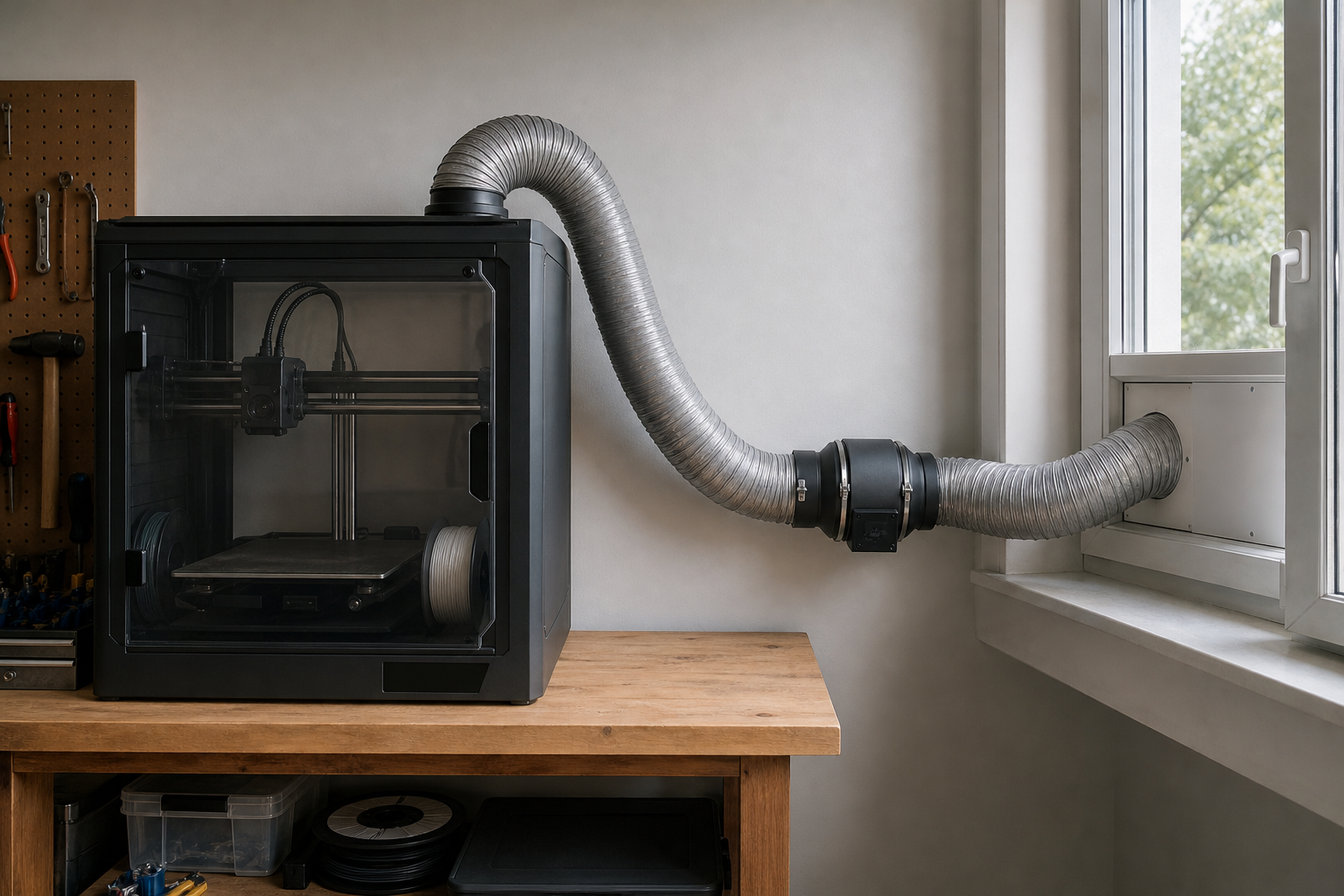
For exhaust, all you need is a small inline duct fan and a duct to a window panel. Put the fan at or near the end of the duct, pulling: that way nearly the whole duct is under negative pressure, and any leaks in it flow inward rather than into the room. The air you remove has to be replaced. Leave an air inlet (a door ajar or a vent), and do not exhaust from a room with a gas boiler or a combustion stove: a strong extractor in a sealed room can draw those appliances' flue gases back indoors.
A draft across an ABS part makes it warp, so exhaust gently to keep the chamber warm: low airflow, with the intake well away from the part. An air purifier with a genuine HEPA helps with particles, but it works on air that is already diluted: it complements treatment at the source, it does not replace it.
Measure instead of guessing. A cheap particle meter (PM2.5 or PM1) and a VOC or eCO₂ sensor tell you whether your setup works. Know their limits: cheap sensors show trends, not absolute values, and almost none of them see particles below about 300 nm, so they undercount UFPs. Use them to compare before and after, with and without the filter.
Post-processing dust is a separate hazard. Sanding or cutting fiber-filled parts releases respirable fibers: sand wet and wear an FFP3 mask. This is covered in Carbon and glass fiber filaments and Sanding and smoothing; solvent vapors, in Vapor and chemical smoothing.
When it fails
| Symptom | Cause | Fix |
|---|---|---|
| The enclosed printer smells when you open it | The carbon is saturated or you opened too soon | Replace the carbon and wait 10–20 minutes with the filter running |
| It has a built-in filter and still smells of styrene | Thin carbon foam or a small cartridge, which saturates in tens of hours with ABS | Change it more often or fit a granular carbon one |
| The room smells of plastic even with a filter | You are only recirculating, and the seals leak | Add exhaust to the outside or move the printer to another room |
| ABS has warped ever since you added exhaust | Too much air is passing over the part | Slow the fan, move the intake away from the part, or exhaust only once the print is done |
| It smells of burning | A clog is charring the plastic or the PTFE is overheating | Stop the print and inspect the hotend; if it happens again, read Fire risk and unattended printing |
| It does not smell, so you assume it is not emitting | PLA barely smells and UFPs do not smell at all | Measure with a particle sensor, or ventilate anyway |
See also
- Fire risk and unattended printing: what fails when a machine prints on its own for hours, and how to keep it from ending in a fire.
- Enclosures and heated chambers: what an enclosure gives you besides containing emissions.
- Print queues and print farms: how the emissions of several machines in one room add up.
- Handling resin safely: resin vapors and contact with liquid resin.