
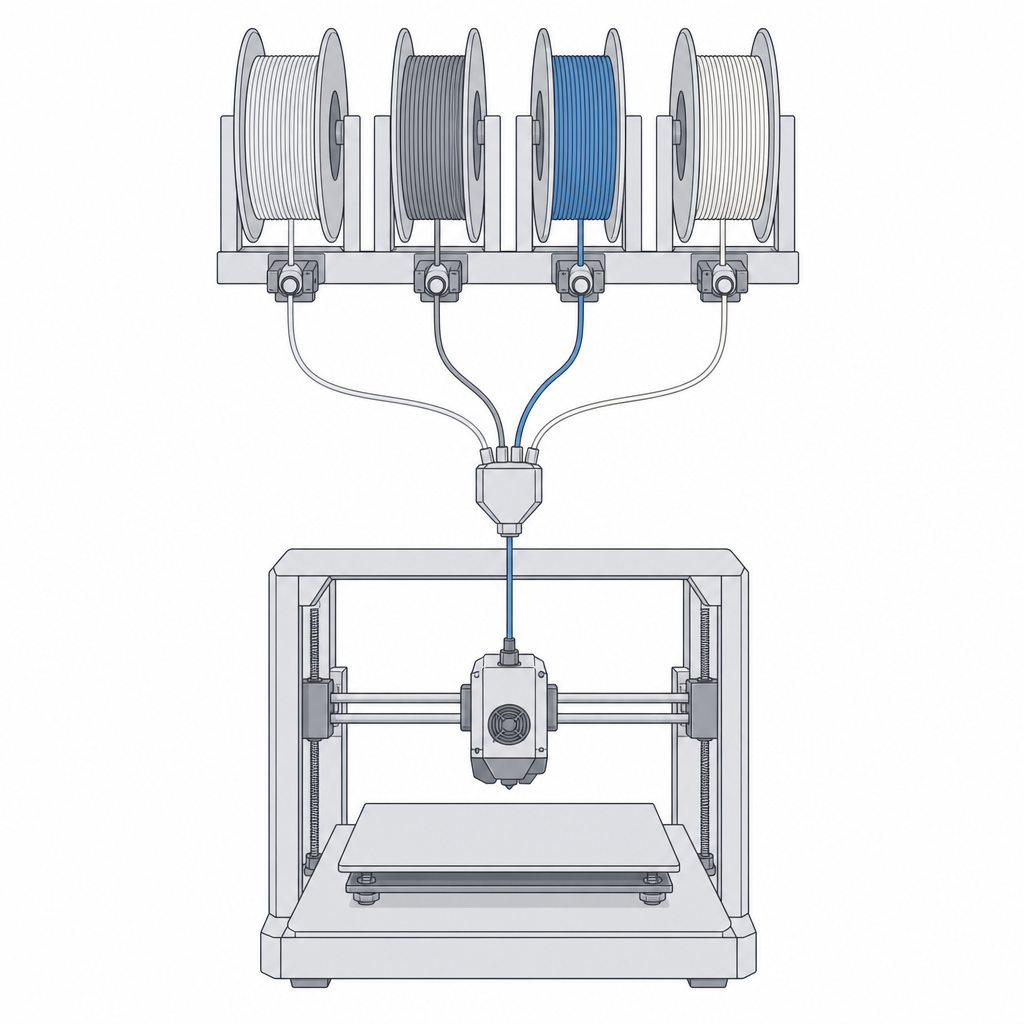
You have one nozzle and you want four, eight or sixteen filaments in the same print. A filament switcher is a robot that swaps the filaments feeding that single nozzle, dozens or hundreds of times in one part. The old filament has to leave the hotend with a clean, narrow end that travels back up the tube without snagging; the cutter or the formed tip, the buffer, the sensors and the list of approved filaments exist to make sure of that. Every swap also costs a purge, because the hotend is still full of the previous color.
How a swap works
Every switcher runs the same cycle:
- The toolhead moves to the purge chute or the prime tower.
- The old filament is separated above the melt zone. Either a cutter in the toolhead snips it (Bambu Lab's AMS family, Creality's CFS, Anycubic's ACE, Elegoo's CANVAS, the Qidi Box), or the printer shapes a tip and pulls it out hot (Prusa's MMU3).
- The unit retracts it past the merge point (where all the paths join) and parks it in its slot.
- The new filament runs down the shared tube to the extruder gears. Sensors confirm each stage.
- The nozzle extrudes until the new color comes out clean, then printing resumes.
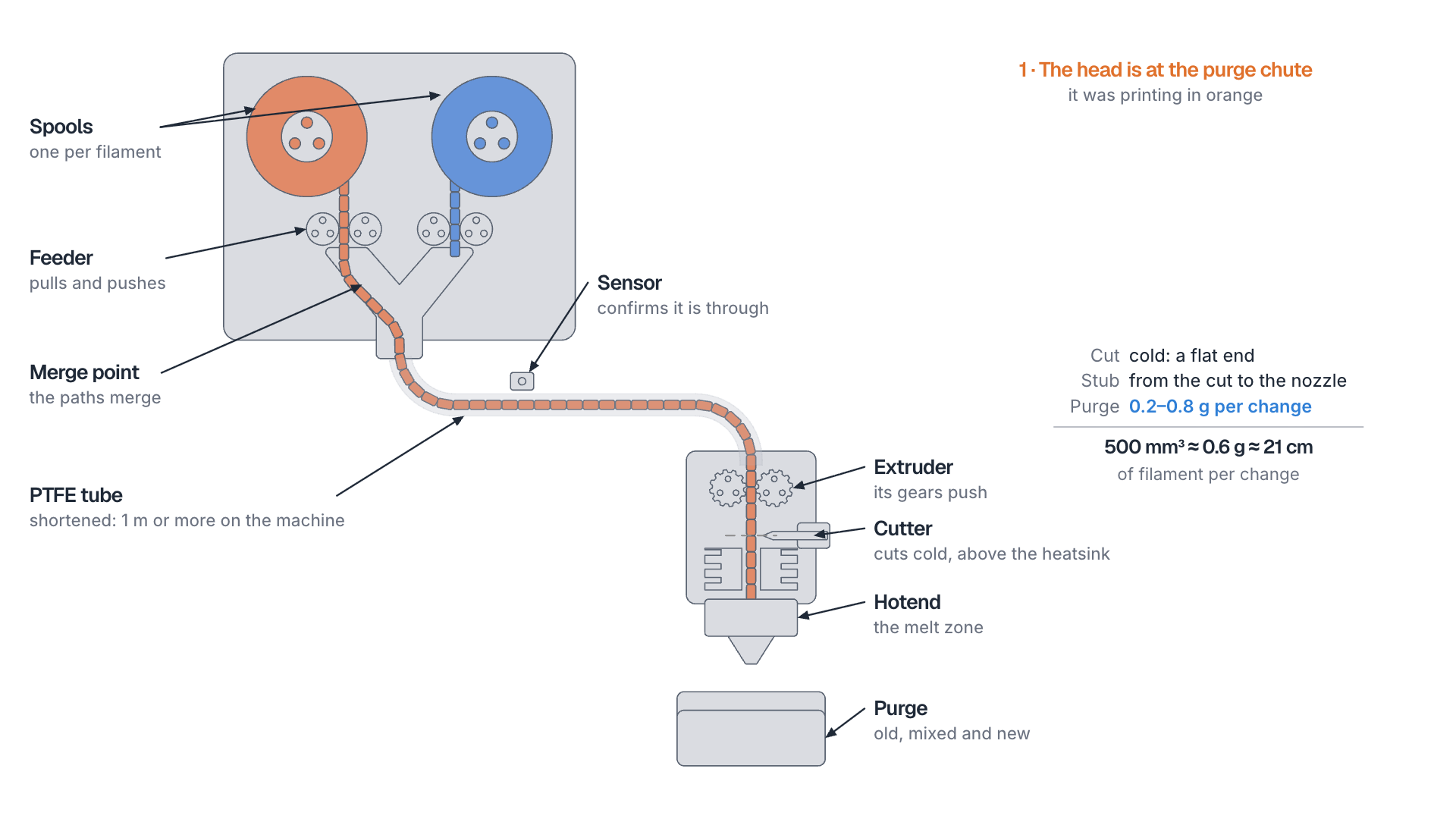
The cut cannot go any lower: the blade needs cold filament, and below the heatsink the plastic is already soft or molten. The price is the stub left between the cutter and the nozzle, inside the heatbreak and the melt zone, which adds to the purge. Whether it cuts or forms a tip, the melt zone still has to be flushed: each color change throws away about 0.2–0.8 g of purge; count the changes before you print (Purge and multicolor waste).
The other price is time: a meter or more of tube out, as much back, and the purge. On a part with color in every layer, the swaps can take longer than the printing itself. The shorter the path from spool to merge point and from merge point to nozzle, the less filament has to be retracted and reloaded. Bambu Lab says the AMS lite swaps faster and more quietly than the AMS because it retracts far less.
Cutting versus tip forming
With a cutter, a lever or actuator on the toolhead snips the cold filament above the hotend. The end comes out flat and at filament diameter, so it always fits back up the tube. It is reliable because the shape of the end does not depend on material, temperature or speed. It has two costs: the stub below the cut, and a blade that wears and can stick.
Without a cutter, the printer has to pull the filament out of the hot nozzle. First it pushes a short, fast burst of filament (ramming); then it moves it up and down several times in a cooler zone so the end cools into a thin cone. This is tip forming, and it is how Prusa's MMU3 works. The MMU3 can also use a cutter in the selector, off by default, that trims the end before reloading; it does not replace tip forming.
Tip forming fails in two ways. If the end is still soft, it forms a blob wider than the tube and jams in the PTFE or the extruder. If it is stretched too far, it leaves a long, hair-thin string that snaps off inside the selector and confuses the sensor. The tip changes with material, temperature and cooling moves, so every filament profile needs its own tuning. PLA forms tips readily; PETG and stringy materials are much harder. Prusa asks for a sharp tip with no lumps or strings, barely wider than the filament.
With a cutter, you switch PLA brands without touching anything. With tip forming, a new filament often needs its ramming and cooling tuned before it swaps reliably. Nearly every recent home machine has a cutter; Prusa is the exception.
From spool to toolhead
Every switcher has four parts:
- One feeder per slot, which pushes and pulls the filament.
- A merge point, where several paths become one. On the AMS it is a fixed part; on the MMU3 it is a selector that slides along the five parked filaments.
- A long tube to the toolhead.
- Sensors that detect where the filament end is.
Many add a fifth part, the buffer, between the unit and the toolhead. It absorbs the difference between what the unit pushes and what the extruder pulls, and tells the unit when to push. Bambu Lab says it keeps filament tension within a range so the extruder works precisely. Units without a buffer, such as the AMS lite, let the extruder pull from the spool during printing. Friction matters more there: a heavy spool, or one that does not turn freely, drags on the extruder millimeter by millimeter.
The sensors sit in the unit or the selector, and in the toolhead. They catch a load that never arrived, a filament that has run out, or a cut that did not separate the two pieces. They matter because a failed swap is not a cosmetic flaw: the printer lays a whole layer in the wrong color, or prints in mid-air.
Nearly every unit switches automatically to an identical spool when one runs out. On a long print, that keeps the machine from sitting idle until you come back. Most also read the RFID tag on their own brand's spools, with the material, color and profile.
Which filaments it accepts, and why
The filament has to travel forwards and backwards through a meter or more of curved tube. It needs stiffness so it does not buckle when pushed, strength so it does not snap when retracted, and a surface that slides. Soft TPU lacks the stiffness, brittle filaments lack the strength, and filaments that absorb water swell and stop sliding; abrasives also wear the path.
Soft TPU and TPE
At 90A, 85A and softer they buckle inside the tube and wrap around the feeder gears. Bambu Lab states that the AMS 2 Pro does not support generic TPU or TPE. Its "TPU for AMS" is far harder (Shore 68D), designed precisely to be pushed through the tube. A 95A TPU works in some units and not in others: check the manufacturer's list. What decides it is the Shore hardness, not the "TPU" label. Print soft TPU from an external spool that feeds the extruder directly (see TPU and flexible filaments).
Brittle and abrasive filaments
Old or dried-out PLA, some silk or heavily mineral-filled blends, and fiber-filled filaments can snap on tight bends or under the cutter. Abrasives (carbon- or glass-fiber filled, or glow-in-the-dark) wear the feeder and the PTFE. Each manufacturer publishes which ones it supports; some machines route them on a separate path, straight to the extruder and with hardened parts.
Moisture-sensitive filaments
PVA and BVOH swell and soften as they absorb water, and Bambu Lab does not support them in the AMS 2 Pro when damp. PC, PA, TPU and PVA need drying before printing; PETG, ABS and ASA benefit from it. If the unit dries, check how hot it gets: a 65 °C dryer, like the AMS 2 Pro's, keeps TPU and PVA dry but will not recover them if they arrive damp, and is not enough for ABS, ASA, PC or PA; an 85 °C one, like the AMS HT's, is (Drying and storing filament). Kept dry, PVA and BVOH give you soluble support with no second extruder, loaded only at the contact layers (Support materials).
The spool has to fit too. The unit turns it resting on its rims, and cardboard spools shed fibers and slip in many units: buy plastic spools or fit a printed adapter ring. There are size limits as well: the AMS 2 Pro takes spools 197 to 202 mm in diameter and 50 to 68 mm wide.
The models on the market
They all repeat the cycle above. What changes is where the merge point sits, whether they cut or form a tip, whether they dry, how many slots they have and whether they chain.
| Unit | Slots | Separates the filament with | Drying | Chaining | Works with |
|---|---|---|---|---|---|
| Bambu Lab AMS lite | 4 | toolhead cutter | no | no (one per printer) | A1, A1 mini, A2L |
| Bambu Lab AMS | 4 | toolhead cutter | no | several units, depending on the printer | P, X and H series |
| Bambu Lab AMS 2 Pro | 4 | toolhead cutter | up to 65 °C | several units, depending on the printer | P, X and H series |
| Bambu Lab AMS HT | 1 | toolhead cutter | up to 85 °C | several units, depending on the printer | P, X and H series |
| Prusa MMU3 | 5 | formed tip | no | no | MK3S+, MK3.9/S, MK4/S, CORE One/+ |
| Creality CFS | 4 | toolhead cutter | no (desiccant) | up to 16 spools | K2 series |
| Anycubic ACE Pro / ACE 2 Pro | 4 | toolhead cutter | yes | depending on the printer, up to 16 spools | Kobra 3, Kobra S1 and other Kobras |
| Elegoo CANVAS | 4 | toolhead cutter | not published | not published | Centauri Carbon 2, Centauri 2 |
| Qidi Box | 4 | toolhead cutter | yes | up to 16 spools | Q2, Plus4 and other Qidis |
Bambu Lab has the widest range. The AMS and AMS 2 Pro are enclosed and have a buffer; the single-slot AMS HT is aimed at engineering filaments. On the two-nozzle H2D and X2D, each nozzle feeds from its own units and still purges on every swap.
Prusa's MMU3 parks five filaments in the unit and picks between them with a moving selector that carries the FINDA sensor. It forms tips. The hardware and firmware are open: you can repair and modify it. The price is tuning the tip for each filament.
On Elegoo's CANVAS the spools sit beside the machine and four separate PTFE tubes run all the way to the toolhead, which acts as the merge point. It has RFID, auto-refill and tangle detection, and is sold with or without a lid.
From Creality, Anycubic and Qidi: the CFS is an enclosed box with desiccant and an RFID reader; the ACE and the Qidi Box dry the filament.
For Klipper printers there are open-source units such as ERCF or Box Turtle, driven by Klipper extensions such as Happy Hare or AFC. The cycle is the same, but you build and tune the unit yourself.
Nearly every switcher works only with its own brand's printers: when you choose a printer, you choose a switcher (more in Closed and open ecosystems).
What to check before you buy one
- The filament list, against what you actually print: TPU, fibers, PVA, cardboard spools. Anything not on the list will have to come from an external spool.
- Cutter or formed tip. With a cutter there is less to tune for each new brand.
- Drying and its maximum temperature, if you print PETG, PA, PC or TPU. At 65 °C neither PA nor PC dries.
- Slots and chaining. Four are enough for most models. Eight or sixteen pay off when you combine support material with many colors, or when a print farm wants to swap spools without stopping the machine.
- Where it sits (on top, beside or behind) and how much tube it uses. More tube means slower swaps and more friction.
- The slicer's purge options: purge into infill, into supports or into a separate object. They affect waste more than the unit itself does. How to map each filament to its slot is covered in Assigning colors in the slicer.
Compared with a toolchanger, it costs far less and takes more spools, but it purges on every swap.
When it fails
| Symptom | Cause | Fix |
|---|---|---|
| The old filament will not go up the tube | the end came out wider than the tube | with tip forming, tune ramming and cooling in that profile; with a cutter, check that it cuts cleanly |
| A soft filament never reaches the toolhead | it buckles in the tube | compare its Shore hardness with the manufacturer's list; if it is not on it, feed it from an external spool |
| No slot loads | a broken piece in the shared tube or merge point, or a cut that did not separate the two pieces | clear it before you try again (Multi-material failures) |
| PVA or BVOH jams mid-print | wet, swollen filament | dry it and keep it sealed or in a drying unit |
| The spool slips or sheds fibers | cardboard spool | a plastic spool or a printed adapter ring |
| A whole layer prints in the wrong color | a failed swap the sensors missed | check the sensors and the cutter (Filament switcher upkeep) |
See also
- Purge and multicolor waste: how much each color pair purges and how to make use of that purge.
- Toolchangers, IDEX and dual nozzles: the alternative that barely purges, and the two-nozzle machines that use switchers.
- Filament switcher upkeep: PTFE tubes, buffer, cutter and purge chute.
- Multi-material failures: failed loads, a stuck cutter, snapped filament and sensor errors.