
You want a part in more than one color, or in more than one material, and there are four ways to get there. What separates them is what each change costs you: in plastic, in time and in hardware. An FDM nozzle is full of molten plastic. Changing color in the same nozzle means pushing the old color out, and that is the purge. Switching to another nozzle only means keeping the idle one hot and stopping it from oozing. Choosing a method is deciding how often you will pay for each of those two things.
Color by height: one pause and a change by hand
The slicer inserts a color change at a given layer, with an M600 or a pause command. When the print reaches that layer, the printer parks the head, you swap the spool, purge by hand until the new color comes through, and printing carries on. It works on any printer and needs no extra hardware.
It is the cheapest method because there is only one change per height you choose. Each change purges the same as on a switcher, 0.2 to 0.8 g, about 7 to 27 cm of 1.75 mm filament, but there is one per height rather than one or more on every layer. If you own a filament switcher, it makes that change on its own, without you, and it costs one purge.
The limit is hard: every layer is a single color across the whole plate. It suits raised text on a flat plate, signs, keyrings or topographic maps in height bands. It cannot put two colors side by side in the same layer.
The typical fault comes from the wait. During the pause the bed must stay hot: if it cools, the part comes loose or warps. The nozzle, on the other hand, can be switched off; many firmwares turn it off by themselves after a while and reheat it before resuming. What you usually see is a blob where the nozzle rejoins the part and a line where the last layer cooled. Wipe the tip before resuming and put the change on the first layer of the relief (the text, the band): the color change is intended there, and the line lands on an edge.
Filament switchers: one nozzle, many spools
Several spools feed a single toolhead. On every change the filament is cut (or, on systems such as the MMU, the tip is shaped and retracted), unloaded, the new one is loaded, and the nozzle purges the old color until the new one runs clean.
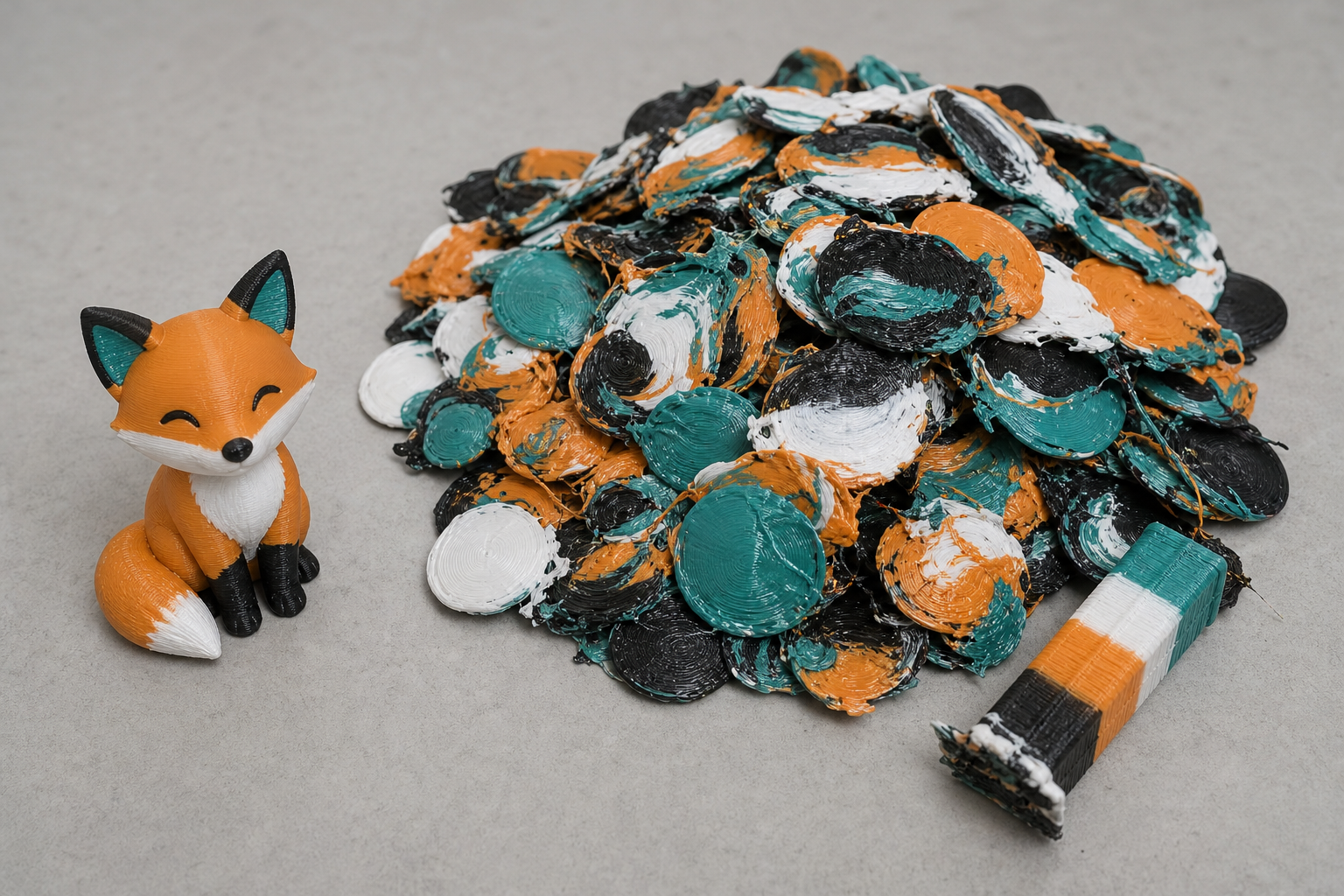
The purge is needed because the hotend still holds plastic of the old color. Each color change throws away about 0.2–0.8 g of purge, more from dark to light than the reverse; count the changes before you print (Purge and multicolor waste).
What sets the waste is the number of layers that carry more than one color, not how much plastic of each color the part has. Every two-color layer is at least one change.
Time follows the same arithmetic. Each change adds cutting, unloading, loading and purging, and on a part with color on every layer the changes can take longer than the printing itself. Some of that purge can be put to use: the slicer can purge into infill, supports or a sacrificial object instead of dumping all of it into the prime tower.
By late 2026 nearly every manufacturer has one. Bambu Lab sells the AMS in several versions (AMS lite, AMS, AMS 2 Pro, AMS HT); Prusa, the five-filament MMU3; Creality, the CFS; Anycubic, the ACE Pro; Elegoo, the CANVAS; and Qidi, the Qidi Box. The CFS, ACE Pro and Qidi Box can be chained for up to 16 spools. Some dry the filament while feeding it: the AMS 2 Pro up to 65 °C and the AMS HT up to 85 °C.
In return for the purge you get any color anywhere on any layer, faces colored with the slicer's paint brush, and soluble or breakaway support interfaces, such as PETG under PLA, which do not bond to each other. A soluble support needs no second extruder: a filament switcher loading dry PVA or BVOH at the contact layers is enough (Support materials). The filament sets the limit: the switcher may not accept soft TPU (90A, 85A), abrasive or brittle filaments or cardboard spools, or may feed them badly. Some take a much harder TPU made to run through them (Bambu's "TPU for AMS" is Shore 68D); a 95A works in some units and not in others.
Several nozzles: toolchangers, IDEX and dual nozzles
Here each color or material has its own hot nozzle. Changing color means changing tool, so there is hardly any purge: the incoming tool only primes a little before printing. The problem shifts: keeping the idle nozzle from oozing. To prevent it, the nozzle drops to a standby temperature, gets wiped, and primes again on its way in.
A toolchanger purges milligrams per change instead of tenths of a gram (Toolchangers, IDEX and dual nozzles). It is not zero waste: most profiles still print a small tower or an ooze shield to settle the pressure and catch drips.
There are four layouts:
- Toolchanger: several complete tools in a dock; one prints at a time. Machines such as the Prusa XL (up to 5 toolheads), the CORE One+ with INDX or the Snapmaker U1. Bambu Lab's announced H3C belongs here too.
- IDEX: two independent carriages. As well as printing in two colors, it can print two copies or two mirrored parts at once.
- Dual nozzle on one toolhead: like the Bambu H2D or X2D, which switch between two nozzles. If each nozzle is fed from a filament switcher, it still purges on every color change within that nozzle. On the X2D the second nozzle is Bowden-fed and does not take TPU.
- Hotend swapping: the Bambu H2C keeps the left nozzle fixed and swaps hotends on the right one from a rack.
You pay for it in price, in weight (on the gantry or in the dock), in more hotends to look after and in calibration. The offset between tools must stay within a few hundredths of a millimeter (the U1 specifies ≤ 0.04 mm). If it drifts, you see it as one color shifted against its neighbor.
You get everything a filament switcher gives you with very little purge, and you can also combine materials that cannot share a nozzle: soft TPU with a rigid plastic, PLA with PC or PA (around 60 °C apart at the nozzle), or a carbon-fiber filament in its own hardened nozzle.
Thin layers: color by stacking
A thin layer of plastic lets some light through. Stack a few colors at different thicknesses and the eye blends them, like glazes in painting.
The first technique is the HueForge-style filament painting: a low relief, printed flat, viewed face-on or against the light. Each height band is one color, so the cheapest method, color by height, is enough, and you need no switcher. The figure that governs it is each filament's transmission distance (TD): the thickness beyond which it stops letting light through. Painting with filament and light develops it.
The second takes the blend to 3D parts. Very thin layers alternating cyan, magenta, yellow and white, or a few base colors, read as in-between shades at a normal viewing distance, looking at the part's walls. Slicers already include it: Color Mixing in Bambu Studio, ColorMix in PrusaSlicer and FullSpectrum, an OrcaSlicer fork. It works on a filament switcher, but the purge multiplies, because every thin layer is one more change. On a toolchanger it pays off.
The price is resolution. A shade that is 30 % one color and 70 % another needs a block of 3 layers plus 7 that repeats: 10 layers for every vertical color "pixel". That is where visible banding comes from, especially with opaque filaments, and why you need very thin layers, which lengthen the print time. The color is also approximate: it does not match an exact reference. Full color with CMYK develops it.
Which method to choose
Answer these questions in order:
- Are there different colors or materials within one layer, or do they only change with height? If they only change with height, a pause is enough.
- Do you want photographic shades? Use thin layers.
- Do you need two materials that cannot share a nozzle, such as soft TPU with a rigid plastic or very different temperatures? Move to several nozzles. A filament switcher, on the other hand, handles soluble or breakaway support interfaces; the details are in Functional multi-material parts.
- How many layers carry more than one color? If only a few, a filament switcher is enough. If a tall part has color on every layer, purge and time balloon: redesign the part or move to several nozzles.
| Method | Hardware | Waste per change | Colors per layer | Typical uses |
|---|---|---|---|---|
| Color by height | none | a normal purge (0.2–0.8 g), once per height | 1 | plates with raised text, signs, keyrings, banded maps |
| Filament switcher | AMS, MMU3, CFS, ACE Pro, CANVAS, Qidi Box | 0.2–0.8 g | the loaded filaments (mostly 4 or 5 per unit; up to 16 chained) | figures, painted faces, soluble or breakaway support interfaces |
| Several nozzles | toolchanger, IDEX, dual nozzle | milligrams of priming, plus a small tower | as many as tools (more if each nozzle has a switcher) | many colors per layer, rigid with soft TPU, materials at different temperatures |
| Thin layers | color by height (flat painting) or several nozzles (3D part) | whatever your hardware wastes | optical mixing | backlit paintings, full-color parts |
On a filament switcher, design cuts purge more than any setting: put color only where it shows, in horizontal bands, and make a raised logo change color once in height (Designing for multicolor). How to give each color to a face, a body or a height is explained in Assigning colors in the slicer.
When it fails
| Symptom | Cause | Fix |
|---|---|---|
| Color bleed at the start of each change, mostly light after dark | that pair's purge falls short | raise the flush volume for that pair, not the global multiplier, which makes every change more expensive |
| The prime tower falls over or the head knocks it | tall, narrow tower on a fast machine | widen it or print it slower (Purge and multicolor waste) |
| A small figure produces more purge than part | color on many layers | check the changes and grams of purge in the preview and cut the colored layers in the model |
| A blob or line at the change by height | the nozzle left a drip on its way back and the last layer cooled | hot bed, clean tip before resuming, change on the first layer of the relief |
| Filament that will not load, a jammed cutter or a nozzle dripping on the part | a fault in the changing hardware | diagnosis in Multi-material failures |
See also
- Purge and multicolor waste: purge volumes, purging into infill or supports, and the prime tower.
- Filament switchers: AMS, MMU, CFS and ACE: how they cut and load filament, and which ones they accept.
- Toolchangers, IDEX and dual nozzles: the several-nozzle method and what it costs.
- Designing for multicolor: how to cut the number of changes in the model.