
The extruder is a volumetric pump: the drive gear turns a fixed number of degrees and the slicer counts on a fixed volume of plastic leaving the nozzle. Every extrusion problem comes down to a different volume from the one the slicer calculated. Less gives gaps, thin walls and a weak part; more gives rough surfaces and oversized parts. Before what the defect looks like, look at when it appears: always, only in the fast sections, now and then, worse as the hours go by, or all at once. Each pattern points to a different stretch of the path.
From spool to nozzle
The filament travels through six stretches, and each has its own failure. The spool and its holder can drag, tangle or have crossed windings. The PTFE tube or the filament switcher's path adds friction. The extruder gears can slip, or grind a notch into the filament. In the heat break, the filament can soften too early and form a plug. The melt zone, the heater block, can only melt so much plastic per second. And the nozzle bore itself can be dirty or worn.
All these faults end the same way, in less plastic, so the symptom alone will not tell you which one you have: you have to find the stretch. Resistance before the gears makes them slip. A restriction after them raises the pressure the extruder has to overcome until the motor skips steps, and you hear that as a click.
To find the restriction, isolate the stretches one at a time. Heat the nozzle to printing temperature, release the extruder lever (or unload the filament and feed it back by hand) and push. If a thin, continuous strand drops straight down, the hotend is clean and the problem is further up. If it comes out bent, curls, spits, runs thinner than usual or does not come out, the restriction is in the nozzle or the heat break. Then extrude with the motor, and finally watch a real print.
Constant under-extrusion
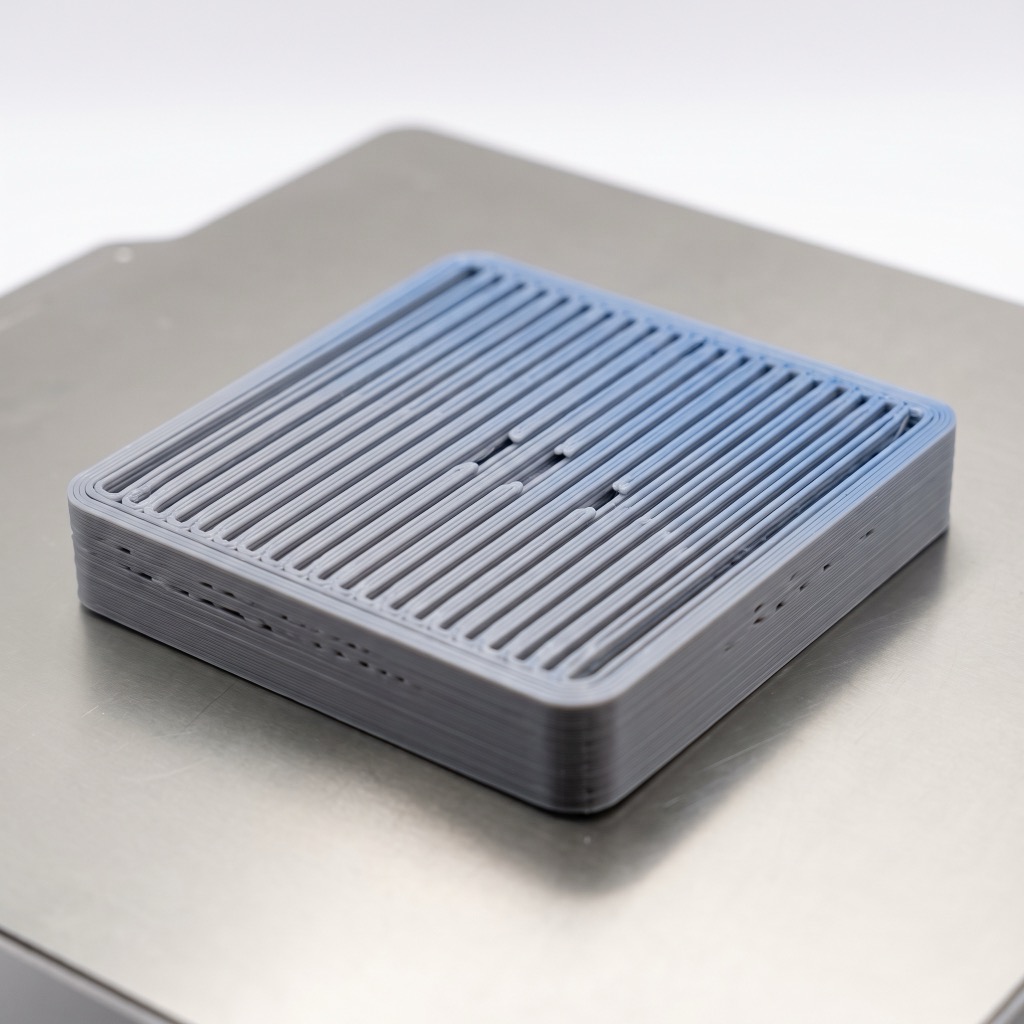
You recognize it by the same gaps between beads across the whole part, walls that let light through, and a part that weighs less than the slicer estimates. If the fault is constant, the cause is a setting or a physical limit; a clog does not produce a fault that regular.
The profile
Check it first: it is the cheapest thing to check and the most common culprit after you change something: a 0.6 mm nozzle with a 0.4 mm profile; 1.75 mm filament set up as 2.85 mm (the reverse over-extrudes, see below); a filament profile for another material. The slicer calculates volume from the profile's line width and layer height. On a printer with quick-swap nozzles, the machine only knows about a swap if you tell it.
The flow ratio
This is the per-filament factor that corrects what the gear actually pushes. It is called "Flow ratio" in Orca and Bambu Studio, "Extrusion multiplier" in PrusaSlicer and "Flow" in Cura, and it differs by a few percentage points between two brands of the same material. Calibrate it with the slicer's flow test, which prints blocks and has you pick the smoothest top surface. Orca's "YOLO" method refines it in a single print, within ±5 % of the current value; if the profile is far off, run it again. Measuring a single-bead wall with callipers is no longer the recommended method. The procedure is in Flow ratio and max flow tests, and when to recalibrate it (new brand or nozzle) in What to calibrate, and in what order. Do not trust automatic calibration here: the Bambu pre-print routine ("Flow dynamics calibration") mainly tunes pressure advance, not the "Flow ratio". With a new brand of filament, run the flow test anyway.
The hardened steel nozzle
Steel conducts heat far worse than brass, so with the same profile it melts less. Print 5–10 °C hotter or lower the maximum flow by 10–20 %. If it has under-extruded since you swapped the nozzle, this is almost always why (Nozzles: size and material).
Damp filament
Steam forms bubbles in the melt: gaps, rough and foamy walls, popping and hissing. It looks like under-extrusion, but no flow setting fixes it. Dry the spool (Drying and storing filament).
What looks like under-extrusion and is not
Three defects pass for under-extrusion and are not. A wall thinner than two line widths prints as a single bead with gaps: that is geometry (Walls, perimeters and infill). Holes in the top surface over infill are usually too few top layers (Top surfaces). And gaps right after every travel move come from retraction, not flow (Stringing and blobs).
Only in fast sections: the flow ceiling
The outer wall is fine, but the inner walls and infill come out thin and gappy, worst on long straights, and gaps open between wall and infill. The slow sections get enough plastic; the fast ones ask for more than the hotend can melt.
The speed ceiling is the hotend's flow: speed = flow / (line width × layer height) (Volumetric flow sets the speed). With 21 mm³/s and a 0.45 × 0.20 mm bead the ceiling is 233 mm/s (250 mm/s with Bambu Studio's 0.42 mm width). Above it, the plastic leaves the nozzle half-melted and in short supply, and the gear starts to slip.
The fix is to put the flow your hotend really melts into the filament profile, measured with the max flow test: "Max volumetric speed" in Orca, Bambu Studio and PrusaSlicer. The slicer then slows only the lines that would exceed it. Raising the temperature buys a little more flow, at the cost of more stringing and, at the top of the range, degraded plastic. Thick layers and wide lines hit the ceiling sooner: at 0.65 × 0.30 mm, the same 21 mm³/s gives about 108 mm/s. The profile's speed settings are in Speed and cooling.
The classic case is a speed profile written for a CoreXY and run on a legacy bedslinger. A less obvious one: the part-cooling fan blowing on a heater block with no silicone sock. At 100 % fan the block cools and melts less, and it does so in the fast sections, which usually get the most cooling.
Intermittent under-extrusion
Bands or patches of thin layers at random heights, a wall that is fine on one side and starved on the other. If the height changes from print to print, the fault is mechanical, thermal or in the material, never in the file.
Drag in the feed
A spool that snags or has a crossed winding, a holder that brakes, a long or kinked tube, a filament switcher that does not feed cleanly (Filament switcher upkeep). The last few meters of a spool are tightly curled and drag more; that is also where the knots tend to be. Test: pull the filament by hand right at the extruder inlet. It should move with almost no effort.
Extruder grip
Too little tension and the gear slips; too much and it crushes and grinds the filament, especially flexibles. Plastic dust packed between the teeth also robs it of grip. The mechanics are in Extruders: direct drive or Bowden.
Partial clog
A speck of carbonized plastic or debris that moves around and blocks the bore now and then, or leftovers of a higher-temperature material such as PETG or PC still inside when you print PLA. On a legacy bedslinger with a Bowden extruder and a PTFE-lined hotend, the most common clog is a different one: the tube does not seat against the nozzle, plastic forms a ring in that gap and extrusion fails intermittently or entirely. Cut the tube square, seat it with the nozzle hot and tighten the coupling. For everything else, do a cold pull (section "Clearing the hotend", below).
Inconsistent diameter
The usual tolerance is ±0.05 mm, and on 1.75 mm that already means ±6 % in volume: (1.80/1.75)² ≈ 1.06. Good brands hold it tighter. A spool out of tolerance or ovalised shows up as bands.
A clicking extruder
The click happens when the motor skips steps or the idler jumps, because the force needed to push exceeds what the motor and gear can deliver. It is a symptom of back pressure. Adding tension only makes it grind the filament.
In order of frequency:
- The nozzle too close to the bed on the first layer: the plastic has nowhere to go (The first layer and bed adhesion).
- A speed above the flow ceiling, or a temperature too low for that speed.
- A partial clog.
- Heat creep.
- Filament with a flat notch the gear can no longer bite.
In a very hot enclosed chamber, the extruder motor also loses torque as it warms, and plastic gears soften: another source of clicking.
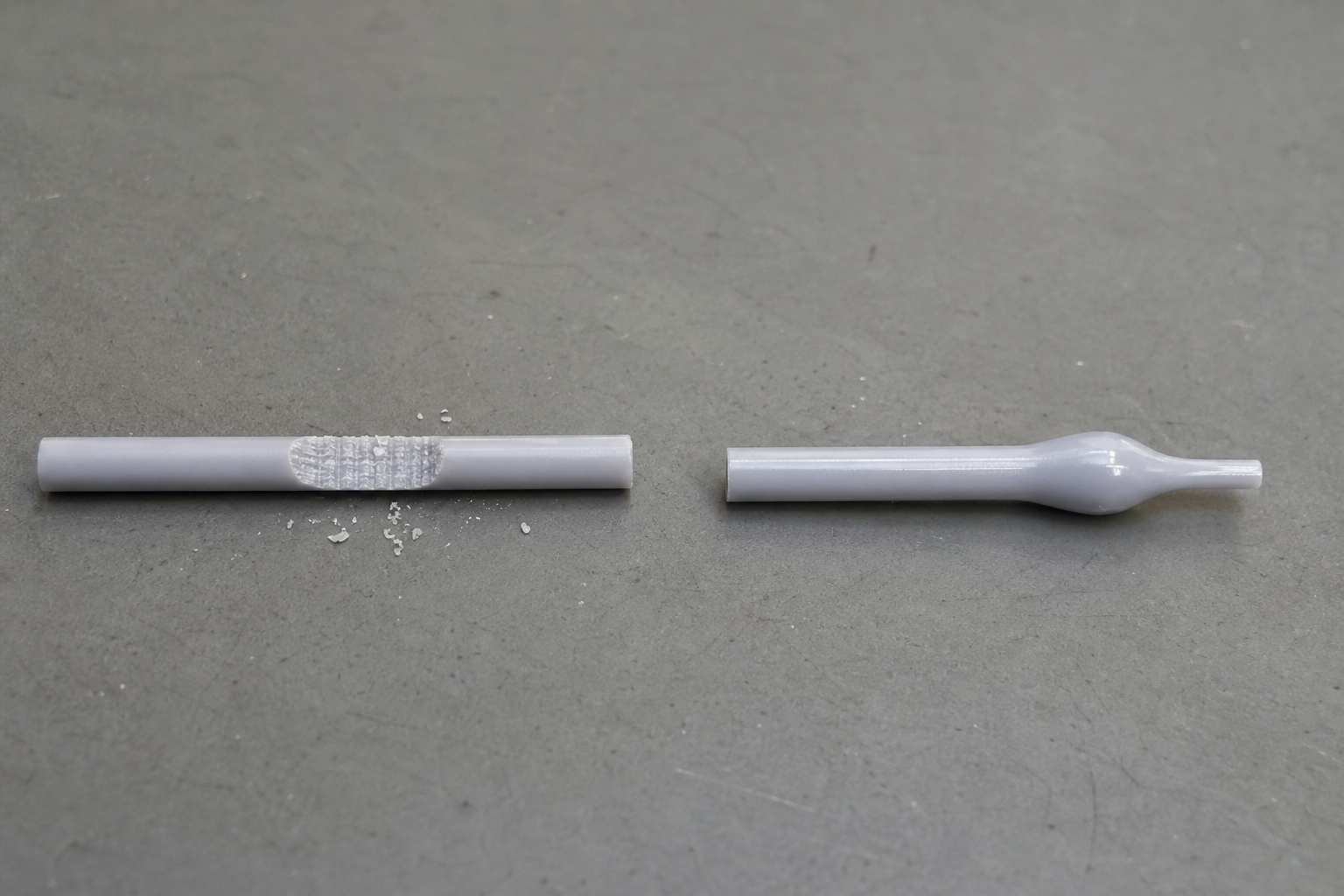
Unload the filament and look at the gear marks. Regular, shallow tooth marks: grip is fine and the problem is further down. A flattened, ground notch with plastic dust: the gear has spun in place on the same spot. Cut above the notch, fix the cause and reload.
As of late 2026, many printers warn you about some of these faults: run-out and tangle sensors on filament switchers and, on the Bambu H2D, "Nozzle clumping detection", which lowers the nozzle to probe on some early layers and pauses the print if it detects a clump of plastic around it. You enable it in Bambu Studio, it does not work in spiral vase mode or with by-object printing, and Bambu says it is not infallible. None of these sensors reliably detects a partial clog (Sensors, cameras and failure detection).
Heat creep
If hot air reaches the cold side of the hotend, PLA softens too early and jams: that is heat creep (Hotends and how much they can melt). The filament swells against the walls of the heat break, and the extruder clicks or flow drops to zero.
You recognize it because the part prints fine for a good while, from half an hour to several hours depending on how fast the chamber warms, then thins and stops, at a different height each time. The most sensitive materials are the ones that soften early: PLA (HDT around 57 °C at 0.45 MPa), PVA and TPU.
The usual causes:
- PLA in an enclosed printer with the door and lid on. The chamber warms up and the heatsink stops cooling. Open the door or lid when the bed goes above about 45 °C with PLA, PVA or TPU, or about 70 °C with PETG (Enclosures and heated chambers).
- The heatsink fan stopped, slow or clogged with dust or strings.
- Tiny parts printed very slowly: the filament spends longer in the hot zone.
- Long or very frequent retractions, which pull molten plastic up into the cold side. Above 1.5–2 mm on a direct drive, this is the mechanical variant described in Stringing and blobs.
Fix it in this order: open the door following the rule above; check that the heatsink fan is clean and runs at full speed whenever the hotend is hot; put retraction back to the profile value; and, last, clear the plug. On a PTFE-lined hotend, never try to solve it by going above 240 °C: PTFE starts to degrade around 250 °C.
Clearing the hotend
Hot push. Heat to the top of the material's range (PLA 230 °C, TPU 250 °C, PETG 260–270 °C on an all-metal hotend), unload, cut the filament tip square and push firmly by hand. That is enough for a soft plug. On a PTFE-lined hotend the limit is 240 °C for PETG and TPU too.
Cold pull (or atomic pull). It works because a semi-solid plug grips the debris and pulls it out the way it came in, instead of pushing it further in. Heat up and push filament until it comes out of the nozzle. Nylon or cleaning filament works best, though PLA will do; nylon only on all-metal hotends, because it has to be loaded above 240 °C. Let the hotend cool until the plastic inside is solid but still slightly flexible, well below printing temperature, and pull with steady force, no jerking. The tip comes out shaped like the inside of the nozzle, with the debris stuck to it. Repeat until it comes out clean. The temperatures depend on the cleaning filament: use the ones its maker gives.
On quick-swap hotends (Bambu, E3D Revo and similar), swapping the nozzle or the hotend assembly is usually faster than clearing it, and the safest route is the maker's procedure. A heat-creep plug inside the heat break may mean taking the hotend apart; follow its guide. Routine swapping and cleaning are in Nozzle and hotend care. If the clog happened with an abrasive filament, take the chance to check the bore for wear (Nozzles: size and material).
Over-extrusion
Rough, ridged top surfaces; the nozzle scraping what it has laid down a moment before (you hear it, and the surface comes out dragged); bulging corners; oversized parts; tight fits and undersized small holes, because the surplus plastic is pushed into the inside of tight curves.
The causes:
- Flow too high, often copied from another brand's profile.
- The wrong profile, the reverse of under-extrusion: a 0.6 mm profile on a 0.4 mm nozzle, or a filament diameter set below the real one.
- Thick filament: 1.80 mm instead of 1.75 mm is 6 % more volume.
Temperature does not add plastic. The pump is volumetric: a hotter nozzle changes how the bead flows and oozes, not how many cubic millimeters the gear pushes. With more heat, ooze and corners can make the part look over-extruded; that belongs to Stringing and blobs or Pressure advance and clean corners. That said, a calibrated flow holds for the temperature you measured it at: with a runnier plastic the back pressure drops and the real flow shifts by a few points, so if you change the temperature a lot, run the test again.
A squashed first layer and elephant's foot are not over-extrusion either (The first layer and bed adhesion), and nor is a bumpy top surface over sparse infill (Top surfaces).
The fix: calibrate flow with the slicer's test and check that the profile matches the nozzle and the filament. If you design parts, this matters because every outer wall grows: a fit tuned on a calibrated machine turns tight or will not go in on one that over-extrudes (Real printed clearances).
When it fails
| Symptom | Cause | Fix |
|---|---|---|
| Gaps between beads across the whole part, lighter than estimated | Low flow, profile for another nozzle or diameter | Check the profile and run the flow test (Flow ratio and max flow tests) |
| Inner walls and infill gappy, outer wall fine | Above the hotend's volumetric flow | Set "Max volumetric speed" in the filament profile |
| Under-extrusion since you fitted a hardened steel nozzle | Steel conducts heat worse | Raise 5–10 °C or lower max flow by 10–20 % |
| Rough, foamy wall, popping, hissing | Damp filament | Dry the spool (Drying and storing filament) |
| Thin bands at random heights | Drag in the feed, grip, partial clog, badly seated PTFE tube | Pull by hand at the extruder inlet, check tension and the tube, do a cold pull |
| The extruder clicks | Back pressure: nozzle low on the first layer, too fast or too cold, clog, heat creep | Check them in that order |
| Fine for a while, then thins and stops; PLA in an enclosed printer | Heat creep | Open the door, check the heatsink fan, shorten retraction, clear the plug |
| Nothing comes out | Full clog or ground filament | Cut above the notch; hot push, cold pull or a nozzle swap |
| Thin start after every travel move | Retraction too long | Tune retraction (Stringing and blobs) |
| Ridged top surface, tight fits, nozzle drags | High flow, wrong profile, thick filament | Run the flow test and check the profile |
| Holes in the top surface over infill | Too few top layers | Add top layers (Top surfaces) |
See also
- Volumetric flow sets the speed: where your hotend's speed ceiling comes from.
- Flow ratio and max flow tests: how to measure each filament's flow ratio and maximum flow.
- Nozzle and hotend care: swapping, cleaning and nozzle wear.
- Stringing and blobs: ooze and retraction, the other half of nozzle defects.