
The extruder decides how precisely and how hard the filament goes into the hotend; the hotend decides how fast it melts. When a part comes out under-extruded or stringy, or the extruder clicks or chews up TPU, look here first. Before you touch a profile, find out which extruder your machine has: where the motor sits, how the gears grip and what reduction they carry decide which retraction, pressure advance and TPU speed suit you.
A pump that pushes a rod
A motor turns a toothed gear that bites the filament and pushes it, still solid, into the hotend like a piston: it is a positive-displacement pump. The firmware commands millimeters of filament and expects the matching volume to come out of the nozzle. The system only works while the filament is solid. Molten plastic cannot transmit a push: it behaves like cooked spaghetti, which buckles when you press on one end. That is why the gear has to push solid filament right up to the edge of the melt zone, and why the hotend keeps its inlet side cold (see Hotends and how much they can melt).
Every millimeter of filament is a fixed volume. A 1.75 mm filament has a cross-section of 2.405 mm², so 1 mm of filament is about 2.4 mm³ of plastic. An enclosed CoreXY printing PLA at 21 mm³/s draws about 8.7 mm/s of filament. At 40 mm³/s, what a high-flow hotend delivers, that is almost 17 mm/s. The teeth have to bite at that speed without slipping. Machines on 2.85 mm, such as Ultimakers and some Bowden printers, move about 6.4 mm³ per millimeter; the thicker filament is stiffer and buckles less inside a tube, which is why it lasted so long on Bowden machines.
Forcing molten plastic through a 0.4 mm hole takes force. That resistance is the back pressure: it rises with flow and falls with temperature, because hotter plastic is runnier. The extruder overcomes it with a few teeth dug into a plastic rod, and that gives it two limits: the motor's torque and the teeth's grip.
Each limit leaves a different sign. If the motor runs out of torque, it skips steps and you hear a rhythmic click. If the grip runs out, the gear spins in place and grinds a flat notch into the filament, with plastic dust around it. Either way, less plastic comes out than the firmware asked for. The full diagnosis is in Extrusion problems.
Direct drive or Bowden: where the motor sits
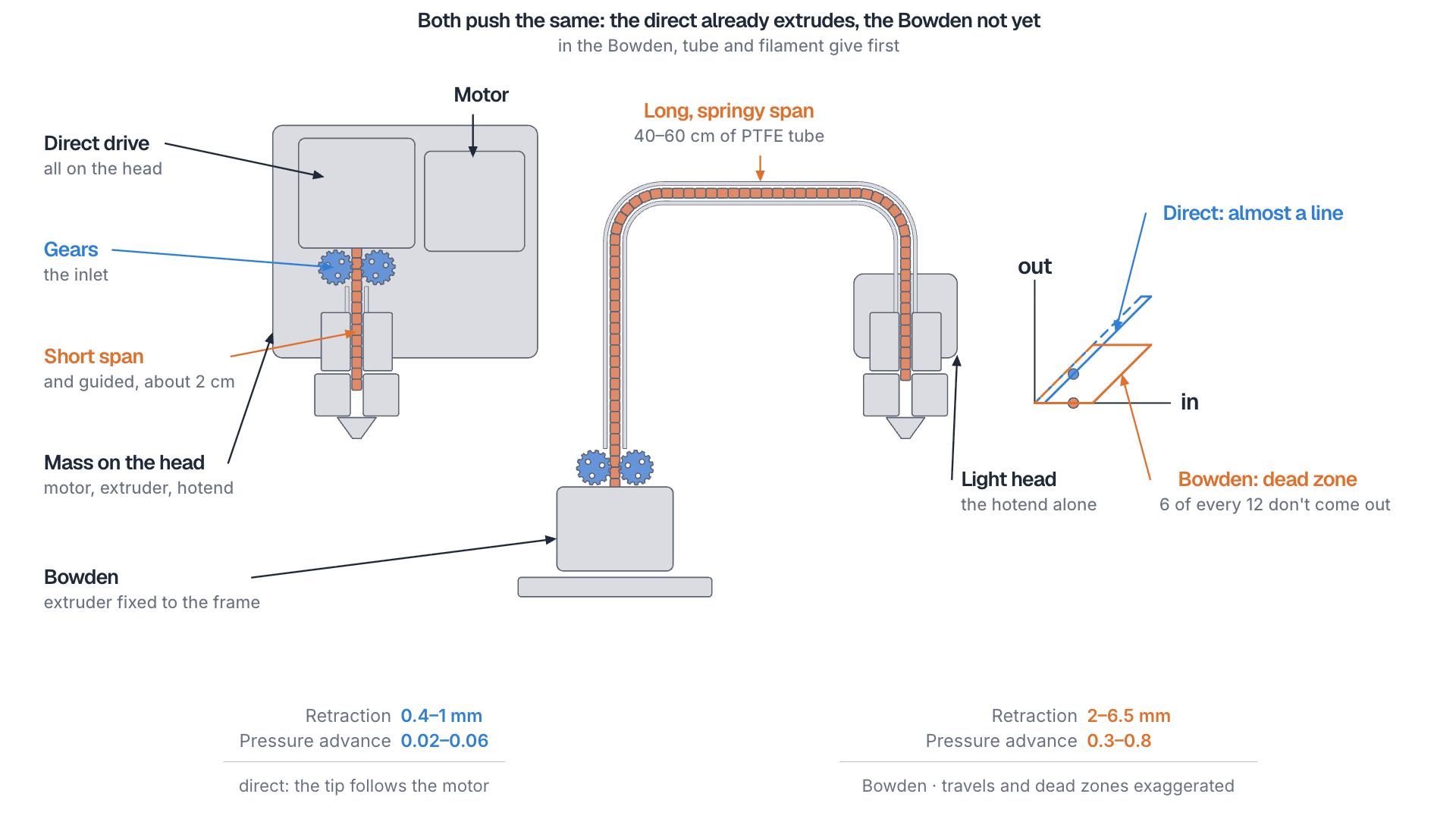
On a direct drive layout, the extruder rides on the toolhead and grips the filament a few centimeters from the melt zone. The path from gear to nozzle is short and guided end to end. Every motor step reaches the nozzle almost at once.
On a Bowden layout, the extruder is fixed to the frame and pushes through a PTFE tube 40 to 60 cm long on a bedslinger, and longer on a classic delta. The 1.75 mm filament sits loose inside the tube: a 2 mm bore is the norm, and 1.9 mm tubes leave less play. Tube and filament both give under load.
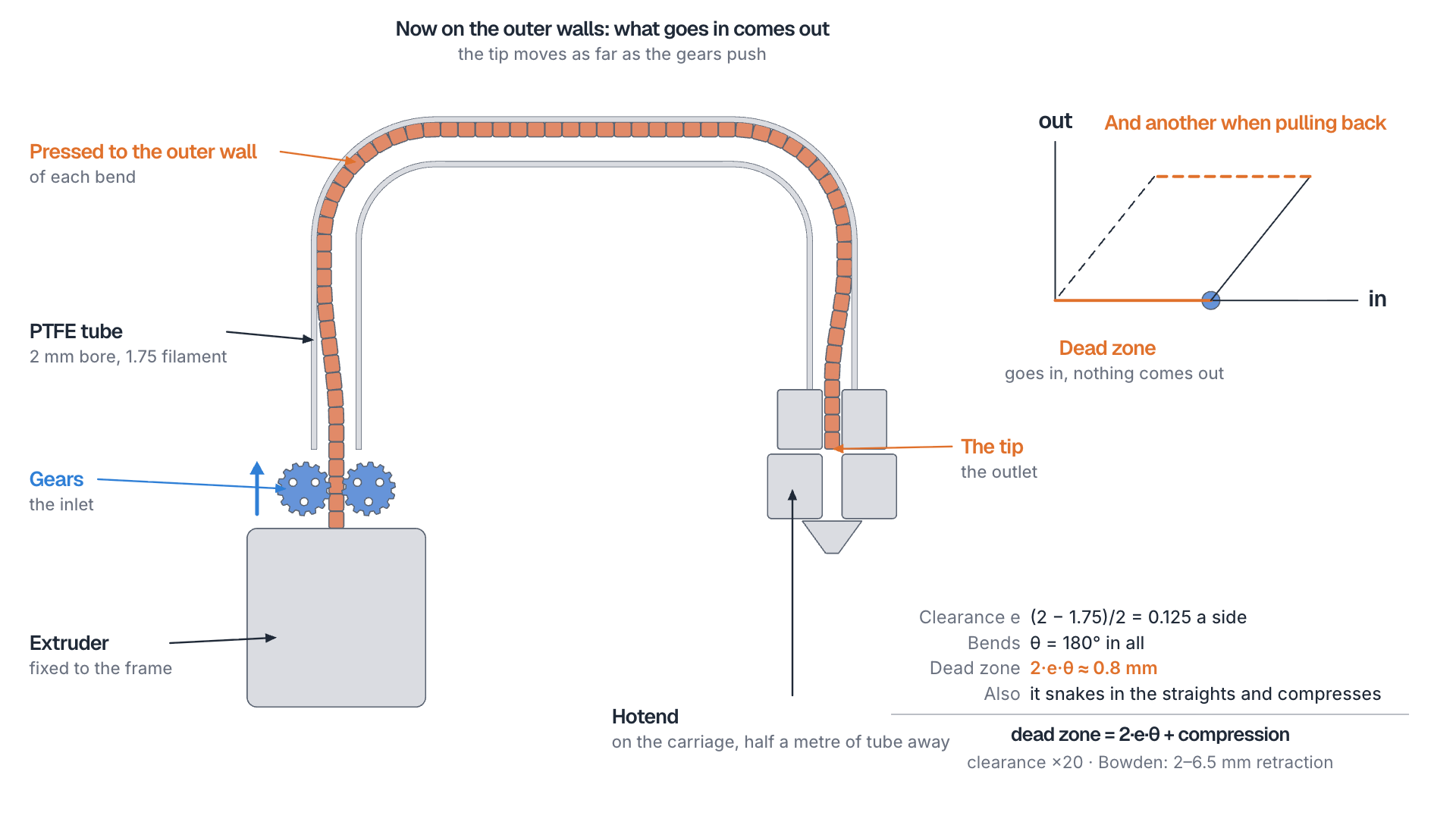
That play, the dead zone in the diagram, has three consequences.
- Retraction. A direct drive needs 0.4 to 1 mm (Bambu Studio and OrcaSlicer use 0.8; Prusa, around 0.7). A Bowden needs 2 to 6.5 mm. The 6.5 mm in Cura's base profile, the one a machine without its own profile inherits, is a Bowden value; copied onto a direct drive, it drags molten plastic back into the cold zone and ends up clogging it.
- Pressure advance. Typical values are 0.02 to 0.06 on a direct drive and 0.3 to 0.8 on a Bowden. The molten plastic compresses the same in both layouts; on a Bowden, half a meter of tube and filament stretching and compressing is added on top, which is why the Bowden needs about ten times more.
- Flexible filament. Soft TPU snakes inside the tube before it transmits any push.
Each layout wins at one thing: the Bowden moves less mass and the direct drive moves the filament precisely.
Why nearly everything is direct drive in late 2026
The Bowden existed to lighten the toolhead. A standard-size NEMA 17 with its extruder adds 300 g or more, and that mass at high speed excites resonances that leave ringing on the walls. Two developments took that reason away. The first was compact geared extruders and flat (pancake) stepper motors: an LDO Orbiter 2.0 weighs about 135 g. The second was input shaping, which cancels out the vibration of that mass (explained in Acceleration, resonance and input shaping).
Today every machine class, from the modern bedslinger to the enclosed CoreXY and the toolchangers, carries a direct drive on its main toolhead. Even current deltas, such as the FLSun S1 or S1 Pro, use a light direct drive. The Bowden survives on the legacy Ender 3-style bedslinger, on older deltas and in specific places, such as the second nozzle of the Bambu X2D, which is Bowden-fed and therefore does not take TPU. Bedslingers, CoreXY and other layouts and Toolchangers, IDEX and dual nozzles cover this in more detail.
The tube of a filament switcher does not turn the machine into a Bowden. An AMS, an MMU3, a CFS or an ACE pushes the filament through a long PTFE tube to the toolhead, but the extruder on the toolhead still meters every millimeter. The switcher only feeds. Its problem with TPU is the path itself, long, curved and with the switcher's own gears in it: TPU 95A rarely gets through it well, yet prints without trouble from an external spool on the same toolhead (Filament switchers: AMS, MMU, CFS and ACE).
Grip: gears, tension and wear
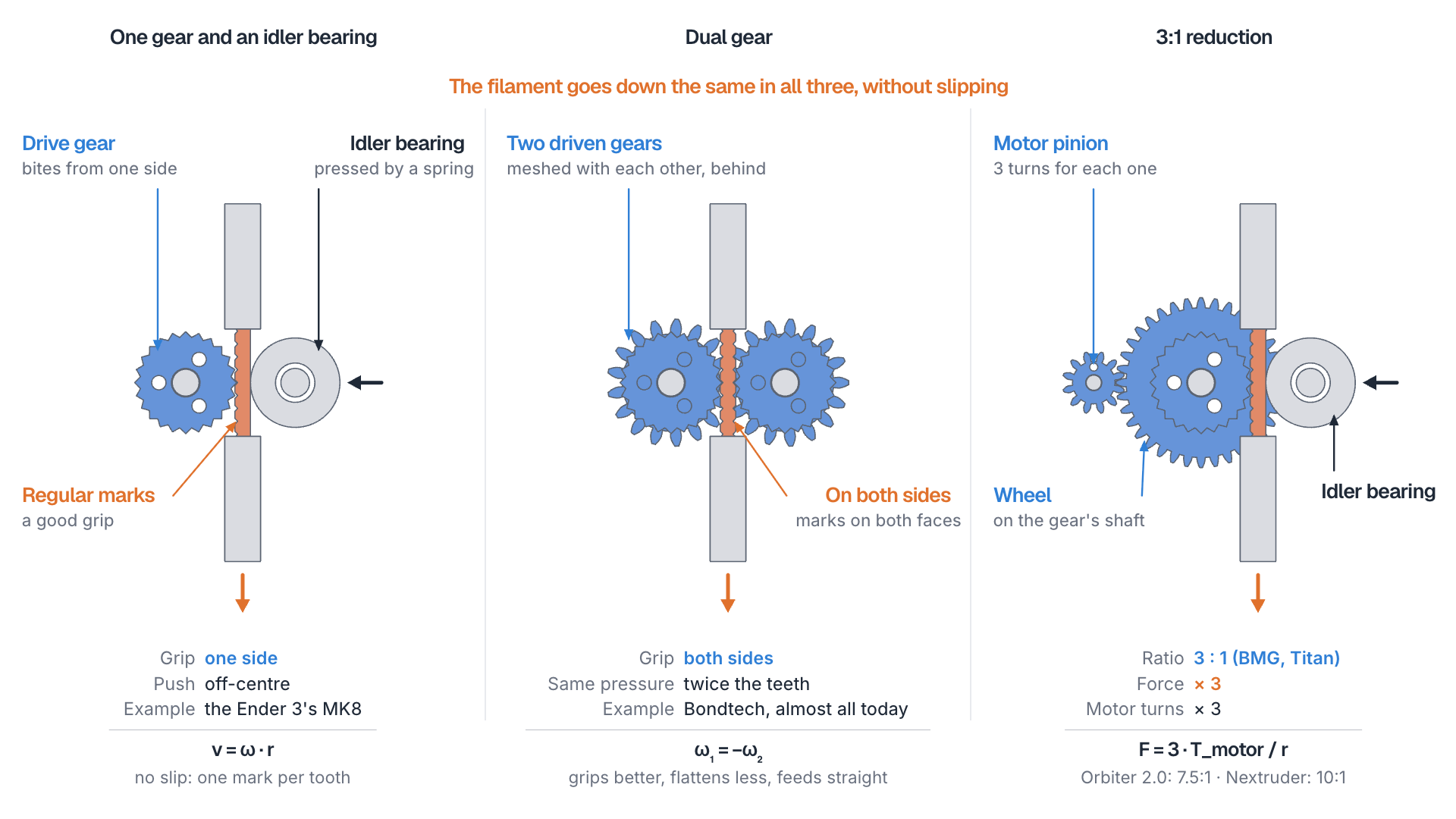
One gear and an idler bearing. A toothed drive gear turned by the motor, with a smooth bearing pressed against it by a spring. The teeth bite from one side only and the push ends up slightly off-center. It is the design of old, cheap extruders, such as the MK8 on the original Ender 3.
Dual gear. Two toothed wheels, both driven and meshed with each other, grip the filament from both sides. It is the layout Bondtech made popular and the one almost every current toolhead uses. At the same pressure, twice as many teeth bite: the filament is gripped better, flattened less and fed straight. You notice it most with flexible or slippery filaments and at high flow.
Tension. The tensioner spring decides how hard the teeth press. Too loose and it slips. Too tight and it squashes the filament oval, which then drags on its way into the hotend, and it mangles TPU. Many modern toolheads have fixed tension or a reference mark. If yours is adjustable, start mid-scale and change it only if you see shiny, sanded patches (slipping) or deep, flattened marks (too tight). Look at the filament every time you unload it.
Abrasives. Carbon-fiber, glass-fiber and glow-in-the-dark filaments wear the drive gear's teeth as well as the brass nozzle. If your machine offers hardened steel gears, fit them along with the hardened nozzle (Carbon and glass fiber filaments, Nozzles: size and material). Worn teeth slip however much you raise the tension.
Plastic dust that builds up between the teeth also costs grip: clean it out with a brush. For how often, see A maintenance schedule.
Gear reduction: force for turns
In a reduction, a small pinion on the motor shaft drives a large wheel fixed to the drive gear. With an N:1 ratio, the motor turns N times for every turn of the gear that bites. The pushing force is multiplied by N (less losses) and each motor step moves N times less filament, so the volume is controlled more finely. In exchange, for the same flow, the motor spins N times faster.
For reference: the MK8 has no reduction (1:1); extruders such as the BMG or the Titan run at 3:1; the LDO Orbiter 2.0 at 7.5:1, and Prusa's Nextruder (MK4S, CORE One, XL) has a 10:1 planetary reduction. The planetary train is explained in Planetary reducers.
Reduction let the motor shrink: the same push comes from a lighter motor, and that made light direct-drive toolheads possible. It has a limit. At very high flow, a small motor behind a high ratio spins so fast that it loses torque right when back pressure is highest, which is why high-flow toolheads fit higher-torque motors. The motor also gets warm: in an enclosed machine with a hot chamber, the extruder body can soften PLA or TPU before the melt zone; together with heat creep in the hotend, that is why you print PLA with the door or lid open (Hotends and how much they can melt).
On the latest Bambu machines, such as the H2 series or the P2S, the extruder is driven by a permanent-magnet synchronous servo motor (PMSM) instead of a stepper, and the system measures extrusion resistance continuously. If it detects abnormal resistance, from a clog or ground filament, it pauses the print. Bambu quotes up to 10 kg of push on the H2 and 8.5 kg on the P2S; treat that as a manufacturer figure, not a basis for comparison. In practice, a clog becomes a warning rather than a part with missing layers. The hotend's melt limit stays where it was.
The firmware has to know how much filament one motor turn moves: that is E-steps in Marlin and rotation_distance in Klipper (Firmware: Marlin, Klipper and closed systems). On a stock machine it is set at the factory: leave it alone unless you change the extruder or the gear. To correct each filament there is the slicer's flow ratio, calibrated in Flow ratio and max flow tests.
TPU and high flow: where the extruder shows
Soft TPU buckles in any stretch where it is not guided. The load a rod can take before it buckles is inversely proportional to the square of its free length: double the free length and it takes a quarter of the load. Three things help on the hardware side: direct drive, a path with no gaps between the gears and the hotend inlet, and dual gears at moderate tension. Speed decides the rest: back pressure rises with flow, so soft TPU needs low flow even on a good extruder.
| Machine | TPU 95A | TPU 85A and softer |
|---|---|---|
| Modern direct drive, from the spool | prints | prints, slower |
| Classic Bowden, tight path | prints slowly | rarely |
| Through a filament switcher | rarely; there are harder grades (68D) designed for the AMS | no |
For reference, Bambu gives about 3.6 mm³/s for its standard TPU 95A and about 12 mm³/s for its 95A HF on the same machine: 3.6 mm³/s is barely 1.5 mm/s of filament. TPU types and their settings are in TPU and flexible filaments.
At 35–40 mm³/s, what a high-flow hotend delivers, the gear moves about 15–17 mm/s of filament against high back pressure. This is where grip and force count: dual gears, reduction and teeth in good condition. Even so, you almost always reach the hotend's melt limit first, and changing the extruder does not raise it (Volumetric flow sets the speed).
Calibrate retraction and pressure advance on your own machine; never copy them from another. The direct-drive and Bowden ranges above are the starting point for Temperature towers and retraction tests and Pressure advance and clean corners.
When it fails
| Symptom | Cause | Fix |
|---|---|---|
| Rhythmic clicking and thin walls | Back pressure exceeds what the motor can give: speed above max flow, first layer with the nozzle too close, or a partial clog | Lower the flow, check the first layer; diagnosis in Extrusion problems |
| Flat notch and dust on the unloaded filament | Slipping: low tension, worn or dirty teeth, or a restriction further down (hotend or nozzle) | Clean or replace the gear, check the tension, find the restriction |
| Oval filament that drags going into the hotend | Tension too high | Back the tensioner off until the marks are regular and shallow |
| Grinding or under-extrusion only with PLA in a hot, enclosed machine | The extruder body warms up and softens the filament | Open the door or lid for PLA |
| TPU escapes and wraps round the gears | Unguided gap or too much speed | Guide the path and lower the flow; TPU and flexible filaments |
| Strings and blobs only on a Bowden machine with a copied profile | Retraction and pressure advance meant for a direct drive | Calibrate both for your machine; Stringing and blobs |
See also
- Hotends and how much they can melt: where the flow ceiling really is, and why the hotend needs a cold side.
- TPU and flexible filaments: which hardness your machine prints, at what speed and with how much retraction.
- Pressure advance and clean corners: how to tune pressure advance for your extruder.
- Extrusion problems: the full diagnosis of clicking, slipping and clogs.