
The hotend melts a rod of plastic at the temperature you ask for and at the pace the extruder pushes it in (Extruders: direct drive or Bowden). Two numbers describe any hotend: its maximum temperature, which sets the filaments it can take, and its melt rate in mm³/s, which sets how fast it can print them. Plus one condition: its cold side has to stay cold. On long walls and big parts, what caps your real speed is usually the hotend, not the motors (Volumetric flow sets the speed).
A heat exchanger with a cold side
A hotend has four parts. At the top sits the heatsink, finned and with its own fan: that is the cold side. Below it is the heat break, a thin-walled tube that narrows the path the heat can take. Then comes the heater block, with the heater and the temperature sensor around the melt channel. And at the bottom, the nozzle.
The cold side exists because molten plastic cannot transmit a push. The filament has to stay solid and stiff until it reaches the top of the melt zone so it can act as a piston. Across the heat break, the temperature falls from printing temperature to close to ambient in a few millimeters.
That is why heat breaks are thin-walled stainless steel or titanium: both conduct heat poorly. Stainless conducts about 16 W/m·K, against 110 for brass. Bimetal heat breaks join a copper or aluminum-alloy upper section to a thin steel or titanium neck. The upper part sheds heat better and the transition gets shorter, which helps with retraction and holds off heat creep.
There are two kinds of heater. A cartridge heater is a resistor inside a steel tube, seated in an aluminum block; in classic V6-style hotends it delivers about 30–40 W. A ceramic heater is a flat or wraparound element with little thermal mass, clamped against the block or built around the channel. It reaches temperature in under a minute and has less mass to keep hot, but it needs good contact, through thermal paste or a clip. Ceramic heaters are now common: Bambu sells a 48 W ceramic heater as a spare for the X1 series, the E3D Revo HeaterCore comes in 40 and 60 W, and the Phaetus Rapido 2 uses a flat ceramic one.
Power sets how much heat per second gets replaced while cold plastic flows in and the part-cooling fan blows across the block. That is why high-flow hotends carry more watts. More watts do not always help. E3D says its 60 W core only pays off when two of these three hold: part-cooling fan at full, more than 40 mm³/s, or more than 275 °C.
Induction is the newest variant. A coil heats the nozzle itself without touching it and takes it from cold to printing temperature in seconds. That is what makes a changer with many passive nozzles practical, such as the Prusa INDX or the Vortek on the Bambu H2C (Toolchangers, IDEX and dual nozzles).
The sensor limits the temperature the firmware can read reliably. An NTC thermistor, the classic 100 kΩ type, is accurate up to about 285–300 °C; above that it drifts or fails. For 400 °C and beyond you need a PT1000 or PT100, or a thermocouple. Changing sensor type means changing the firmware configuration (Firmware: Marlin, Klipper and closed systems). If the sensor works loose, it reads low and the heater keeps pumping in heat. The firmware's thermal runaway protection exists to cut power in exactly that case, so never disable it (Fire risk and unattended printing).
Why a hotend has a flow ceiling
Plastic is a poor conductor. Heat comes in through the channel wall and has to reach the center of the filament, and the time that takes grows with the square of the radius. The time available is how long the plastic takes to travel the heated length. Push faster and the core reaches the nozzle still cold.
In numbers: 1 mm of 1.75 mm filament is 2.4 mm³. At 21 mm³/s the filament moves at about 8.7 mm/s; at 40 mm³/s, about 16.6 mm/s. Assume a heated length of 15 mm, purely for the arithmetic. Each millimeter of plastic spends about 1.7 s in the hot zone at 21 mm³/s and about 0.9 s at 40: roughly half the time to heat the same core.
Above the ceiling you get thin, matt, brittle walls in the fast sections, inner walls and infill first. The extruder starts clicking because the cold core acts as a plug. Layers bond poorly because the plastic arrives too cold. The fix is to slow down or set the maximum volumetric flow in the filament profile. The full diagnosis is in Extrusion problems.
Raising the temperature does buy flow, sometimes a fair amount, because a hotter wall passes heat faster. It comes at a price: the plastic touching the wall overheats before the center gets up to temperature, and that brings stringing, degradation and worse overhangs. Manufacturers measure their flow figures hot: Bambu measures with ABS at 280 °C in vase mode. Trust the limit in the slicer profile, not the spec sheet.
| Machine class | Standard hotend | High-flow hotend |
|---|---|---|
| Legacy bedslinger | 8–12 PTFE-lined · 11–15 all-metal (V6) | — |
| Modern bedslinger | 15–21 | 21–28 |
| Enclosed CoreXY | 21–25 | 35–40 (per maker) |
In real profiles, Bambu caps its PLA Basic at 21 mm³/s on the X1 and P1, and at 25 or 40 on the H2D depending on whether the standard or the high-flow hotend is fitted. Prusa caps Prusament PLA at 15 mm³/s with the standard nozzle and at 24 with the 0.4 HF. Other materials usually carry lower limits in their profiles, for viscosity, stringing or cooling, and HF variants of PLA and PETG exist to raise them. Each material's value lives in its filament profile.
To turn it into speed, divide the flow by the cross-section of the bead: 21 mm³/s with a 0.45 × 0.20 mm bead gives 233 mm/s. The rest of that calculation is in Volumetric flow sets the speed.
The nozzle matters too. Hardened steel passes heat worse than brass: in the same hotend it prints 5–10 °C hotter or with 10–20 % less flow (Nozzles: size and material).
Raising the ceiling: high-flow designs
Every high-flow design pulls one of three levers on the same equation: more heated length (more time), more wall per volume of plastic (a shorter path to the center) or more power (the wall stays hot even with a lot of cold plastic coming in).
Longer melt zone. A taller heater block and a longer nozzle. This is the Volcano idea: E3D says its melt zone is nearly double the V6's and that the gain comes from the longer dwell time. It has costs. There is more molten plastic in the channel, so it oozes and strings more, and it responds later to pressure changes: you have to retune pressure advance and retraction (Pressure advance and clean corners). The toolhead also gets taller.
Split channel. Nozzles that divide the inlet into several narrower channels, such as the Bondtech CHT and its licensed variants. Each strand of plastic is thinner and the wall's heat reaches its center sooner, so the core arrives hot within the same length. Independent tests show a clear gain, but it depends on material, temperature and diameter: there is no single figure.
High-flow nozzles and modules. Manufacturers offer a high-flow version of their own nozzle or hotend: Prusa's 0.4 HF, the high-flow hotend for Bambu's H2 series, or E3D's Revo High Flow and ObXidian. The principle is the same, and they swap in like the standard part, without taking the hotend apart. E3D claims 55 % more flow for the ObXidian High Flow over the standard Revo, and Phaetus Rapido 2 resellers quote up to about 75 mm³/s for the UHF and about 45 for the HF. Those are maker and reseller figures; measure what yours does.
High flow pays off with large nozzles (0.6–1.0 mm), thick layers, big parts and vases. With a 0.4 nozzle and 0.20 mm layers in PLA, the limit usually moves to cooling, because the part-cooling fan cannot chill the bead in time (Speed and cooling), or to acceleration, because short moves never reach top speed (Acceleration, resonance and input shaping). And plastic that arrives colder bonds worse between layers (Speed against finish and strength).
The temperature ceiling
The maximum temperature depends on four things: what lines the channel, the sensor, the heater and its block, and the materials of the heat break and the nozzle seals; the lowest of those four limits sets it.
PTFE-lined. A PTFE tube runs down through the heat break to the nozzle. It is smooth and cheap, but it must not run above 240 °C continuously: PTFE starts to decompose around 250 °C. Its fumes cause polymer fume fever in people, mostly from about 300 °C up, and can kill birds at milder overheating: keep birds out of the printer room (Emissions and ventilation). A hotend like this suits PLA and TPU, and PETG only at the bottom of its range, 230–240 °C. It is typical of legacy bedslingers such as the Ender 3, and still ships on budget machines and hotends. Never try to clear a clog in one by going above 240 °C.
All-metal. No PTFE in the hot zone; the sensor and the heater set the ceiling.
| Hotend | Max nozzle temperature | What it can print |
|---|---|---|
| PTFE-lined | 240 °C continuous | PLA (190–230), PETG only at the low end (230–240), TPU (200–240) |
| Hobby all-metal, V6 style with thermistor | 285 °C | plus ABS (240–280), ASA (240–270) |
| Modern stock and quick-swap | 290–300 °C | plus PC (260–290), PA (250–290) and most CF/GF (260–300) |
| Desktop high-temp | 320–350 °C | plus PPA-CF across its whole range (285–320); PPS-CF (310–340), better on the 350 °C ones |
| Industrial | 400–500 °C | PEI (340–390), PEEK (380–440), PEKK, with a chamber ≥ 90 °C |
Some examples as of late 2026: the Prusa MK4S and CORE One reach 290 °C; the Bambu A1, P1 and X1C, 300; the E3D Revo, 300, and the Rapido 2, 290. The Bambu X1E reaches 320, and the H2 series (H2D, H2S, H2C) 350, as does the Rapido 2 Plus. PEEK and PEI need an industrial hotend and, on top of it, a chamber at 90 °C or more (PPS, PEEK, PEKK and PEI).
Buy with headroom. For a material that prints at 300 °C, look for a hotend rated above 300 °C, because a hotend that spends hours at its maximum ages its sensor and heater faster.
All-metal has its own costs. Soft plastic sticks and drags on the metal wall of the heat break, where PTFE let it slide. That makes it more prone to heat creep with PLA and to jamming on long retractions. Modern designs solve it with bimetal heat breaks, strong heatsink fans and short retractions on direct drive. On a current stock machine it is no longer a problem, but it explains the bad name of the old all-metal conversions on Bowden machines.
Heat creep: when the cold side stops being cold
If the heatsink cannot get rid of the heat, the soft zone climbs above the heat break. The filament softens there, swells against the wall, and the extruder ends up pushing against a plug. The typical symptom: the part prints fine for a while, then thin layers and clicking appear. It happens mostly with PLA, slow printing and lots of retractions, because the soft plastic spends longer in the transition zone.
PLA is the most sensitive because it softens before anything else: its glass transition sits around 55–60 °C and its heat deflection temperature (HDT) at 0.45 MPa is 57 °C. A lukewarm heat break is enough to soften it.
There are two usual causes. The first is the heatsink fan: it has to spin whenever the hotend is hot, and firmware usually switches it on from about 50 °C. A dirty or failing fan is the usual culprit. The second is the air the heatsink breathes. In an enclosed printer, open the door for PLA, PVA or TPU once the bed is above about 45 °C, and for PETG above about 70 °C (Enclosures and heated chambers).
How to diagnose it, clear the jam and in what order to try the fixes is in Extrusion problems. Cleaning the fan and heatsink is in Nozzle and hotend care.
Quick-swap hotends
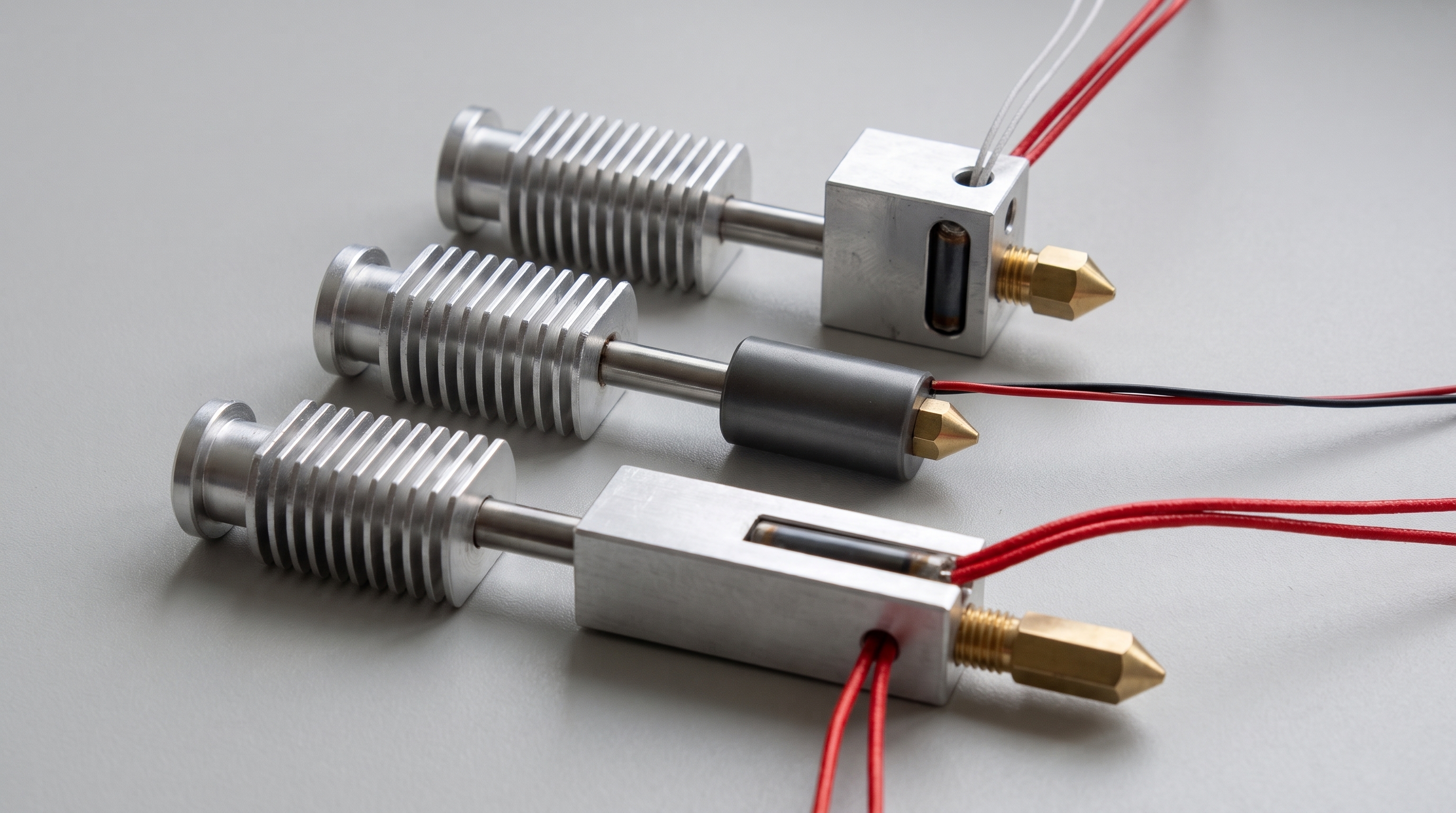
Nearly every current machine packs the nozzle and the melt zone, and sometimes the heater and sensor too, into a module you swap cold, by hand or with a couple of screws. The Bambu A1 uses a clip; the P1 and X1, two screws; the H2 series, interchangeable modules. On Prusa's Nextruder the nozzles swap without hot-tightening, and the E3D Revo makes nozzle and heat break one piece.
That changes what your hotend can do. Changing diameter or nozzle material, or moving to a high-flow module, takes minutes. Each module has its own flow and temperature limits, and the printer or slicer profile has to know which one is fitted. Usually you tell it yourself, on the printer or in the slicer; some systems detect the module on their own.
The catch is price. Proprietary modules cost more per nozzle and tie you to the maker's range. The best-selling machines have compatible third-party modules (Closed and open ecosystems).
What to look at in a hotend
| Limit | What sets it | Typical value | How to improve it |
|---|---|---|---|
| Maximum temperature | Channel lining, sensor, heater | 240 °C PTFE-lined · 290–300 °C modern · 350 °C high-temp · 400–500 °C industrial | All-metal, PT1000 or thermocouple, higher-power heater |
| Melt rate | Heated length, wall area, power, nozzle conductivity | 15–25 mm³/s with PLA, standard hotend · 35–40 high-flow | Longer zone, split-channel nozzle, more watts, brass or carbide instead of hardened steel |
| Heat-up time | Mass of heater and block | minutes with cartridge and block · under a minute with ceramic · seconds with induction | Ceramic or induction heater |
| Margin against heat creep | Heatsink, fan, heat break | — | Bimetal heat break, clean fan, door open with PLA |
Choose the hotend first by the hottest material you need, with headroom. Then by the flow your nozzles and parts really use.
When it fails
| Symptom | Cause | Fix |
|---|---|---|
| You fit a high-flow hotend and the printer is no faster | The filament profile still caps flow at the old value | Measure the new limit and raise it in the profile |
| You move to a hardened steel nozzle and walls come out under-extruded | Steel conducts heat worse than brass | Go up 5–10 °C or drop the flow by 10–20 % |
| A PTFE-lined hotend clogs and you heat it to 260 °C to free it | You are decomposing the PTFE | Stay at 240 °C or below and follow Nozzle and hotend care |
| With PLA, the door shut and the bed at 60 °C, the part fails halfway up with thin layers and clicking | The heatsink breathes hot air: heat creep | Open the door or the lid |
| After fitting a longer block you get stringing and bulging corners | There is more molten plastic in the channel | Retune retraction and pressure advance |
| You take a hotend with the usual thermistor to 350 °C and the reading is off | An NTC reads wrong above 285–300 °C | Switch to a PT1000 or a thermocouple, and change the firmware configuration with it |
| After changing the heater, block or sensor, the temperature swings and leaves banding | The old PID tune no longer fits | Rerun the PID tune |
How to test it
Before you buy anything, run a max flow test on what you already have (Flow ratio and max flow tests). If the maximum flow in your profile sits below the hotend's real limit, the upgrade is free: raise that value in the profile. Repeat the test whenever you change module, nozzle or material, and store the result in the filament profile.
See also
- Nozzles: size and material: which nozzle size and material to choose, and how much flow steel costs.
- Volumetric flow sets the speed: how the hotend's flow turns into print speed.
- Extrusion problems: how to diagnose and clear a hotend that cannot keep up.
- Nozzle and hotend care: cleaning the heatsink, swapping nozzles and clearing clogs.