
In a multicolor print, the filament switcher drives filament back and forth through the same tubes and rollers, and cuts it with the same blade, hundreds of times: a four-color test cube at 0.20 mm layers needs 153 changes. Its parts wear with the number of changes and the meters of filament they move, not with machine hours. The wear shows up as intermittent faults that look like software bugs: a slot that fails one load in twenty, an unload that stops halfway. Count changes, and check each stretch of the path before it fails.
What wears
The filament path is the same in every family: spool, feeder, merge point, tube, buffer, extruder, cutter, hotend, wiper and chute. Each stretch has a part that takes the punishment.
The rule that governs everything else is that wear grows with the number of changes. Count changes or cuts, not hours. That is how Prusa does it on the MMU3: at 30,000 filament changes the printer prompts you to inspect and clean the extruder, and at the same count it asks you to replace the Nextruder's main plate. A machine that nearly always prints in one color barely wears its switcher. A farm printing four colors per layer wears it out fast.
Three things multiply the wear. Abrasive filaments (carbon- or glass-fiber filled, or glow-in-the-dark) cut grooves in the PTFE and polish the gears; Carbon and glass fiber filaments explains why. Cardboard spools shed fiber that ends up on the rollers. And brittle or damp filament snaps and leaves pieces along the path.
Before you touch anything, switch the printer off. Bambu Lab, Anycubic and Creality all ask for this in their maintenance procedures. If you will be working near the cutter or the hotend, also wait for the toolhead to cool.
PTFE tubes
In a bend, the filament rubs against the tube wall, and which wall depends on what is moving it. When the extruder pulls it (while printing) or the unit pulls it (when unloading), it runs taut and hugs the inside wall of the bend, like a rope over a pulley. When the unit pushes it (when loading, or up to the buffer), it bows out against the outside wall. Friction grows exponentially with the total wrap angle of all the bends (the capstan effect): each bend multiplies the resistance rather than adding to it. The radius does not appear in that equation, but it drives the wear. In a tight bend the same force bears on a shorter arc, and the tighter the radius, the harder the filament's own stiffness presses it against the wall. That is where the pressure concentrates and where the groove opens. On a straight run there is almost no force against the wall, and almost no wear.
Every change passes through the shared tube that runs from the unit to the buffer and the toolhead; each slot's tube sees only that slot's changes. The shared one wears first.
Signs of wear: a slot that sometimes fails to load and works when you retry; white or colored dust at the couplings; a groove or a shiny stripe you can see when you hold the tube up to the light; filament arriving late at the toolhead. A tangle or excess-resistance alarm with no tangle on the spool also points to the tube. Bambu Lab lists a tube bent too tightly, or longer than it needs to be, among the causes.
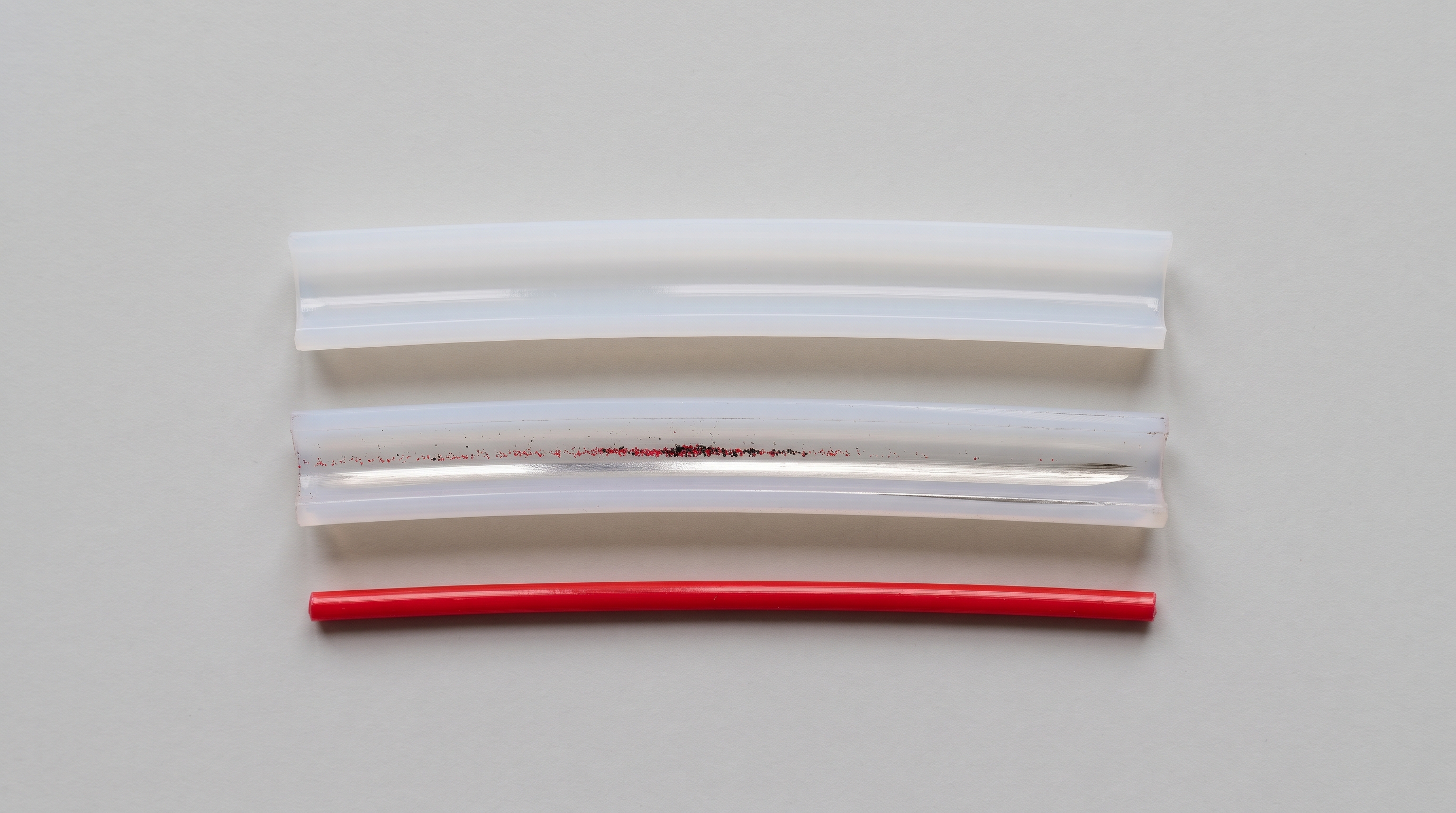
As of late 2026, these are the intervals the manufacturers publish. Bambu Lab treats AMS tubes as consumables and advises replacing them roughly every two months of normal use. That is a calendar interval for average use: if you print a lot of multicolor or use abrasives, count changes. Creality, for the CFS 2, suggests cleaning the tube after about 10,000 feed cycles, and describes it as a suggested maintenance interval, not a sign of damage. With abrasive filaments, inspect the tubes more often.
To replace a tube:
- The same diameters as the original, outside and inside. The outside diameter has to match the collet or the tube will not grip. The bore must not be narrower. Creality specifies 4 mm OD × 2.5 mm ID tube for the CFS; a 2 mm ID tube, even one sold as low-friction, adds drag over a run that long.
- The same length as the original. A longer one adds bends and friction; a shorter one forces a tighter bend.
- A square cut, with a sharp blade or a tube cutter. Never with side cutters: they crush the end and leave it oval.
- Pushed fully home in the coupling, until you feel it bottom out. Then pull gently to check the collet holds it.
The typical failure is a tube that is not fully home, or one cut at an angle. Either leaves a step or a gap inside the coupling. On machines with a cutter, the filament end is a flat cut face that shuttles back and forth, and its edge catches on the step: the load or unload stops right at that joint. Some users have found that their buffer jams came from badly seated tubes. Route the new tube with wide bends and no pinch points, and check that nothing squeezes it when the toolhead reaches the end of its travel.
Feeders, rollers and the merge point
The feeder gears bite off a little filament on every push and every pull. The dust packs between the teeth and the gear slips. The AMS HT guide asks you to clean that dust regularly because it adds resistance to loading and unloading. For the MMU3, Prusa says to brush the pulleys with a small brass brush (or, failing that, a stiff-bristled brush, a needle or a toothpick). Then check that they line up with the filament holes and that the set screw bears on the flat of the motor shaft. The set screw matters because a loose pulley spins on the shaft and the slot fails for no apparent reason.
The units rest the spool by its rims on rollers that turn it. Cardboard rims shed fiber, which coats the rollers until they slip: the rollers turn and the spool does not. Clean them with a dry brush or a cloth and compressed air, and deal with the cause: fit a rim adapter to every cardboard spool, or rewind the filament onto a plastic one. Damp cardboard also swells and goes oval. Spool types are described in What comes on a spool of filament.
The merge point is either a fixed hub (Bambu Lab, CFS, ACE) or a moving selector (MMU3). A broken piece stuck there blocks every slot that feeds into it. Bambu Lab describes how to clean the hub: disconnect the tube and pull the pieces out. Anycubic, for the ACE, says to unscrew the external hub and check for broken filament inside. On the MMU3, push the debris out of the selector with a 1.5 mm wire or an interdental brush and finish with compressed air.
The sensors in the unit and at the merge point are usually optical or Hall-effect. Dust on an optical window makes the sensor see filament where there is none, or the reverse. Blow them clean with air when you go over the feeders, and do not take them apart: sensor errors are diagnosed in Multi-material failures.
Do not lubricate anything that touches the filament unless the manufacturer says so. Grease traps dust and carries it onto the filament, and with it into the hotend.
The buffer
The buffer absorbs the difference between what the unit pushes and what the extruder pulls, and tells the unit when to push. It fails in two ways: the slider or the spring seizes and the unit pushes at the wrong moment, or an end crushed or frayed by a bad cut snags inside. Check that the slider runs smoothly from stop to stop and returns on its own, and that both tubes are fully home.
If the jam is inside the buffer, open it only if the manufacturer explains how; otherwise, replace it. Bambu Lab publishes the buffer replacement procedure for the H2 series. Fix the cause as well: almost always a bad cut, covered in the next section.
Units without a buffer, such as the AMS lite, let the extruder pull straight off the spool while printing. On those, watch the drag: the holders must spin freely and no spool should rub against the frame.
The cutter
Every change is a cut, so the cutter is the hardest-working part. Bambu Lab says the blade can go dull at around 5,000–7,000 cuts, and recommends replacing it every 10–15 spools or sooner. At about 150 changes per print, as on the four-color cube, 5,000 cuts last about 33 prints. On a cutter-equipped machine printing in a single color, the same blade lasts much longer, because it only cuts when unloading or changing spools.
A dull blade leaves the end crushed or frayed instead of flat. Sometimes the two pieces stay joined and the unload fails; on Bambu Lab you get "Failed to pull back". Crushed ends also tend to snag in the buffer. Bambu Lab sums it up in one rule: if the filament does not come out clean on unload, replace the cutter.
A lever that does not spring back is a different fault, with several possible causes, diagnosed in Multi-material failures. Your part in upkeep is to keep the toolhead fan cable out of the lever's path, and that path free of plastic dust.
To replace it, switch the printer off and wait for the toolhead to cool. The blade is sharp, so hold it by the body. On Bambu Lab machines, use the flat end of the Allen key so you do not round off the screw head. Afterwards, if the machine offers it, run the cutter check or calibration (the Creality K2 Plus maintenance routine includes calibrating its position) and do a load and an unload on every slot.
Systems that shape the tip instead of cutting, such as the MMU3, have no main cutter to replace. On those, the equivalent is getting clean tips, with a tuned filament profile and dry filament, and keeping the selector free of the strings that bad tips leave behind. How to tune the tip is covered in Multi-material failures.
Wiper and purge chute
Every change ends with a purge into the chute and a pass over the wiper. A printer with a switcher purges far more often than a single-color one, so its chute fills and its wiper wears sooner.
Empty the chute or waste bin before every long multicolor job. When it is full, the next purge stays on the nozzle or drops onto the plate, and the toolhead drags it into the part: that is where the dark specks described in Multi-material failures come from. For scale, that four-color cube leaves about 83 g of waste over 153 changes, split between the chute and the tower. A print like that sends tens of grams to the chute: empty it before you start, not halfway through. Purge and multicolor waste explains how to cut that purge down. If you use a tower, also keep the plate under it clean: leftover purge there stops the tower sticking, and a tower that comes loose catches the nozzle on the next change.
A silicone or brush wiper clogged with strings smears the nozzle instead of cleaning it. Replace it when it is torn or worn; Bambu Lab sells it as a spare and publishes the procedure for each series. A misplaced wiper or chute can hit the nozzle and damage the toolhead. Check that the wiper is seated properly, and fit the chute with its side tabs engaged and no cable trapped.
Desiccant and moisture
A closed unit is a dry box only until the desiccant saturates. Bambu Lab's AMS has two desiccant compartments with indicator beads that change color when saturated; in the AMS HT, the desiccant is dried or replaced when the yellow beads turn dark green. Saturated desiccant stops protecting: the room's moisture ends up inside, and the closed box is slow to let it go.
In a switcher, damp filament fails in three ways: it snaps at the bends, strings during the purge and oozes on the travel to the part. That is why desiccant belongs to upkeep.
Some units also dry the filament: the AMS 2 Pro, the AMS HT, the ACE Pro, the ACE 2 Pro and the Qidi Box. On Bambu Lab's units, the maximum drying temperature is 65 °C on the AMS 2 Pro and 85 °C on the AMS HT. Temperatures and times for each material are in Drying and storing filament.
What to check and when
| Part | Sign of wear | Interval or when to check | What to do |
|---|---|---|---|
| PTFE tubes | intermittent load failures on one slot, dust at the couplings, groove | Bambu Lab: about 2 months; Creality CFS 2: clean at about 10,000 cycles; more often with abrasives | replace: same diameters and length, square cut, fully home |
| Shared tube to the toolhead | the same signs on every slot | before the per-slot tubes | replace it first |
| Feeder gears and pulleys | slipping, dust in the teeth | at every unit clean; MMU3: at the 30,000-change prompt or when a slot slips | brass brush, check the set screw |
| Spool rollers | the rollers turn and the spool does not | with cardboard spools, at every clean | clean, rim adapters |
| Merge point or selector | every slot fails | after any snapped filament | open, remove the pieces |
| Buffer | stiff slider, crushed ends | when loading stops at the buffer | free it, seat the tubes, replace it if jammed |
| Cutter | crushed or frayed end, unload does not retract the filament | Bambu Lab: 10–15 spools or 5,000–7,000 cuts | replace, cutter check, load test |
| Wiper | smears the nozzle, torn pad | when torn or worn | replace, seat it in place |
| Purge chute or bin | purge on the nozzle or the plate | before every long job | empty, engage the tabs |
| Desiccant | the indicator has changed color | when the indicator says so | dry or replace |
| Extruder (MMU3) | on-screen prompt | 30,000 changes | inspect and clean; replace the Nextruder main plate |
When it fails
| Symptom | Cause | Fix |
|---|---|---|
| A slot fails one load in twenty and works on retry | Grooved tube, or one cut or seated badly | Replace the tube: same diameters and length, square cut, fully home |
| The unload does not retract the filament; on Bambu Lab, "Failed to pull back" | Dull cutter: the two pieces stay joined | Replace the cutter and run a load test |
| Dark specks on the part | Full purge chute: purge goes back onto the nozzle or the plate | Empty the chute before every long job |
| Every slot fails at once | A piece of filament stuck at the merge point | Open the hub or selector and remove the pieces |
| Loading stops at the buffer | Seized slider, or an end crushed by a bad cut | Free the slider, seat the tubes and check the cutter |
| The rollers turn and the spool does not | Cardboard fiber on the rollers | Clean the rollers and fit rim adapters |
| Filament snaps at the bends | Saturated desiccant: the filament is damp | Dry or replace the desiccant and dry the filament |
How to test it
After touching anything, and before starting a long job, three checks:
- A load and an unload on every slot (on the MMU3, with the load test in the menu; on Bambu Lab, from the screen or the slicer). A freshly seated tube or a new blade only proves itself by moving filament both ways.
- A short two-color print, because it runs the whole sequence: cut, purge and wipe.
- Reset the maintenance counter or reminder if the printer keeps one, so the next reminder arrives when it should. The MMU3 warns at 30,000 changes and also asks you to inspect the Nextruder if it logs 50 failed loads within 1,000 successful changes.
See also
- Filament switchers: AMS, MMU, CFS and ACE: how a change works and what each part does.
- Multi-material failures: how to read a specific error when a slot keeps failing.
- Nozzle and hotend care: the tip, hot brushing and the silicone sock.
- A maintenance schedule: how often to check the rest of the printer.