
Use polycarbonate (PC) when a part has to take heat and knocks at the same time: a clip for the car's center console, the handle of a tool that will end up on the workshop floor. ASA takes the heat but is less tough; PETG takes the knock but softens around 70 °C. PC handles both: its heat deflection temperature (HDT) is 112–117 °C at 0.45 MPa, and it is the toughest of the rigid filaments. The price is a 260–290 °C nozzle, a 100–120 °C bed, an enclosed printer, mandatory drying and glue on the plate.
Why PC survives a knock
PC is amorphous, and its molecular chain carries stiff, bulky groups. Those groups hold back chain movement and keep the glass transition temperature high: that is where the heat resistance comes from. Under a sudden load, the material yields in shear bands instead of letting a crack run: that is where the toughness comes from.
Tough is not stiff. Its flexural modulus is around 2.3 GPa, against 1.8 GPa for PETG and 2.8 for PLA. A PC arm bends almost as much as a PETG one under the same load, but it does not break. If you need a jig or a fixture that does not flex, look at the filled grades in Carbon and glass fiber filaments.
Notched Charpy impact strength, measured on printed specimens, can come out lower for PC than for PETG or ABS: Bambu's datasheet gives PC 7.5 kJ/m², against 21.6 for PETG and 21.5 for ABS. And yet a PC part that gets dropped survives where the others snap. The reason is that PC is notch-sensitive. A sharp notch, or a pronounced layer line, concentrates the stress in so little volume that the material never gets to yield and the crack runs. For design, that means generous fillets on inside corners, no sharp grooves in the load path and a rounded root on every snap fit. To read this off a stress-strain curve, see Stiffness, strength and toughness.
PC's other strength is layer bonding. In Bambu's datasheet, tensile strength is 62 MPa along the beads and 56 MPa in Z, across the layers: 90 %, level with PLA and well above PETG (69 %). But that specimen was printed hot, in a closed chamber. On an open printer, a large PC part can keep only 20–40 % of its XY strength in Z. The usual design rule, assuming the part is half as strong in Z as in XY, only holds if you print enclosed; on an open machine, count on less. And orient the part so the main load runs along the beads (Layer adhesion and anisotropy).
How much heat and cold it takes
PC's HDT at 0.45 MPa is 112–117 °C: 117 °C for Bambu PC, 114 °C for Polymaker's PolyMax PC. For a loaded part, leave a 15–20 °C margin (Heat, cold, sunlight and chemicals): about 95 °C as the maximum service temperature under load.
In summer, a car's dashboard in the sun reaches 70–100 °C. A loaded part there needs a fiber-filled compound: PA-CF, PET-CF or PPA-CF. Unloaded or in the shade, in the console or the glovebox, ASA, PC or annealed PLA-HT will do, and PC wherever it takes knocks, such as a console clip or the door pocket. Inside a car, never PLA or PETG.
In the cold, an un-notched PC part keeps good toughness below freezing; with notches and thick walls it turns brittle sooner. PLA handles cold worst of all. Cold toughness is one of PC-PBT's selling points: Polymaker claims theirs keeps over 70 % of its impact strength at −30 °C.
Annealing barely raises PC's HDT: as an amorphous plastic it has nothing to crystallize, unlike PLA or nylon. What it does is relieve stress, and that matters against chemicals. The annealing temperatures are in Annealing and strengthening. In the sun, PC yellows and loses surface toughness over the years unless it carries a UV stabilizer. For a long outdoor life, choose ASA or a UV-stabilized PC grade; the data is in Heat, cold, sunlight and chemicals.
PC, PC-ABS and PC-PBT: what each blend changes
| Material | What it is | Nozzle (°C) | Bed (°C) | HDT at 0.45 MPa | When to choose it |
|---|---|---|---|---|---|
| PC | Polycarbonate, often already modified for printing | 260–290 | 100–120 | 112–117 °C | Heat above ~50 °C plus knocks, on an enclosed printer |
| PC-ABS | PC with an ABS phase | 250–275 | 100–110 | 100–120 °C depending on brand, check the datasheet | When straight PC keeps lifting |
| PC-PBT | PC with a semi-crystalline polyester | 260–280 | 100–115 | about 107 °C | Near fuels, oils or frost |
PC-ABS. The ABS phase lowers the printing temperature and the shrinkage stress. It prints almost like ABS, with a cooler nozzle and less warping, keeps far more toughness than ABS, and its heat resistance sits halfway between the two. It is the classic injection-molding blend for laptop housings and car interior trim. HDT varies a lot from brand to brand: current datasheets run from about 100 to about 120 °C, so read the one for your spool. Choose it when straight PC fights you. It still needs an enclosure, drying at 75–80 °C for 6–8 h, and glue on PEI.
PC-PBT. PBT is a semi-crystalline polyester. In the blend it brings resistance to fuels, oils, greases and many cleaning products, and holds impact strength in the cold, at the cost of some heat resistance: an HDT of about 107 °C according to Polymaker's datasheet. It suits the garage, the car, the bike, or tools used outdoors in winter. Its limits, per Polymaker's own printing guide: it does not resist strong alkalis, chlorinated or aromatic solvents, ketones or esters. Polymaker recommends printing it with the part-cooling fan off; with other brands, 10–30 % on overhangs is usual.
"PC Blend" and other easy-print PCs. Many spools sold as PC are already modified to print cooler and warp less. Prusament PC Blend, for example, calls for a 275 ± 10 °C nozzle, a 110 °C bed for the first layer and 115 °C after, and a glue stick as a release layer on the satin sheet. Prusa's datasheet gives an HDT of 113 °C at 0.45 MPa (ISO 75). "PC" on the label is a family, not a specification: read the brand's datasheet (Reading a material datasheet).
There are flame-retardant grades (PC-FR), such as Bambu PC FR, for housings around mains-powered electronics; check the rating on the datasheet. Carbon- or glass-filled PC is abrasive and needs a hardened nozzle: it is covered in Carbon and glass fiber filaments.
What PC asks of the machine
Hotend. PC prints at 260–290 °C. A hotend with a PTFE tube down to the nozzle should not go above 240 °C, so it is out for PC. The all-metal hotends that current machines ship with reach 290–300 °C (Prusa MK4S and CORE One, 290 °C; Bambu A1, P1 and X1C, 300 °C), and that is enough. For unfilled PC, a brass nozzle is fine. The limits of each hotend type are in Hotends and how much they can melt.
Bed. 100–120 °C. At the end of 2026, Bambu Studio's PC profile sets 110 °C on the plates of the enclosed machines and 100 °C on the A1, whose bed goes no higher; even so, Bambu does not recommend PC on its open machines except for small, low-infill parts. The bottom of the range works for small parts; large, flat parts need the upper half (Warping and lifting corners).
Enclosure. At least a passive one; for large parts, a heated chamber at 50–65 °C. The reason is the gap between the temperature at which the plastic solidifies and the temperature of the air around it.
Each layer solidifies and shrinks surrounded by much colder air, and the bigger that gap, the more stress stays trapped in it. That stress shows up as corners lifting in the first hour and as a layer splitting halfway up a tall part: Polymaker warns that PC cooled too quickly cracks and delaminates. On an open printer, print only small, low parts, and shield them from drafts with a screen. The types of enclosure are covered in Enclosures and heated chambers.
Fan. 10 to 30 %, and more only on overhangs and bridges: Bambu's base PC profile goes up to 60 % on overhangs. With the fan at 100 %, the layers cool before they fuse and the part splits along them.
Speed. Flow sets the limit. Bambu's base PC profile caps volumetric flow at 18 mm³/s. Since speed = flow / (line width × layer height), at 0.45 × 0.20 mm that comes to about 200 mm/s. PC is viscous: above that limit it under-extrudes and the layers bond worse. More in Volumetric flow sets the speed.
Emissions. PC belongs with ABS, ASA and nylon: do not print it in a bedroom or an unventilated room. Use an enclosure with a HEPA and activated-carbon filter, or vent the air outdoors (Emissions and ventilation).
Keeping it on the bed
Print on smooth PEI or an engineering plate, with a glue stick. The glue does two jobs: it grips while the part is hot and acts as a release agent once it cools. PC on clean, hot PEI can bond very hard and, like PETG, tear chunks out of the coating when you remove the part. The glue prevents that.
If corners lift, try these fixes, cheapest first:
- Clean plate and glue. A single fingerprint in one corner is enough for the part to start lifting there.
- Bed in the upper half, 110–120 °C, for large footprints: it narrows the temperature gap of the bottom layers and the stress they build up.
- Door closed and chamber preheated for 10–15 minutes before you start, so the first layer does not go down into cold air.
- Mouse ears or a brim on the corners: they move the point where lifting starts away from the part and add grip area (Brims, rafts and mouse ears).
- Parts toward the center of the plate, where the bed is most even.
- In the model, rounded base corners, with a radius of 10 mm or more on PC bases longer than about 100 mm, and long flat bases split into pieces.
Do not lower the bed temperature so the part releases more readily, and do not squash the first layer harder: neither changes the shrinkage. To remove the part, let the plate cool completely and flex it; never lever it off with a scraper. The routine for each plate is in Bed prep for each material.
Drying: mandatory, and once
Within hours or days, PC pulls enough moisture from the air to cause trouble. In the nozzle the water boils: popping, hissing, bubbles and rough walls. Worse, it cuts the polymer chains (hydrolysis). The part prints, looks almost right and comes out brittle. That damage cannot be undone: drying the filament afterwards does not fix a part already printed.
Dry PC at 80 °C for 8 h, never above 90 °C; PC-ABS at 75–80 °C for 6–8 h. A 65 °C dryer, such as the AMS 2 Pro's, is not enough for PC; an 85 °C one, such as the AMS HT's, is. Some plastic spools deform at 80 °C: check what yours tolerates, or rewind the filament onto one that takes the heat.
PC has one more quirk: repeated heating and cooling cycles make it brittle. Dry it once and keep it dry, in a sealed box with desiccant, below 20 % relative humidity, and on long prints feed it from a dry box. Do not re-dry it out of habit before every print. The mechanism and the dryers are in Drying and storing filament.
Chemicals: why PC cracks without being hit
Some chemicals leave unstressed PC alone but open microcracks wherever the part is under strain. This is environmental stress cracking. A printed PC part already holds residual stress from fast cooling, and on top of that come the stresses from an insert, a screw or a snap fit. The usual culprits are isopropyl alcohol and many solvents, some oils and greases, and alkaline detergents. Acetone also attacks it directly: it swells and whitens it even without stress. One lab figure, measured on bulk PC specimens: immersed in isopropyl alcohol, PC starts to craze from 1.2 % strain. A snap fit works at 2–4 %, so a PC clip cleaned with alcohol can crack without anyone touching it.
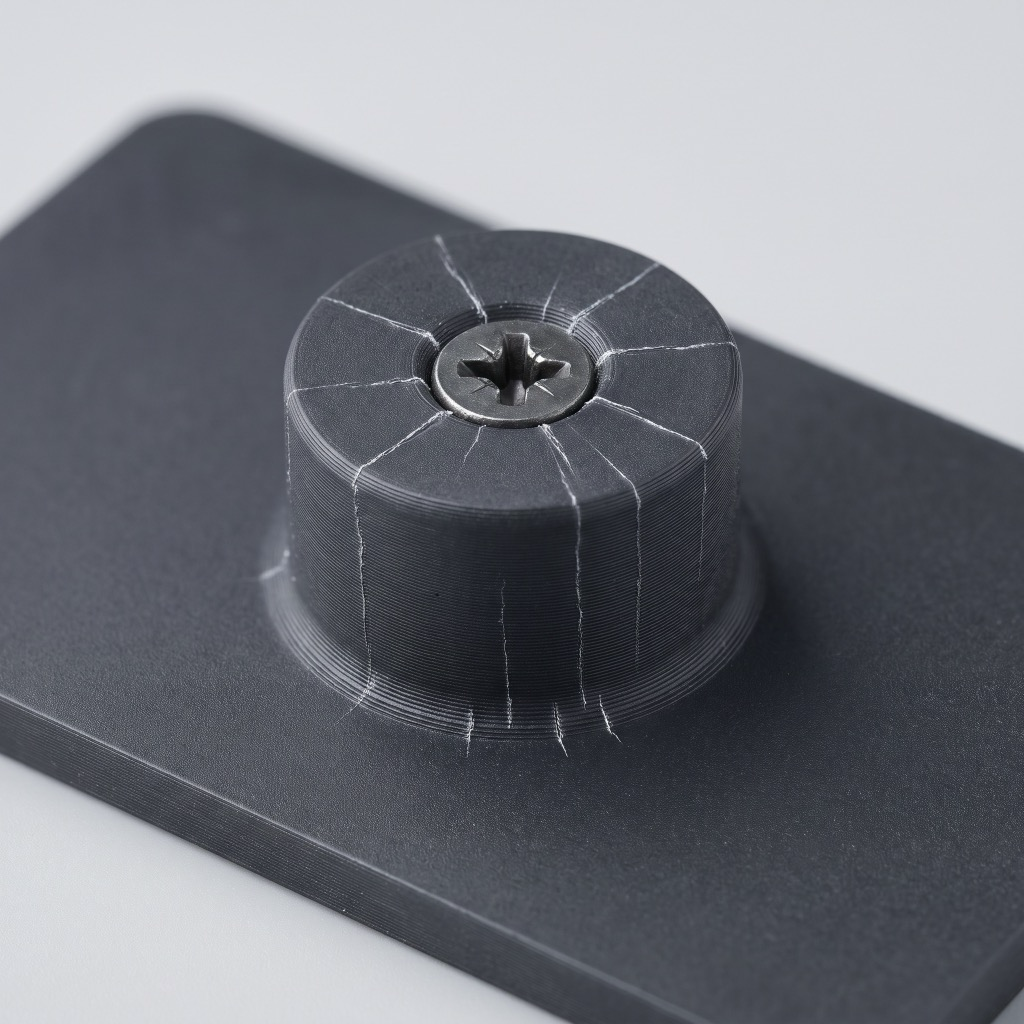
If you see these whitish lines around a boss or in an inside corner, it is not a layer adhesion problem. To avoid them:
- Clean PC with water and mild soap, not isopropyl alcohol.
- Do not overtighten screws or inserts in bosses.
- If the part will meet chemicals, relieve stress by annealing below the glass transition (Annealing and strengthening).
- If the part will be in contact with fuels or oils, use PC-PBT.
The chemical resistance tables are in Heat, cold, sunlight and chemicals.
What changes in your model
Snap fits. PC's allowable strain is 3–4 % for a snap fit assembled once and 2 % for repeated use, the same as PETG. Round the root, because PC is notch-sensitive, and keep chemicals away from it. The calculations are in Print-friendly snap fits.
Heat-set inserts. Set the iron to 280–300 °C. Overheating it or forcing the insert leaves stresses that end in cracks. The boss wall thickness is in Designing for heat-set inserts.
Clearances. PC shrinks on the order of 0.5–0.8 %, more than PETG and similar to ABS: a fit tuned in PLA or PETG comes out tight. Check clearances with your PC (Real printed clearances).
Food. Do not use printed PC for parts that touch food; the why is in Printing for food contact.
When it fails
| Symptom | Cause | Fix |
|---|---|---|
| Corners lift in the first hour | Shrinkage with a cold bed or chamber, or grease on the plate | Clean plate and glue, bed at 110–120 °C, preheated chamber, mouse ears or a brim and rounded base corners |
| A layer splits halfway up a tall part | Cold air around it or too much fan | Enclosed printer, a heated chamber for large parts and the fan at 10–30 % |
| Popping, hissing and bubbles at the nozzle | Damp filament | Dry at 80 °C for 8 h, never above 90 °C |
| The part looks almost right but comes out brittle | It was printed from damp filament: hydrolysis cut the chains | Reprint it from dry filament; drying afterwards does not fix the part |
| Whitish lines next to a boss or in an inside corner | Environmental stress cracking: alcohol or a solvent on a stressed area | Clean with soap and water, do not overtighten screws or inserts, anneal to relieve stress or move to PC-PBT |
| The part tears chunks out of the PEI when removed | PC on clean, hot PEI with no release layer | A glue stick as release layer; remove the part with the plate cold, by flexing it |
See also
- PETG, PCTG and other copolyesters: below about 50 °C with knocks, and far easier to print.
- ABS and ASA: heat and sun without hard knocks.
- Carbon and glass fiber filaments: when you need stiffness, or a load in the sun, on top of the heat.
- Drying and storing filament: how to dry PC once and keep it dry.