
Before you load a spool, check four things: what diameter it is and how far it deviates, how much plastic it really holds, whether the spool fits your holder or your switcher, and whether the printer can read its tag. Diameter matters because the extruder pushes length, so many millimeters of filament per second, and the slicer turns it into volume by assuming the nominal cross-section. If the real cross-section is different, more or less plastic comes out in the same proportion, and the machine has no way of knowing.
1.75 or 2.85 mm
Buy 1.75 mm unless your machine asks for something else. It is the de facto standard: current consumer printers (Bambu Lab, Prusa, Creality, Elegoo, Anycubic, Qidi, Snapmaker) and filament switchers (AMS, MMU, CFS, ACE) take 1.75 only.
2.85 mm, sold for years as "3 mm", lives on in machines such as UltiMaker's S series, some LulzBots and older Bowden printers. 2.85 and 3.00 are different nominal diameters. A 3.00 mm filament in a 2.85 mm machine can jam: it leaves almost no clearance in the PTFE tube or the hotend, and a thick stretch wedges itself in.
1.75 won for physical reasons. It has less mass per millimeter to heat, so it melts sooner in a hotend of the same length. Each extruder step moves less volume, and nozzle pressure responds faster, which helps pressure advance and retraction. It also bends better through the tight curves of a Bowden tube or a switcher. The advantage of 2.85 was stiffness: it buckles less inside a long Bowden tube, which mattered for flexible filament when direct-drive extruders were rare. Diameter does not make a part stronger or better-looking. It only changes melting speed, control and compatibility.
| Diameter | Cross-section | Meters per kilo of PLA | Grams per meter |
|---|---|---|---|
| 1.75 mm | 2.405 mm² | about 330 m | about 3 g |
| 2.85 mm | 6.38 mm² | about 125 m | about 8 g |
The figures come from the geometry and a PLA density of 1.24 g/cm³: 1 g of PLA takes up about 0.8 cm³, which is roughly 33 cm of 1.75 mm filament.
Diameter tolerance: what ±0.02 mm means for the part
Cross-section scales with the square of the diameter, so the flow error is roughly twice the diameter error. Filament 1 % too thick lays down 2 % more plastic.
| Tolerance | Diameter error | Flow error |
|---|---|---|
| ±0.02 mm | ±1.1 % | about ±2.3 % |
| ±0.03 mm | ±1.7 % | about ±3.4 % |
| ±0.05 mm | ±2.9 % | about ±5.8 % |
A 5 % swing in flow is the difference between a clean top surface and one with gaps or ridges. It also changes the width of each bead: on a 0.45 mm bead, that is two or three hundredths of a millimeter. On a sliding fit you will barely notice; on a press fit, whose total interference is 0.05 to 0.10 mm on the diameter, it matters.
Good brands guarantee ±0.02 or ±0.03 mm. Prusament, for example, states ±0.02 mm; many well-known brands, ±0.03 mm. Some unbranded spools quote ±0.05 mm, or nothing at all. The label is the maker's promise, not your measurement. Prusament publishes the measured diameter of every spool, and the code on the label takes you straight to that data.
Ovality matters as much as diameter. Oval filament measures right in one direction and wrong in the other, and its real cross-section is π·a·b, where a and b are the two semi-axes. A filament of 1.72 × 1.78 mm has practically the nominal area even though each reading is three hundredths out; one of 1.75 × 1.80 is thick even though one of its readings is perfect. That is why you always measure in two perpendicular directions.
Checking a spool takes two minutes. With callipers, measure at five points spread over two or three meters, taking two perpendicular readings at each. If the average is off but the spread is small, leave the slicer's diameter at 1.75 and correct it with the flow ratio calibration in Flow ratio and max flow tests: change the diameter as well and you correct the same error twice. If the spread is large, no setting will fix it.
Bad diameter shows up like this: irregular bands of over- and under-extrusion up the height of the part, with no fixed pitch, that go away when you change spools; a jam when a thick stretch reaches a narrow PTFE tube or the hotend; thin stretches where the extruder gear slips and the extrusion falls short. If the bands have a constant pitch, look for the cause in the mechanics. The full symptom table is in Extrusion problems.
Net weight and how much is left
The weight on the label is net: plastic only. The standard is 1 kg, but spools also come in 250, 500 and 750 g, 2 and 3 kg, and 5 kg and up. Prusament refills moved to 900 g in late 2025. Compare the price per net kilo, not per spool; the full cost of a part is worked out in What a printed part costs.
The label hardly ever says what the empty spool weighs, and that weight varies a lot between brands and between plastic and cardboard. Weigh one empty spool of each brand you use, once, and write the weight on the box. From then on, what is left is the scale reading minus that weight.
Before every long print, compare the grams the slicer asks for with what the scale shows. A four-hour part that needs 320 g, on a spool holding 280 g, runs out near the end. A runout sensor, or automatic switching to a backup spool of the same material in a switcher, saves you if you get the sums wrong, but it does not replace the scale.
The remaining amount the printer shows, whether it keeps it on the tag or in its own memory, is an estimate based on what the extruder has pushed. It drifts with every manual load, every purge and every rewound spool. Trust the scale.
If your printer counts in meters, use the figures above and, for other materials, correct for density. Typical datasheet values, in g/cm³: PETG 1.27; PC 1.20; TPU 1.21; ABS 1.04. A kilo of ABS gives about 20 % more filament than a kilo of PLA. The values for each family are collected in Filament comparison table.
The spool: plastic, cardboard and refills
A standard 1 kg spool is around 200 mm in outer diameter. Switchers have strict limits: the AMS 2 Pro, for example, takes 197 to 202 mm in diameter and 50 to 68 mm in width. A spool outside that range rubs or does not turn. If the spool is going into a switcher, check the diameter and width before you buy it; the limits for each system are in Filament switchers: AMS, MMU, CFS and ACE.
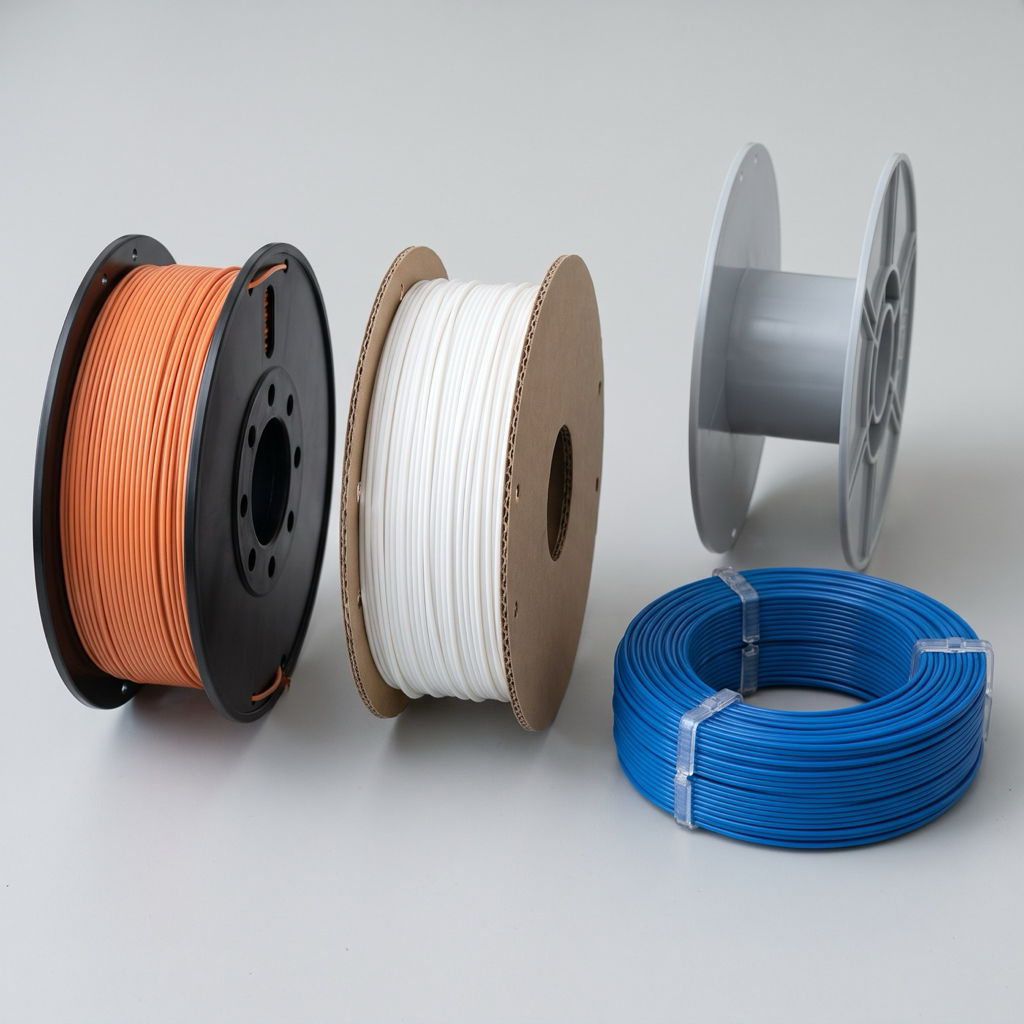
Plastic spools are rigid, have a smooth rim and every switcher handles them. The downside is that each kilo leaves behind a plastic spool that many councils will not collect for recycling.
Cardboard spools create less waste, but the rim sheds fibers and dust that build up on the switcher's rollers, and over time the rollers slip or wear. In the damp, the cardboard swells and the spool goes out of round. Among AMS users, the usual advice is to fit an adapter ring, printed or bought, on each flange, or to rewind the filament onto a plastic spool. Filament switcher upkeep covers cleaning the rollers.
Refills are coils without a spool, held together with clips or a cardboard core: you keep one reusable spool and buy only plastic. The formats are not universal. A refill made for Bambu Lab's reusable spool will not always fit a Prusament one. Within Prusament, the brand advises against using the new 900 g refills on its old spools, because the extra slack causes failures, and the old 1 kg refills do not fit the new spool, which is narrower. Use a refill and spool from the same system and the same generation, and cut the clips only once the refill is seated and locked on the spool. Cut them earlier and the turns spring loose and the coil unravels. Printing with less waste weighs refills and cardboard against other ways of cutting waste.
Almost every tangle starts when the loose end is let go: one turn slips under its neighbor and gets trapped. The knot shows up hours later, when the extruder clicks or the print stops. Always secure the end in the hole in the flange.
The sealed bag with desiccant guarantees the filament leaves the factory dry. Once you open it, it starts taking up moisture; Drying and storing filament explains how to bring it back and keep it dry.
What the label tells you and what it does not
The label gives the material and its variant (PLA Matte, PETG-HF), the diameter and its tolerance, the net weight, the nozzle and bed temperature range, the drying recommendation, the batch number and, sometimes, a QR code that leads to the datasheet.
The batch matters: color varies from batch to batch, and sometimes flow does too. For a project that needs several spools of the same color, buy from the same batch and keep the label until the spool runs out.
The temperature range is a guide written for a generic machine. The exact temperature comes from your slicer profile and a temperature test. Mechanical data is not on the label but on the datasheet, and Reading a material datasheet explains how to read it.
RFID and NFC tags on the spool
A tag is a small transponder, stuck to the hub or the flange, that the printer or switcher reads when you load the spool. With it, the machine proposes the material, color and slicer profile for that slot; depending on the system, it assigns them itself or asks you to confirm on screen. Some systems also log how much has been used.
The tag does not measure diameter, or moisture, or what is really left on the spool, and it does not calibrate flow for your printer and your nozzle. If the spool is damp, the tag will not fix it.
| System | Technology | What it accepts |
|---|---|---|
| Bambu Lab (AMS family) | MIFARE Classic 1K, encrypted and signed | Reads Bambu spools only. The community can read and clone tags, but not write its own data |
| Creality CFS (K2 family) | MIFARE Classic, proprietary format | Creality has not published the format; community and third-party tools write compatible tags |
| Snapmaker U1 | MIFARE Classic, proprietary format | On the official firmware, reads Snapmaker spools only |
| Elegoo CANVAS | RFID | Reads Elegoo spools with a tag |
| OpenPrintTag (Prusa) | NFC-V (ISO 15693) | Open standard, free to implement, rewritable tags |
Other brands' spools work in an AMS too; you pick the material by hand. If your switcher is an Anycubic ACE or a Qidi Box, check your model's documentation to see whether it reads tags, and which kind, before you rely on it.
OpenPrintTag arrived in October 2025 with the new Prusament spools. The tag reads through a full spool, can be rewritten and stores the material, color, main print settings and remaining amount, plus a link to the datasheet and the diameter data. The specification is published at specs.openprinttag.org and blank tags are on sale. On a phone, you read it with the Prusa app. Prusa announced for 2026 a reader that mounts on the CORE One's spool holder; check whether your setup (with INDX or an MMU3, for example) supports it. For other machines, check whether your specific model reads it. For tagging your own spools there are also open community formats, such as OpenSpool and TigerTag.
To read Bambu or Creality tags with a phone, you need an Android phone: an iPhone cannot read or write MIFARE Classic.
A tag is a convenience. Do not choose a filament or a printer because of it. Buy the switcher maker's spools if you want to print in several colors without setting anything up, and keep a slicer profile for each untagged spool you use often.
When it fails
| Symptom | Cause | Fix |
|---|---|---|
| Thinner and thicker bands in the walls, with no fixed pitch, on a machine that prints other spools fine | Diameter spread or ovality | Measure; if the spread exceeds ±0.05 mm, keep the spool away from parts with tight dimensions. If the bands have a constant pitch, check the mechanics (Extrusion problems) |
| Faces and walls consistently thick or thin after changing brand | The average diameter or the density does not match the profile | Calibrate the flow ratio for that spool; leave the diameter alone |
| The print stops halfway, the extruder clicks, the filament is pulled taut | One turn crossed under another | Unwind until you are past the knot; always secure the end |
| The switcher will not feed or slips in one slot | Cardboard dust on the rollers, or a spool outside its size range | Fit adapter rings, clean the rollers and check the diameter and width |
| The printer picks the wrong profile or color | The tag belongs to another spool (a reusable spool refilled with different filament) or a slot set by hand that nobody updated | Set the slot by hand: the tag describes the spool as it left the factory |
| You run out of filament mid-part | You trusted the label or the printer's count | Weigh the spool and subtract the empty spool's weight |
See also
- Choosing a filament: which family to buy, by what would make the part fail.
- Drying and storing filament: what to do with a spool that has been open for weeks.
- Flow ratio and max flow tests: how to set the flow ratio when the average diameter does not match your profile.
- Filament switchers: AMS, MMU, CFS and ACE: which spools and materials each switcher takes.