Keeping filament dry
Here's a failure that feels like a curse: a spool that printed perfectly last month now spits, strings and lays down weak, rough layers — same printer, same profile, same file. Nothing broke. The filament got wet. Plastics pull water vapour out of the air, some of them greedily, and a damp spool prints worse in every measurable way. It's one of the most common causes of a mysteriously bad print, and one of the easiest to prevent once you know it's happening.
Why water ruins a print
The water a spool absorbs is invisible, but the moment the filament hits the melt zone it turns violent. At 200–260 °C the absorbed moisture flashes to steam right inside the nozzle, and it blows tiny bubbles and pockets through the bead as it's laid down. That single mechanism produces the whole catalogue of wet-filament symptoms: a faint popping or crackling sound as it prints, fine strings and blobs everywhere, a rough and hairy surface, and — the one that matters most — weak layers, because a bead full of steam bubbles can't weld cleanly to its neighbour. A wet-printed part is measurably more brittle along its layer lines than the same filament printed dry.
Not every filament is equally thirsty. PLA is relatively tolerant; PETG is more sensitive; and the engineering materials — nylon, PC, TPU and anything filled — are strongly hygroscopic, wet enough to matter within hours of sitting open. For those, drying isn't occasional maintenance; it's part of the print.
| Filament | Absorbs moisture | In practice |
|---|---|---|
| PLA | Slowly | Tolerant; dry if a spool's been open for months |
| PETG | Moderately | Dry if it's been open a while or strings badly |
| ABS / ASA | Moderately | Dry after long exposure |
| TPU | Quickly | Dry before printing; store sealed |
| Nylon / PC | Very quickly | Dry before nearly every print |
| Filled (CF/GF) | Quickly | Dry; the base plastic sets the rate |
Drying and storing
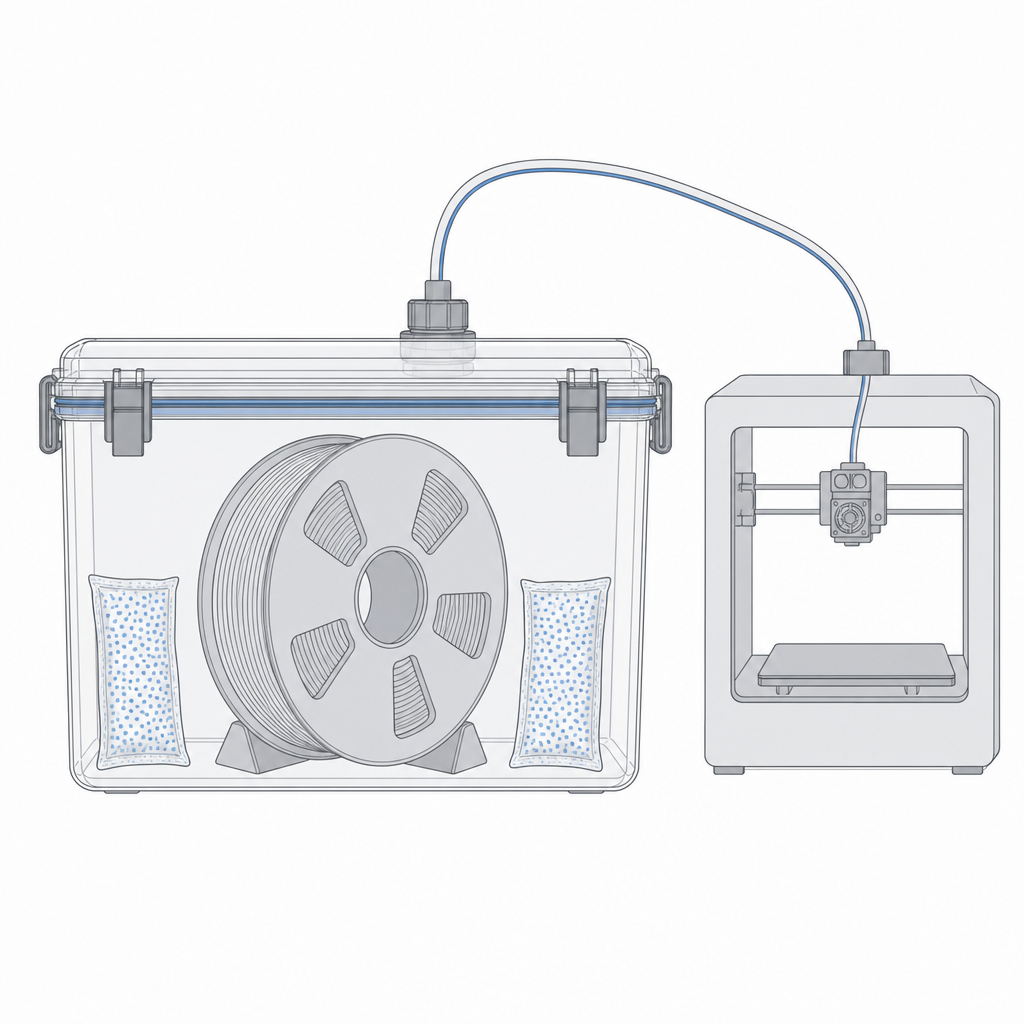
The fix is heat and time: hold the spool below its softening point for hours so the absorbed water bakes back out. A dedicated filament dryer is easiest; a convection oven at a low, verified temperature works if you trust its thermostat. Then keep it dry — a sealed box or bag with fresh desiccant, so it doesn't re-absorb what you just drove off. A spool left on the printer in a humid room is re-wetting between prints.
| Filament | Dryer temperature | Time |
|---|---|---|
| PLA | 45 °C | 4–6 h |
| PETG | 55 °C | 4–6 h |
| ABS / ASA | 60 °C | 4–6 h |
| TPU | 50 °C | 4–8 h |
| Nylon | 80 °C | 8–12 h |
| PC | 70 °C | 6–8 h |
The quiet part: moisture moves your dimensions
There's a consequence of wet filament that goes beyond ugly surfaces, and it's the one that matters most for parametric design: moisture shifts the size of the printed feature. A bead foaming with steam extrudes wider and less consistently than a dry one, so walls thicken unpredictably and the real clearance on a fit drifts away from the number you calibrated. A press-fit that clicked yesterday can seize today — not because your model changed, but because the spool got damp overnight.
That's why filament care belongs in the same mental bucket as calibration. The fits you dial in with Real printed clearances and confirm with a test coupon are only valid while the conditions that produced them hold — and filament dryness is one of those conditions, right alongside the nozzle and the material. When a fit that used to work suddenly doesn't, the spool is one of the first suspects, and re-measuring is the honest response (Validate before you print).
That closes the loop on materials: choose the family for the job, respect what it does to your dimensions, and keep it dry so those dimensions stay true. With the material understood, the next thing worth knowing is how to read its numbers — the stiffness, heat and shrinkage figures on a datasheet — and turn them into design decisions.