
openGrid is an open system for hanging accessories on a wall or under a desk, created by David D. The board is a printed panel with a square grid of 28 mm cells, and printed snaps click into those cells. You design accessories on the snap, never on the board. It is released under CC BY 4.0 (Printables 1214361): anyone can make and sell compatible parts as long as they credit the author (the code of QuackWorks' board generator is CC BY-NC-SA; the parts it generates are CC BY). KapyCAD is not affiliated with openGrid.
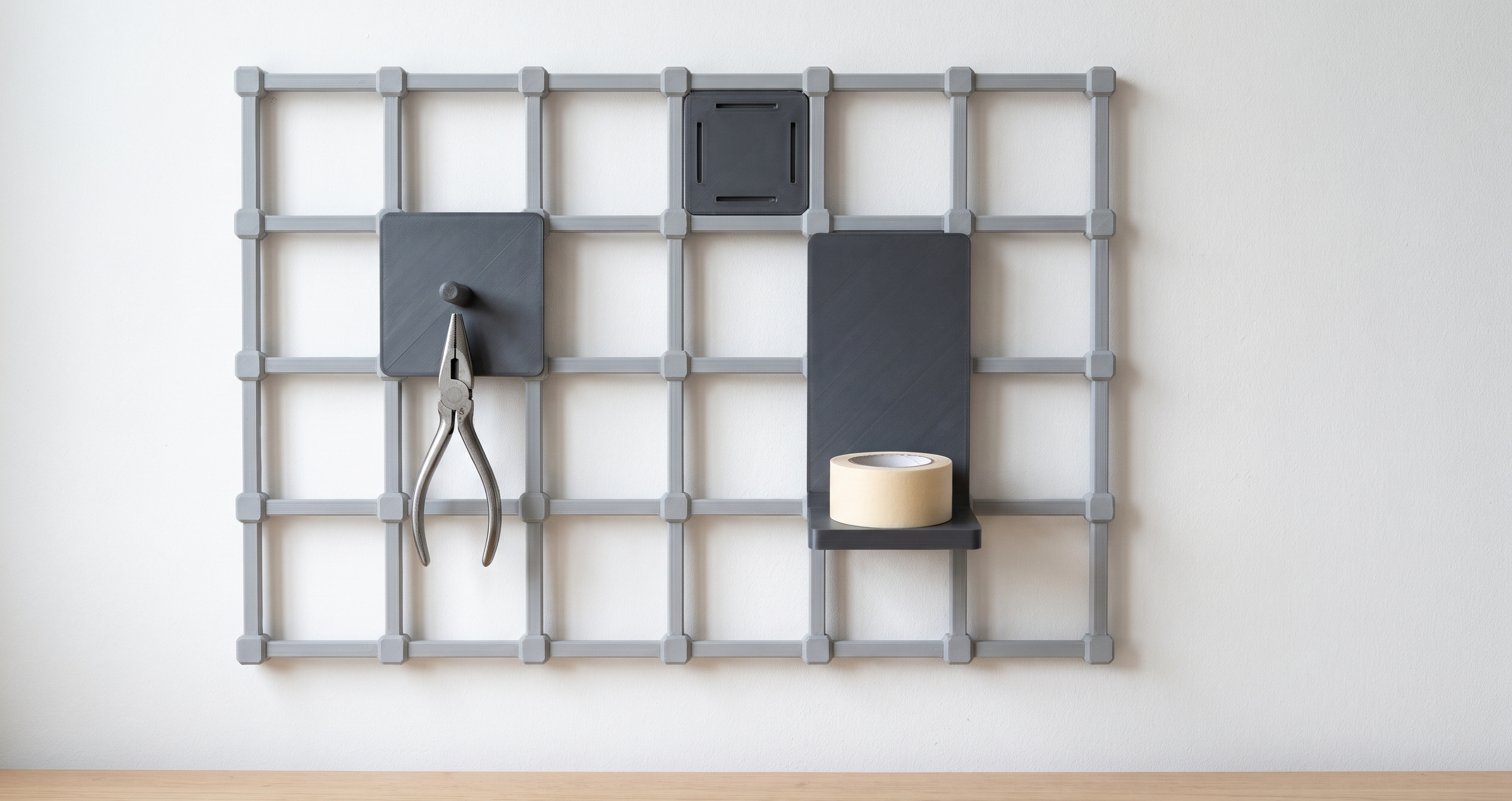
The cell: 28 mm pitch and a lip on each face
| Dimension | Value | Source |
|---|---|---|
| Grid pitch | 28 × 28 | opengrid.world/guides/board |
| Full board thickness | 6.8 | opengrid.world/guides/board |
| Lite board thickness | 4.0 | opengrid.world/guides/snaps |
| Snap outline | 24.8 × 24.8 | mitufy opengrid-projects |
| Full snap thickness | 6.8 | opengrid.world/guides/snaps; mitufy opengrid-projects |
| Lite snap thickness | 3.4 | opengrid.world/guides/snaps |
| Lite self-expanding snap thickness (Aug. 2025) | 4.0 | mitufy opengrid-projects |
| Opening at the lip | 25.0 (28 − 2 × 1.5) | QuackWorks openGrid.scad |
| Opening at mid-thickness | 26.4 (28 − 2 × 0.8) | QuackWorks openGrid.scad |
| Lite board screw hole | Ø4.1, head Ø7.2, 90° countersink | generator default, not openGrid's |
| License | CC BY 4.0 | opengrid.world |
The cell is not a straight hole: it has a lip on each face. It narrows to 25 mm at both faces and widens to 26.4 mm inside. The snap measures 24.8 mm, so it clears the front lip with 0.1 mm per side. Once it is in, its flexible tabs push small nubs out into the wide zone, and the corner wedges catch behind the board's posts. That is the whole interface: an accessory only has to respect the snap's outline and thickness; it needs to know nothing about the board.
The Lite board is the front 4 mm of the Full profile, with the same lip at the front. That is why a Lite snap (3.4 mm) also fits a Full board: that follows from the profile, because the documentation only mentions full-thickness snaps for Full boards. The reverse does not work: a Full snap (6.8 mm) in a Lite board stands 2.8 mm proud at the back and hits the wall.
openGrid is printed at nominal size on a calibrated machine: do not add clearance to the standard's dimensions, and do not scale the board or the snap. A snap only sees its own cell, and if board and accessory come off the same printer in the same material, they shrink by the same amount and the pitch still matches. Pitch error shows up between parts from different printers or materials. PLA shrinks by around 0.3 %: on an accessory with two snaps 56 mm apart that is ≈ 0.17 mm, nearly all of the 0.2 mm clearance (0.1 per side) the lip leaves. Across an 8-cell board (224 mm) it adds up to ≈ 0.7 mm, and you notice it when you join boards. If a snap is loose or tight after calibration, reprint the snap: it is the cheap part and the one you replace.
Full or Lite: stiffness, weight and fixing
The Full board (6.8 mm) is stiffer, but the standard gives it no screw holes. It is fixed with mounting snaps: each one takes up a cell, and a countersunk screw goes through its center into the wall. openGrid's documentation does not say how many you need. Put them near the corners and next to each heavy accessory, because the load's moment reaches the whole board.
The Lite board (4.0 mm) uses less plastic and prints faster. It has its own countersunk holes; in the community generator they sit at the grid intersections one cell in from each corner. It also takes Lite mounting snaps.
Choose by weight. Full is for load-bearing hooks and for adapter snaps (Multiboard, HSW, GOEWS…). Lite is for light organizing and for screwing straight to the wall or under a desk. openGrid does not specify wall plugs or screws: use whatever your wall calls for. If you screw an accessory to a snap, see Self-tapping screws in plastic.
Print the board flat. The lip on the face against the bed prints wide from elephant's foot and closes the opening below 25 mm: compensate it in the slicer and also chamfer the bottom edge 0.5 mm at 45° (The face on the bed).
Snap types
openGrid's documentation lists four families: the normal snap, which pushes straight in; the directional snap, with three flexible sides and one rigid side marked with an arrow that points up, which holds better against an outward pull on its top edge; the locking snap, printed assembled and turned with a coin so it expands; and the "Bare" snap, a base to model on. The community adds mitufy's self-expanding snap and a parametric snap generator (MakerWorld 1680432) with expanding, openConnect and threaded variants.
Adapter snaps carry a Multiboard thread, a Multiconnect slot, a metric thread, or the HSW or GOEWS interface. openGrid's own documentation warns that Multiboard's 25 mm grid does not match the 28 mm one: an adapter works for accessories with a single Multiboard anchor; one with two anchors will not land on two cells (Multiboard: the wall of anchor points). The HSW board is 8 mm thick, more than Full, which is why its adapter has its own geometry (Honeycomb Storage Wall and hexagonal storage).
The snap is printed flat and its tabs flex in the plane of the layer; sizing them is covered in Print-friendly snap fits.
openConnect: the sliding connector
openConnect is a connector by mitufy (CC BY 4.0, Printables 1559478 / MakerWorld 2257440). It is inspired by Multiconnect and, according to its author, backward-compatible with it. The snap carries a head and the accessory the matching slot; the accessory slides down over the head until a nub clicks.
| Dimension | Value |
|---|---|
| Head | 17 × 10.6 |
| Total height | 2.6 (0.6 + 1.4 of 45° dovetail + 0.6) |
| Chamfer on the top corners | 4 |
| Slot clearance | 0.10 per side and 0.10 in depth |
| Nub height | 0.6 |
Single source, as of late 2026: mitufy's openConnect library (opengrid-projects). Newer versions change some dimensions, so check them before you print.
The whole head fits inside a 28 mm cell, so each slot bears on its own snap. According to openConnect's author, Multiconnect's larger head on a 28 mm grid often leaves the top slot carrying all the load.
The library offers the slot in three versions: standard, negative (to subtract from your model) and vase mode, so a shelf or a bin can carry it in any orientation. Generators for hooks, shelves, drawers and a shelf compatible with Gridfinity: the 42 mm grid build on it. It is the default connector in the community generators; making it openGrid's official connector is mitufy's proposal, not a decision openGrid has taken.
Hanging weight: snap spacing decides
A hanging accessory works as a couple: the pull at the top is F ≈ W·e/h, so spread the supports as far as you can (French cleat). Here h runs from the point that pulls at the top to the support at the bottom, and the grid sets the possible values:
- One snap: h is the snap's height, about 20 mm, and the whole pull lands on its top edge.
- Two snaps one cell apart: h = 28 mm, center to center.
- Two snaps two cells apart: h = 56 mm: the pull drops to a little over a third of a single snap's.
With two snaps, taking h center to center is conservative: the real support sits lower, at the bottom edge of the lower snap. A stop at the bottom of the back face does the same job as the second snap. Two snaps on the same row share the pull and keep the accessory from rotating, but they do not lengthen h. If a hook has a single snap, make it directional, with the arrow up. openGrid publishes no rated loads, and a hook loaded for months on a wall that warms up gives way. Under a sustained load, PLA is only comfortable below about 30 °C and its limit under load is around 40 °C; PETG's is around 50 °C (Creep and fatigue).
When it fails
| Symptom | Cause | Fix |
|---|---|---|
| The snap wobbles | Flow out of calibration, undersized snap or worn tab | Recalibrate and reprint the snap; on an expanding snap, add expansion |
| The snap will not pass the lip | Elephant's foot on the board face, or oversized snap | Compensate the elephant's foot (The face on the bed) and reprint |
| An accessory's second snap does not land in its cell | Pitch error between printers or materials | If it does not fit, calibrate the printer; the standard's dimensions stay as they are (Designing for an ecosystem) |
| The tab breaks at the root | Brittle PLA (cold or aged), or a redesigned tab that is too short | Reprint in PETG; keep the tab length |
| The accessory tips forward | A single snap and the weight far out from the board | A second snap or a stop lower down |
| The screw head stands proud of the board | A 4 mm screw in the 7.2 mm recess | Widen the head countersink to about 8.2 mm, or use 3.5 mm screws |
How to test it
Print a 2 × 2 board and four snaps of the variant you will use, plus one with a screw hole. The snap should go in with a firm push and a click, with no play, and stay put under the load you plan to hang. Two snaps 28 mm apart on one backing plate should seat at the same time: that checks the pitch. If anything is loose or tight, calibrate first (Dimensional calibration, Test coupons) and then reprint the snaps.
See also
- Multiboard: the wall of anchor points: the 25 mm alternative with threaded anchors.
- Underware: cable channels: cable channels that mount on openGrid snaps.
- French cleat: where the couple F ≈ W·e/h comes from.
- Designing for an ecosystem: why you calibrate the machine and leave the dimensions alone.